Problem
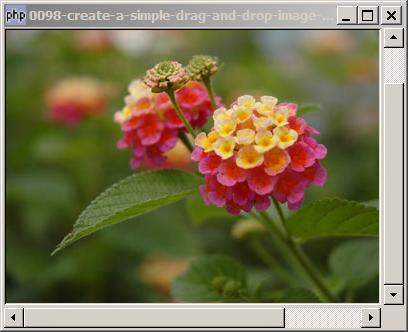
You want to create a simple image viewer that allows users to drag a gif/jpg/png image file from a file explorer and drop it into the image viewer as shown below:
Solution
- Create a GtkImage.
- Stuff the image into a GtkScrolledwindow using GtkScrolledwindow::add_with_viewport().
- Display the image using the filename dropped onto the image viewer with GtkImage::set_from_file().
Sample Code
| 1 2 3 4 8 9 12 13 16 22 23 24 25 26 28 29 30 31 32 35 37 39 40 43 44 45 46 | <?php $window = new GtkWindow(); $window->set_size_request(400, 300); $window->connect_simple('destroy', array('Gtk','main_quit')); $img = new GtkImage(); $img->drag_dest_set(Gtk::DEST_DEFAULT_ALL, array( array( 'text/uri-list', 0, 0)), Gdk::ACTION_COPY); // note 1 $img->connect('drag-data-received', 'on_drop', $img); // note 1 $scrolled_win = new GtkScrolledWindow(); // note 2 $scrolled_win->set_policy( Gtk::POLICY_AUTOMATIC, Gtk::POLICY_AUTOMATIC); $window->add($scrolled_win); $scrolled_win->add_with_viewport($img); // note 3 $window->show_all(); Gtk::main(); // process drop function on_drop($widget, $context, $x, $y, $data, $info, $time, $img) { $uri_list = explode("\n",$data->data); $img_file = $uri_list[0]; $img_file = str_replace("file:///", "", $img_file); $img_file = str_replace("\r", "", $img_file); $img->set_from_file($img_file); // note 4 } ?> |
Output
As shown above.Explanation
- Set up the GtkImage so that it allows users to drop an image onto it.
- Create a scroll window.
- Stuff the img in the scroll window. Note the use of GtkScrolledwindow::add_with_viewport().
- Display the image using the filename "dropped" onto the image viwer.
Related Links
- How to drag and drop between 2 GtkTreeViews - Part 1 - left to right?
- How to drag and drop between 2 GtkTreeViews - Part 2 - in both directions?
- How to use drag and drop to shift rows in a GtkTreeView - Part 1?
- How to get image size?
- How to scale an image?
- How to rotate an image?
- How to imprint date on photo?
Read more...