Problem
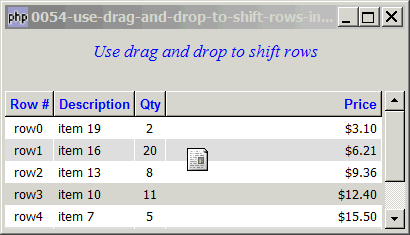
You would like to use drag and drop to shift rows in a treeview as shown below:
Solution
- Enable drag with drag_source_set
- Enable drop with drag_dest_set
- Know when the user starts dragging with the signal GtkWidget::drag-data-get()
- Know when the user drops the item with the signal GtkWidget::drag-data-received()
- Get the destination row from x,y position with GtkTreeview::get_path_at_pos()
- Remove the row from the original position with GtkListstore::remove()
- Insert the dragged row at the new position with GtkListstore::insert()
Sample Code
| 1 2 3 4 5 6 7 8 9 10 11 12 13 14 15 16 17 18 19 20 21 22 23 24 25 26 27 28 29 30 31 32 33 34 35 36 37 38 39 40 41 42 43 44 45 46 47 48 49 50 51 52 53 54 55 56 57 58 59 60 61 62 63 64 65 66 67 68 69 70 71 72 73 74 75 76 77 78 79 80 81 82 83 84 85 86 87 88 89 90 91 92 93 94 95 96 97 98 99 100 101 102 103 104 105 106 107 108 109 110 111 112 113 114 115 116 117 118 119 120 129 130 131 132 133 134 135 137 139 140 141 143 145 153 154 155 156 157 158 159 160 161 162 163 164 165 166 167 | <?php $window = new GtkWindow(); $window->set_size_request(400, 200); $window->connect_simple('destroy', array('Gtk','main_quit')); $window->add($vbox = new GtkVBox()); // display title $title = new GtkLabel("Use drag and drop to shift rows"); $title->modify_font(new PangoFontDescription("Times New Roman Italic 10")); $title->modify_fg(Gtk::STATE_NORMAL, GdkColor::parse("#0000ff")); $title->set_size_request(-1, 40); $vbox->pack_start($title, 0, 0); $vbox->pack_start(new GtkLabel(''), 0, 0); // Set up treeview1 $data1 = array( array('row0', 'item 42', 2, 3.1), array('row1', 'item 36', 20, 6.21), array('row2', 'item 21', 8, 9.36), array('row3', 'item 10', 11, 12.4), array('row4', 'item 7', 5, 15.5), array('row5', 'item 4', 17, 18.6), array('row6', 'item 3', 20, 21.73)); $view1 = display_table ($vbox, $data1); $view1->drag_source_set(Gdk::BUTTON1_MASK, array( array( 'text/plain', 0, 0)), Gdk::ACTION_COPY|Gdk::ACTION_MOVE); // note 1 $view1->connect('drag-data-get', 'on_drag'); // note 1 $view1->drag_dest_set(Gtk::DEST_DEFAULT_ALL, array( array( 'text/plain', 0, 0)), Gdk::ACTION_COPY|Gdk::ACTION_MOVE); // note 2 $view1->connect('drag-data-received', 'on_drop', $view1); // note 2 $window->show_all(); Gtk::main(); function display_table($vbox, $data) { // Set up a scroll window $scrolled_win = new GtkScrolledWindow(); $scrolled_win->set_policy( Gtk::POLICY_AUTOMATIC, Gtk::POLICY_AUTOMATIC); $vbox->pack_start($scrolled_win); // Creates the list store if (defined("GObject::TYPE_STRING")) { $model = new GtkListStore(GObject::TYPE_STRING, GObject::TYPE_STRING, GObject::TYPE_LONG, GObject::TYPE_DOUBLE); } else { $model = new GtkListStore(Gtk::TYPE_STRING, Gtk::TYPE_STRING, Gtk::TYPE_LONG, Gtk::TYPE_DOUBLE); } $field_header = array('Row #', 'Description', 'Qty', 'Price'); $field_justification = array(0.5, 0.0, 0.5, 1.0); // Creates the view to display the list store $view = new GtkTreeView($model); $scrolled_win->add($view); // Creates the columns for ($col=0; $col<count($field_header); ++$col) { $cell_renderer = new GtkCellRendererText(); $cell_renderer->set_property("xalign", $field_justification[$col]); $column = new GtkTreeViewColumn($field_header[$col], $cell_renderer, 'text', $col); $column->set_alignment($field_justification[$col]); $column->set_sort_column_id($col); // set the header font and color $label = new GtkLabel($field_header[$col]); $label->modify_font(new PangoFontDescription("Arial Bold")); $label->modify_fg(Gtk::STATE_NORMAL, GdkColor::parse("#0000FF")); $column->set_widget($label); $label->show(); // setup self-defined function to display alternate row color $column->set_cell_data_func($cell_renderer, "format_col", $col); $view->append_column($column); } // pupulates the data for ($row=0; $row<count($data); ++$row) { $values = array(); for ($col=0; $col<count($data[$row]); ++$col) { $values[] = $data[$row][$col]; } $model->append($values); } // setup selection $selection = $view->get_selection(); $selection->connect('changed', 'on_selection'); return $view; } // display alternate row color function format_col($column, $cell, $model, $iter, $col_num) { $path = $model->get_path($iter); // get the current path $row_num = $path[0]; // get the row number if ($col_num==3) { $amt = $model->get_value($iter, 3); $cell->set_property('text', '$'.number_format($amt,2)); } $row_color = ($row_num%2==1) ? '#dddddd' : '#ffffff'; $cell->set_property('cell-background', $row_color); } // process user selection function on_selection($selection) { list($model, $iter) = $selection->get_selected(); if ($iter==null) return; $desc = $model->get_value($iter, 1); $qty = $model->get_value($iter, 2); $price = $model->get_value($iter, 3); echo "You have selected $desc: $qty ($price)\n"; } function on_drag($widget, $context, $data, $info, $time) { $selection = $widget->get_selection(); list($model, $iter) = $selection->get_selected(); if ($iter==null) return; $id = $model->get_value($iter, 0); $desc = $model->get_value($iter, 1); $qty = $model->get_value($iter, 2); $price = $model->get_value($iter, 3); $data->set_text(serialize(array($id, $desc, $qty, $price))); } function on_drop($widget, $context, $x, $y, $data, $info, $time, $src_view) { $path_array = $widget->get_path_at_pos($x, $y); // note 3 $path = $path_array[0][0]-1; // note 3 if ($path>=0) { // make sure it's a valid path // remove the item from original location first $src_selection = $src_view->get_selection(); list($src_model, $src_iter) = $src_selection->get_selected(); $src_model->remove($src_iter); // move it to the new location $data2 = unserialize($data->data); $src_model->insert($path, $data2); $src_view->scroll_to_cell($path); } } ?> |
Output
As shown above.
Explanation
Please take a look at the article How to drag and drop between 2 GtkTreeViews - Part 1 - left to right? if you haven't. The way to set up the drag and drop is exactly the same.
What's new here:
- Set up drag.
- Set up drop.
- In the callback function, php-gtk2 only tells us the
xandycoordinates where the user drops the item. The function GtkTreeview::get_path_at_pos() comes in very handy to transform this into the row number. Please take note that the path returned by this function starts the row at 1, and not 0! Not sure if this is a bug...
Read more...