Problem
You have set up a simple drag-and-drop image viewer in How to create a simple drag and drop image viewer?
Now you would like to imprint some text (e.g. date) on the photo as shown below:
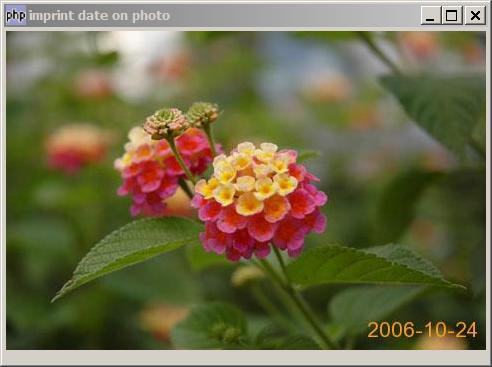
Solution
Please refer to How to rotate an image? on the use of GD2 with php-gtk2. We employ exactly the same technique as described in the article.
- Use imagettfbbox to find out the width and height of the text that will be printed on the photo.
- Imprint the date with imagettftext.
Sample Code
| 1 2 3 4 5 6 7 8 9 10 11 12 13 14 15 16 17 18 19 20 21 22 23 24 25 26 27 28 29 30 31 32 33 34 35 37 38 40 42 43 44 45 46 47 48 49 50 51 52 53 54 55 56 57 58 59 60 61 62 65 66 67 68 69 70 71 72 73 74 75 76 77 78 79 80 81 83 84 85 86 90 91 92 93 94 96 97 99 100 101 102 103 | <?php $window = new GtkWindow(); $window->set_size_request(240, 200); $window->connect_simple('destroy', array('Gtk','main_quit')); $img = new GtkImage(); $img->drag_dest_set(Gtk::DEST_DEFAULT_ALL, array( array( 'text/uri-list', 0, 0)), Gdk::ACTION_COPY); $img->connect('drag-data-received', 'on_drop', $img); // Set up gtkentry to get rotation angle $vbox = new GtkVBox(); $button = new GtkButton('Imprint date'); $button->set_size_request(-1,24); $hbox = new GtkHBox(); $hbox->pack_start(new GtkLabel('Date: '), 0, 0); $date = date('Y-m-d'); $angle = new GtkEntry($date); $angle->set_size_request(100, -1); $button->connect('clicked', 'on_button', $angle); $hbox->pack_start($angle, 0, 0); $hbox->pack_start(new GtkLabel(' '), 0, 0); $hbox->pack_start($button, 0, 0); $vbox->pack_start($hbox, 0, 0); $vbox->pack_start($img); $window->add($vbox); $window->show_all(); Gtk::main(); // process drop function on_drop($widget, $context, $x, $y, $data, $info, $time, $img) { $uri_list = explode("\n",$data->data); global $img_file; $img_file = $uri_list[0]; $img_file = str_replace("file:///", "", $img_file); $img_file = str_replace("\r", "", $img_file); global $pixbuf; $pixbuf=GdkPixbuf::new_from_file($img_file); $width = $pixbuf->get_width(); $height = $pixbuf->get_height(); $img->set_from_pixbuf($pixbuf); global $window; $window->set_size_request($width, $height+24); } function on_button($button, $angle_widget) { global $img_file; $date = $angle_widget->get_text(); // get the rotation angle $im = imprint_date($img_file, $date); $pixbuf = GdkPixbuf::new_from_gd($im); // note 2 imagedestroy($im); $img = GtkImage::new_from_Pixbuf($pixbuf); $dialog = new GtkDialog("imprint date on photo", null, Gtk::DIALOG_NO_SEPARATOR); // place the rotated image in a dialog $dialog->vbox->pack_start($img); $dialog->show_all(); } function imprint_date($img_file, $text) { list($img_width,$img_height, $img_type) = getimagesize($img_file); echo "img_size = $img_width x $img_height ($img_type)\n"; switch($img_type) { case 1: $im = imagecreatefromgif($img_file); break; case 2: $im = imagecreatefromjpeg($img_file); break; case 3: $im = imagecreatefrompng($img_file); break; default: echo "unsupported file format\n"; exit(1); } $font_color = imagecolorallocate($im, 255, 153, 24); // set the font color $font = 'arial.ttf'; // specify the truetype font $angle = 0; // angle of the text $fontsize = 16; // set the font size $bbox = imagettfbbox ($fontsize, $angle, $font, $text); // note 1 $text_width = $bbox[2] - $bbox[0]; // note 1 $text_height = $bbox[1] - $bbox[7]; // note 1 $x_margin = 10; $y_margin = 2; $x = $img_width - $text_width - $x_margin; // note 2 $y = $img_height - $text_height + $y_margin; // note 2 imagettftext($im, $fontsize, $angle, $x, $y, $font_color, $font, $text); // note 3 return $im; } ?> |
Output
As shown above.Explanation
This example make use of the method as described in How to rotate an image?.
What's new here:
- Get the width and height of the bounding box of the date that will be imprinted.
- Calculate the start position of the date. Note that we leave some x and y margin from the bottom right-hand corner of the image.
- Imprint the date!
Read more...