Problem
You have set up a simple drag-and-drop image viewer in How to create a simple drag and drop image viewer?
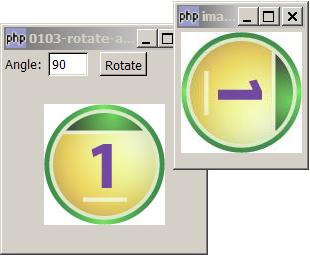
Now you would like to rotate the image as shown below:
Solution
PHP-GTK2 does not have a built-in function to rotate an image. However, GD2 does. (For those of you who are not familiar with GD2, please refer to the PHP documentation at: http://www.php.net/gd
For linux users, adding GD2 to php-gtk2 is easy. Just recompile php-gtk2 to include GD2. Not so for windows users, as the current Gnope Installer does not include GD2.
I believe most of you started off using PHP for web applications before moving on to try out php-gtk. So if you are using windows, most likely you have two copies of PHP5 on your machine - one used by your web server, and the other php-gtk2.
Since we have no idea when Gnope Installer will include GD2, let's just go ahead and make use of the web server's PHP which comes standard with GD2. (Note: The gd2 dll is included, but it's not turn on by default. If you have not turned it on yet, please turn on the gd2 feature in php.ini by uncommenting the line "extension=php_gd2.dll".)
The idea is simple. The php-gtk2 portion will get the filename (when the user dragged the image file from file explorer and dropped it onto the GtkWindow). Then we pass the image filename to rotate_img.php which we execute using the web server's php. When the image processing is done, we read the processed image and display it in a GtkDialog.
For GD2,
- We load the image using imagecreatefromgif, imagecreatefromjpeg, or imagecreatefrompng depending on the image type.
- Rotate the image with imagerotate.
- Then save the image with imagegif, imagejpeg, or imagepng depending on the image type.
Sample Code
| 1 2 3 4 5 6 7 8 9 10 11 12 13 14 15 16 17 18 19 20 21 22 23 24 25 26 27 28 29 30 31 32 33 34 36 37 39 41 42 43 44 45 46 47 48 49 50 51 52 53 57 58 59 60 61 65 69 70 73 74 75 | <?php $window = new GtkWindow(); $window->set_size_request(200, 200); $window->connect_simple('destroy', array('Gtk','main_quit')); $img = new GtkImage(); $img->drag_dest_set(Gtk::DEST_DEFAULT_ALL, array( array( 'text/uri-list', 0, 0)), Gdk::ACTION_COPY); $img->connect('drag-data-received', 'on_drop', $img); // Set up gtkentry to get rotation angle $vbox = new GtkVBox(); $button = new GtkButton('Rotate'); $button->set_size_request(-1,24); $hbox = new GtkHBox(); $hbox->pack_start(new GtkLabel('Angle: '), 0, 0); $angle = new GtkEntry(''); $angle->set_size_request(40, -1); $button->connect('clicked', 'on_button', $angle); $hbox->pack_start($angle, 0, 0); $hbox->pack_start(new GtkLabel(' '), 0, 0); $hbox->pack_start($button, 0, 0); $vbox->pack_start($hbox, 0, 0); $vbox->pack_start($img); $window->add($vbox); $window->show_all(); Gtk::main(); // process drop function on_drop($widget, $context, $x, $y, $data, $info, $time, $img) { $uri_list = explode("\n",$data->data); global $img_file; $img_file = $uri_list[0]; $img_file = str_replace("file:///", "", $img_file); $img_file = str_replace("\r", "", $img_file); global $pixbuf; $pixbuf=GdkPixbuf::new_from_file($img_file); $width = $pixbuf->get_width(); $height = $pixbuf->get_height(); $img->set_from_pixbuf($pixbuf); global $window; $window->set_size_request($width, $height+24); } function on_button($button, $angle_widget) { $angle = $angle_widget->get_text(); // get the rotation angle global $img_file; system("f:/php/php G:/g1/php-gtk2/php/rotate_img.php $img_file $angle"); $dialog = new GtkDialog("image rotate at $angle deg", null, Gtk::DIALOG_NO_SEPARATOR); // place the rotated image in a dialog $ext = end(explode('.',$img_file)); $img = GtkImage::new_from_file("c:/processed_img.$ext"); // note 7 $dialog->vbox->pack_start($img); $dialog->show_all(); } ?> |
And here's the code for rotate_img.php. Note that the processed image is stored at c:\ root folder. You may change it to any other location you like.
| 1 9 10 11 12 14 15 16 17 18 19 20 21 22 23 24 25 26 27 28 29 30 31 32 33 | <?php $img_file = $argv[1]; $angle = $argv[2]; $processed_img_file = "c:\processed_img"; // note 2 list($img_width,$img_height, $img_type) = getimagesize($img_file); // note 3 echo "img_size = $img_width x $img_height ($img_type)\n"; switch($img_type) { // note 4 case 1: $img = imagecreatefromgif($img_file); break; case 2: $img = imagecreatefromjpeg($img_file); break; case 3: $img = imagecreatefrompng($img_file); break; default: echo "unsupported file format\n"; exit(1); } $img2 = imagerotate($img, -$angle, 0, 0); // note 5 switch($img_type) { // note 6 case 1: imagegif($img2, "$processed_img_file.gif"); break; case 2: imagejpeg($img2, "$processed_img_file.jpg"); break; case 3: imagesavealpha($img2, true); imagepng($img2, "$processed_img_file.png"); break; } ?> |
Output
As shown above.Explanation
- Execute the script
rotate_img.phpusing the web server's php with support for gd2. The php used by my web server is located atc:/php5/php. Please change yours accordingly. - I store the processed image temporarily at
c:\root folder. You may choose any other location you like. - Get the image size and type. For image type, 1 = GIF, 2 = JPG, 3 = PNG, 4 = SWF, 5 = PSD, 6 = BMP, 7 = TIFF(intel byte order), 8 = TIFF(motorola byte order), 9 = JPC, 10 = JP2, 11 = JPX, 12 = JB2, 13 = SWC, 14 = IFF, 15 = WBMP, 16 = XBM.
- Load the image file.
- Rotate the image. Note that the default direction of rotate is counter clockwise. But I think most of us think clockwise instead. Hence
-$angleto reverse the direction, i.e. if you put 90, it will do a 90 deg clockwise rotation. - Save the processed image.
- Load the processed image with GtkImage::new_from_file, stuff it in the dialog, and display the rotated image!
Note
- Note that
imagerotatedoes not preserve the alpha channel i.e. it destroys transparency information (transparent areas turn black). For solutions, please refer to the readers comments in php manual. - There are also many suggestions in the readers comments in php manual to imporove the speed and quality of the image rotation.
Read more...