Problem
You have set up a simple drag-and-drop image viewer in How to create a simple drag and drop image viewer?
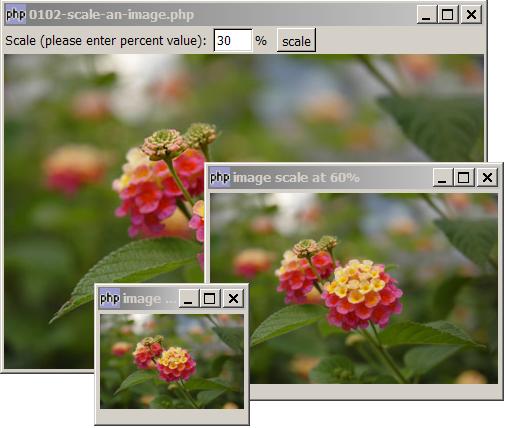
Now you would like to scale the image as shown below:
Note: This example also shows how to popup multiple images using dialogs.
Solution
- First set up drag-and-drop using the technique as explained in How to create a simple drag and drop image viewer?.
- Load the image into a pixbuf using GdkPixbuf::new_from_file.
- Get the width and height of the image with GdkPixbuf::get_width and GdkPixbuf::get_height
- Scale the image with GdkPixbuf::scale_simple.
- Display the image using GtkImage::set_from_pixbuf().
Sample Code
| 1 2 3 4 5 6 7 8 9 10 11 12 13 14 15 16 17 18 19 20 21 22 23 24 25 26 27 28 29 30 31 32 33 35 36 38 40 41 42 43 44 45 46 47 48 49 50 51 53 56 57 58 59 60 61 62 63 64 65 66 67 68 69 70 74 76 79 80 81 | <?php $window = new GtkWindow(); $window->set_size_request(400, 300); $window->connect_simple('destroy', array('Gtk','main_quit')); $img = new GtkImage(); $img->drag_dest_set(Gtk::DEST_DEFAULT_ALL, array( array( 'text/uri-list', 0, 0)), Gdk::ACTION_COPY); $img->connect('drag-data-received', 'on_drop', $img); // Set up gtkentry to get scale_factor $vbox = new GtkVBox(); $button = new GtkButton('scale'); $button->set_size_request(-1,24); $hbox = new GtkHBox(); $hbox->pack_start(new GtkLabel('Scale (please enter percent value): '), 0, 0); $scale_factor = new GtkEntry(''); $scale_factor->set_size_request(40, -1); $button->connect('clicked', 'on_button', $scale_factor); $hbox->pack_start($scale_factor, 0, 0); $hbox->pack_start(new GtkLabel('% '), 0, 0); $hbox->pack_start($button, 0, 0); $vbox->pack_start($hbox, 0, 0); $vbox->pack_start($img); $window->add($vbox); $window->show_all(); Gtk::main(); // process drop function on_drop($widget, $context, $x, $y, $data, $info, $time, $img) { $uri_list = explode("\n",$data->data); $img_file = $uri_list[0]; $img_file = str_replace("file:///", "", $img_file); $img_file = str_replace("\r", "", $img_file); global $pixbuf; $pixbuf=GdkPixbuf::new_from_file($img_file); // note 1 $width = $pixbuf->get_width(); $height = $pixbuf->get_height(); $img->set_from_pixbuf($pixbuf); global $window; $window->set_size_request($width, $height+24); // note 2 } function on_button($button, $scale_factor_widget) { $scale_factor = $scale_factor_widget->get_text(); // get scale factor $dialog = new GtkDialog("image scale at $scale_factor%", null, Gtk::DIALOG_NO_SEPARATOR); // place the scaled image in a dialog global $pixbuf; $width = $pixbuf->get_width(); $height = $pixbuf->get_height(); echo "image size = $width x $height\n"; $new_width = $width * $scale_factor / 100; // note 3 $new_height = $height * $scale_factor / 100; // note 3 echo "new image size = $new_width x $new_height (scale_factor: $scale_factor%)\n"; // scale the image $new_pixbuf = $pixbuf->scale_simple($new_width, $new_height, Gdk::INTERP_HYPER); // note 4 $img = new GtkImage(); $img->set_from_pixbuf($new_pixbuf); // note 5 $dialog->vbox->pack_start($img); $dialog->show_all(); // note 6 } ?> |
Output
As shown above.Explanation
- Load the image into a pixbuf.
- Get the image width and height from the pixbuf, and adjust the window size accordingly. Note that we added 24 to the height, which is the height of the button.
- Calculate the new width and height based on the scale factor.
- Scale the image with GdkPixbuf::scale_simple(int dest_width, int dest_height, GdkInterpType interp_type). For GdkInterpType, you have the following options:
Gdk::INTERP_NEAREST: Nearest neighbor sampling; this is the fastest and lowest quality mode. Quality is normally unacceptable when scaling down, but may be OK when scaling up.Gdk::INTERP_TILES: This is an accurate simulation of the PostScript image operator without any interpolation enabled. Each pixel is rendered as a tiny parallelogram of solid color, the edges of which are implemented with antialiasing. It resembles nearest neighbor for enlargement, and bilinear for reduction.Gdk::INTERP_BILINEAR: Best quality/speed balance; use this mode by default. Bilinear interpolation. For enlargement, it is equivalent to point-sampling the ideal bilinear-interpolated image. For reduction, it is equivalent to laying down small tiles and integrating over the coverage area.Gdk::INTERP_HYPER: This is the slowest and highest quality reconstruction function. It is derived from the hyperbolic filters in Wolberg's "Digital Image Warping", and is formally defined as the hyperbolic-filter sampling the ideal hyperbolic-filter interpolated image (the filter is designed to be idempotent for 1:1 pixel mapping).- Display the image using the pixbuf.
- Show the image, but don't include
$dialog->runso that we can popup multiple images.
Note
You can use this technique to generate your own thumbnails of your image libraries.
Also, as noted in How to get image size?, the window will only auto-expand, but will not auto-shrink. php-gtk1 used to have a method GtkWindow::set_policy() that supports auto-shrink. But this is no longer available in php-gtk2. Until they add this back, there is no easy one-liner that allows you to auto-shrink based on image size.
Read more...