Problem
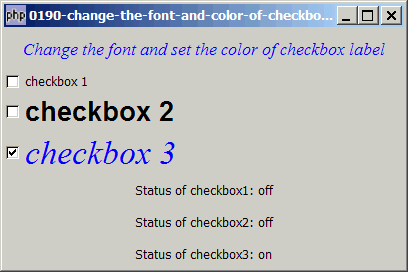
You would like to change the font and set the color of the labels of GtkCheckButtons as shown below:
Solution
- A GtkCheckbutton is a descendent of GtkButton except that the button label is displayed on the right of the button instead of inside.
- So just like a GtkButton, to change its button label, we first get the pointer to the label with GtkBin::child.
- The button label is a standard GtkLabel. So once we have the label, we can change the font and font size using the method as described in How to change the font and font size of GtkLabel?, and also its color using the method as described in How to change the font color of GtkLabel?
Sample Code
| 1 2 3 4 5 6 8 9 10 11 12 13 14 15 16 17 18 19 20 21 22 23 24 25 26 27 28 29 30 31 32 33 35 36 37 38 39 40 41 42 43 44 45 46 47 48 49 50 51 52 53 54 55 56 57 58 59 60 61 | <?php $window = new GtkWindow(); $window->set_size_request(400, 240); $window->connect_simple('destroy', array('Gtk','main_quit')); $window->add($vbox = new GtkVBox()); // display title $title = new GtkLabel("Change the font and set the color of checkbox labels"); $title->modify_font(new PangoFontDescription("Times New Roman Italic 10")); $title->modify_fg(Gtk::STATE_NORMAL, GdkColor::parse("#0000ff")); $title->set_size_request(-1, 40); $vbox->pack_start($title, 0, 0); // setup checkboxes $checkbox1 = setup_checkbox('checkbox 1'); $checkbox2 = setup_checkbox('checkbox 2', "Arial Bold 16"); $checkbox3 = setup_checkbox('checkbox 3', "Times New Roman Italic 20", "#0000ff"); // pack them inside vbox $vbox->pack_start($checkbox1, 0, 0); $vbox->pack_start($checkbox2, 0, 0); $vbox->pack_start($checkbox3, 0, 0); // add a status area $vbox->pack_start($status_area = new GtkLabel('Select the checkboxes')); $window->show_all(); Gtk::main(); // function to simplify the display of grouped radio buttons function setup_checkbox($label, $fg='', $color='') { $checkbox = new GtkCheckButton($label); $checkbox->connect('toggled', "on_toggle"); $button_label = $checkbox->child; // note 1 if ($fg!='') $button_label->modify_font(new PangoFontDescription($fg)); // note 2 if ($color!='') { $button_label->modify_fg(Gtk::STATE_NORMAL, GdkColor::parse($color)); // note 3 $button_label->modify_fg(Gtk::STATE_PRELIGHT, GdkColor::parse($color)); // note 3 $button_label->modify_fg(Gtk::STATE_ACTIVE, GdkColor::parse($color)); // note 3 } return $checkbox; } // call-back function when user pressed a radio button function on_toggle($checkbox) { global $status_area; $label = $checkbox->child->get_label(); global $checkbox1, $checkbox2, $checkbox3; $status1 = $checkbox1->get_active() ? 'on' : 'off'; $status2 = $checkbox2->get_active() ? 'on' : 'off'; $status3 = $checkbox3->get_active() ? 'on' : 'off'; $status_area->set_text("Status of checkbox1: $status1\n Status of checkbox2: $status2\n Status of checkbox3: $status3"); } ?> |
Output
As shown above.
Explanation
The above example make use of the code in How to setup and process checkboxes?
What's new here:
- Get the button label.
- Set the font and font size of the button label.
- Set the color of the button label.
Related Links
- How to change the font and font size of GtkButton?
- How to change the font and font size of GtkLabel?
- How to change the font color of GtkLabel?
- How to set the background color of GtkButton?
- How to set the button to the exact size you want - Part 1?
- How to display button with image?
- Table of Contents - GtkButton
Read more...