Problem
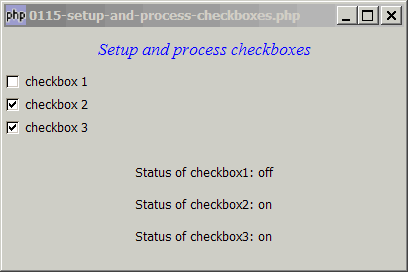
You want to setup checkboxes and find out the status of each checkbox as shown below:
Solution
- Display checkboxes using GtkCheckbutton.
- Find out the status with GtkTogglebutton::get_active().
Sample Code
| 1 2 3 4 5 6 7 8 9 10 11 12 13 14 15 16 17 18 19 20 21 22 23 24 25 26 27 28 29 30 31 32 33 34 35 36 37 38 39 40 41 42 43 44 45 46 47 48 49 50 | <?php $window = new GtkWindow(); $window->set_size_request(400, 240); $window->connect_simple('destroy', array('Gtk','main_quit')); $window->add($vbox = new GtkVBox()); // display title $title = new GtkLabel("Setup and process checkboxes"); $title->modify_font(new PangoFontDescription("Times New Roman Italic 10")); $title->modify_fg(Gtk::STATE_NORMAL, GdkColor::parse("#0000ff")); $title->set_size_request(-1, 40); $vbox->pack_start($title, 0, 0); // setup checkboxes $checkbox1 = setup_checkbox('checkbox 1'); $checkbox2 = setup_checkbox('checkbox 2'); $checkbox3 = setup_checkbox('checkbox 3'); // pack them inside vbox $vbox->pack_start($checkbox1, 0, 0); $vbox->pack_start($checkbox2, 0, 0); $vbox->pack_start($checkbox3, 0, 0); // add a status area $vbox->pack_start($status_area = new GtkLabel('Select the checkboxes')); $window->show_all(); Gtk::main(); // function to simplify the display of grouped radio buttons function setup_checkbox($label) { $checkbox = new GtkCheckButton($label); // note 1 $checkbox->connect('toggled', "on_toggle"); // note 2 return $checkbox; } // call-back function when user pressed a radio button function on_toggle($checkbox) { global $status_area; $label = $checkbox->child->get_label(); global $checkbox1, $checkbox2, $checkbox3; $status1 = $checkbox1->get_active() ? 'on' : 'off'; // note 3 $status2 = $checkbox2->get_active() ? 'on' : 'off'; // note 3 $status3 = $checkbox3->get_active() ? 'on' : 'off'; // note 3 $status_area->set_text("Status of checkbox1: $status1\n Status of checkbox2: $status2\n Status of checkbox3: $status3"); } ?> |
Output
As shown above.
Explanation
- Create the checkbox.
- Call
on_toggle()when user checks the checkboxes. - Get the status of each checkbox.
Read more...