Problem
Saw Angelo's post and realized that I missed out this one.
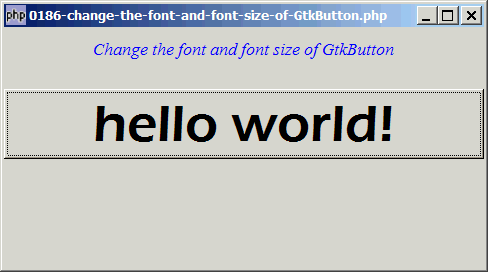
This example shows you how to change the font and font size of a GtkButton as shown below:
Solution
- To change the font and font size of a GtkButton, you need to first get the button label with GtkBin::get_child().
- The button label is a standard GtkLabel. So once you have the label, you can change the font and font size using the method as described in How to change the font and font size of GtkLabel?
Sample Code
| 1 2 3 4 5 6 7 8 9 10 11 12 13 14 16 17 18 19 20 21 22 23 24 25 26 27 28 29 30 31 32 33 | <?php $window = new GtkWindow(); $window->set_size_request(480, 240); $window->connect_simple('destroy', array('Gtk','main_quit')); $window->add($vbox = new GtkVBox()); // display title $title = new GtkLabel("Change the font and font size of GtkButton"); $title->modify_font(new PangoFontDescription("Times New Roman Italic 10")); $title->modify_fg(Gtk::STATE_NORMAL, GdkColor::parse("#0000ff")); $title->set_size_request(-1, 40); $title->set_justify(Gtk::JUSTIFY_CENTER); $alignment = new GtkAlignment(0.5, 0, 0, 0); $alignment->add($title); $vbox->pack_start($alignment, 0, 0); $vbox->pack_start(new GtkLabel(), 0, 0); // setup button $button = new Gtkbutton("hello world!"); $button_label = $button->get_child(); // note 1 $button_label->modify_font(new PangoFontDescription('Eras Demi ITC 32')); // note 2 $button->connect('clicked', 'on_click'); $vbox->pack_start($button, 0); $window->show_all(); Gtk::main(); function on_click($button) { echo "You clicked me!\n"; } ?> |
Output
As shown above.
Explanation
- Get the button label.
- Set the font and font size of the button label.
Read more...