Problem
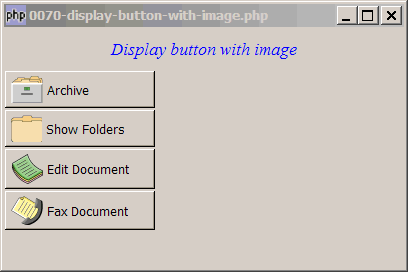
You would like to display buttons with images as shown below:
Solution
- Create a standard GtkButton.
- Create a standard GtkHBox and stuff it inside the button.
- Load the image with GtkImage::new_from_file.
- Pack the image in the hbox.
- Create the button label with GtkLabel and pack it inside the hbox too.
You now have a button with image on the left and label on the right.
Sample Code
The following image files are required by the sample code below. Please save a copy of the image files and put them in the same directory where you store the sample code.
 | 0070.1.png |
 | 0070.2.png |
 | 0070.3.png |
 | 0070.4.png |
| 1 2 3 4 5 6 7 8 9 10 11 12 15 16 17 18 19 20 21 22 23 24 25 26 27 28 31 32 33 34 35 36 37 38 39 40 41 42 43 44 45 46 47 48 49 53 54 55 | <?php $window = new GtkWindow(); $window->set_size_request(400, 240); $window->connect_simple('destroy', array('Gtk','main_quit')); $window->add($vbox = new GtkVBox()); // display title $title = new GtkLabel("Display button with image"); $title->modify_font(new PangoFontDescription("Times New Roman Italic 10")); $title->modify_fg(Gtk::STATE_NORMAL, GdkColor::parse("#0000ff")); $title->set_size_request(-1, 40); $vbox->pack_start($title, 0, 0); // create the buttons with images $button1 = create_img_button($vbox, 'Archive', '0070.1.png'); $button2 = create_img_button($vbox, 'Show Folders', '0070.2.png'); $button3 = create_img_button($vbox, 'Edit Document', '0070.3.png'); $button4 = create_img_button($vbox, 'Fax Document', '0070.4.png'); $window->show_all(); Gtk::main(); function create_img_button($container, $label, $img) { $button = new GtkButton(); // create a standard button $button->set_size_request(150, -1); $button->connect('clicked', 'on_click'); // setup the event handler $button_hbox = new GtkHBox(); // note 1 $button->add($button_hbox); $img=GtkImage::new_from_file($img); $button_hbox->pack_start($img, 0, 0); $button_hbox->pack_start(new GtkLabel(), 0, 0); // note 2 $button_hbox->pack_start(new GtkLabel($label), 0, 0); $container->pack_start($hbox = new GtkHBox(), 0, 0); $hbox->pack_start($button, 0, 0); } // process button click function on_click($button) { $button_hbox = $button->child->get_children(); $button_label = $button_hbox[2]->get_text(); print "button_clicked = $button_label\n"; } ?> |
Output
As shown above.Explanation
- The hbox is used to hold the image and the label.
- This is here to put in a small gap between the image and the label. Try commenting this and you will know what I mean.
Read more...