Problem
There are some stuff that are supposed to be simple and fundamental, but for some reason, are not that "straightforward" in php-gtk. Setting the size of a GtkButton is one example.
Suppose you want your button to be of size 80x32, if you just use:
$button = new GtkButton('button');

$button->set_size_request(80, 32);

$vbox->pack_start($button);
You will find the button expanding to fill up the entire window, even though you have used set_size_request:
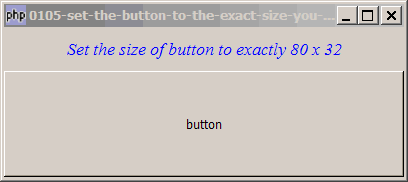
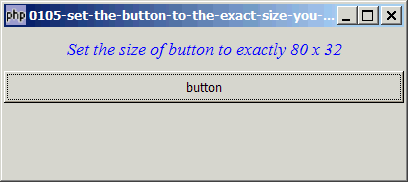
Even if you set the expand and fill to false:
$button = new GtkButton('button');

$button->set_size_request(80, 32);

$vbox->pack_start($button, 0, 0);
You will get this:
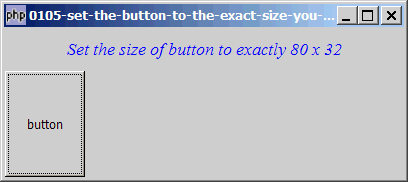
Let's stuff the button into a hbox:
$button = new GtkButton('button');

$button->set_size_request(80, 32);

$hbox = new GtkHBox();

$hbox->pack_start($button, 0, 0);

$vbox->pack_start($hbox);
You will get this:
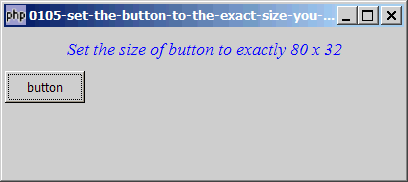
So what should you do if you really want the button to be exactly of size 80x32 as shown below:
Solution
- Stuff the button in a GtkHBox. Don't forget to set the expand and fill to
falsewhen packing the button into the hbox. - When stuffing the above hbox in the container, don't forget to set the expand and fill to
falsetoo.
Sample Code
| 1 2 3 4 5 6 7 8 9 10 11 12 13 29 30 31 32 33 34 35 36 37 38 | <?php $window = new GtkWindow(); $window->set_size_request(400, 150); $window->connect_simple('destroy', array('Gtk','main_quit')); $window->add($vbox = new GtkVBox()); // display title $title = new GtkLabel("Set the size of button to exactly 80 x 32"); $title->modify_font(new PangoFontDescription("Times New Roman Italic 10")); $title->modify_fg(Gtk::STATE_NORMAL, GdkColor::parse("#0000ff")); $title->set_size_request(-1, 40); $vbox->pack_start($title, 0, 0); $button = new GtkButton('button'); // note 1 $button->set_size_request(80, 32); // note 1 $hbox = new GtkHBox(); // note 2 $hbox->pack_start($button, 0, 0); // note 2 $vbox->pack_start($hbox, 0, 0); // note 3 $window->show_all(); Gtk::main(); ?> |
Output
As shown above.
Explanation
- Create the button and set its size.
- Create a HBox and stuff the button into it. Don't forget to set the expand and fill to
false. - Stuff the HBox in the containing VBox. Set the expand and fill to
falsetoo.
Read more...