Problem
You have set up a combo box in a GtkTreeView in Part 1, and processed the combo box when user selects from the list in Part 2.
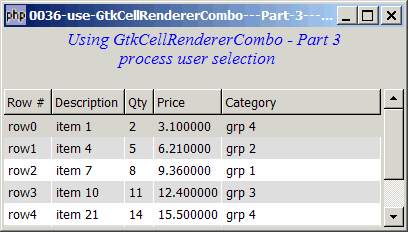
Now let's wrap up GtkCellRendererCombo with alternate row color and processing of user selection.
Solution
- This example makes use of the technique as described in How to display a 2D array in GtkTreeView - Part 3 - with alternate row colors? to display alternate row colors.
- This example makes use of the technique as described in How to display a 2D array in GtkTreeView - Part 5 - get user selection? to process of user selection.
Sample Code
| 1 2 3 4 5 6 7 8 9 10 11 12 13 14 15 16 17 18 19 20 21 22 23 24 25 26 27 28 29 30 31 32 33 34 35 36 37 38 39 40 41 42 43 44 45 46 47 48 49 50 51 52 53 54 55 56 57 58 59 60 61 62 63 64 65 66 67 68 69 70 71 72 73 74 75 76 77 78 79 80 81 82 83 84 85 86 87 88 89 90 91 92 94 95 96 97 98 99 100 101 102 110 111 112 113 114 125 126 127 128 129 130 131 132 133 134 135 136 137 138 139 | <?php $window = new GtkWindow(); $window->set_size_request(400, 200); $window->connect_simple('destroy', array('Gtk','main_quit')); $window->add($vbox = new GtkVBox()); // display title $title = new GtkLabel("Using GtkCellRendererCombo - Part 3\n". " process user selection"); $title->modify_font(new PangoFontDescription("Times New Roman Italic 10")); $title->modify_fg(Gtk::STATE_NORMAL, GdkColor::parse("#0000ff")); $title->set_size_request(-1, 40); $vbox->pack_start($title, 0, 0); $vbox->pack_start(new GtkLabel(), 0, 0); // the 2D table $data = array( array('row0', 'item 1', 2, 3.1), array('row1', 'item 4', 5, 6.21), array('row2', 'item 7', 8, 9.36), array('row3', 'item 10', 11, 12.4), array('row4', 'item 21', 14, 15.5), array('row5', 'item 36', 17, 18.6), array('row6', 'item 42', 20, 21.73)); display_table($vbox, $data); $window->show_all(); Gtk::main(); function display_table($vbox, $data) { // Set up a scroll window $scrolled_win = new GtkScrolledWindow(); $scrolled_win->set_policy( Gtk::POLICY_AUTOMATIC, Gtk::POLICY_AUTOMATIC); $vbox->pack_start($scrolled_win); // creates the list store if (defined("GObject::TYPE_STRING")) { $model = new GtkListStore(GObject::TYPE_STRING, GObject::TYPE_STRING, GObject::TYPE_LONG, GObject::TYPE_DOUBLE, GObject::TYPE_STRING); } else { $model = new GtkListStore(Gtk::TYPE_STRING, Gtk::TYPE_STRING, Gtk::TYPE_LONG, Gtk::TYPE_DOUBLE, Gtk::TYPE_STRING); } $field_header = array('Row #', 'Description', 'Qty', 'Price'); // creates the view to display the list store $view = new GtkTreeView($model); $scrolled_win->add($view); // creates columns for ($col=0; $col<count($field_header); ++$col) { $cell_renderer = new GtkCellRendererText(); $column = new GtkTreeViewColumn($field_header[$col], $cell_renderer, 'text', $col); $column->set_cell_data_func($cell_renderer, "format_col", $col); // note 1 $view->append_column($column); } // setup combo box $cell_renderer = new GtkCellRendererCombo(); if (defined("GObject::TYPE_STRING")) { $category = new GtkListStore(GObject::TYPE_STRING); } else { $category = new GtkListStore(Gtk::TYPE_STRING); } $list = array('grp 1', 'grp 2', 'grp 3', 'grp 4'); foreach($list as $choice) { $category->append(array($choice)); } $cell_renderer->set_property('model', $category); $cell_renderer->set_property('text-column', 0); $cell_renderer->set_property('editable', true); $cell_renderer->connect('edited', 'on_combo', $model); $column = new GtkTreeViewColumn('Category', $cell_renderer, 'text', 4); $column->set_cell_data_func($cell_renderer, "format_col", 4); $view->append_column($column); $selection = $view->get_selection(); $selection->connect('changed', 'on_selection'); // note 2 // pupulates the data for ($row=0; $row<count($data); ++$row) { $values = array(); for ($col=0; $col<count($data[$row]); ++$col) { $values[] = $data[$row][$col]; } $values[] = ''; $model->append($values); } } // self-defined function to display alternate row color function format_col($column, $cell, $model, $iter, $col_num) { // note 3 $path = $model->get_path($iter); $row_num = $path[0]; $row_color = ($row_num%2==1) ? '#dddddd' : '#ffffff'; $cell->set_property('cell-background', $row_color); } function on_combo($renderer, $path, $selection, $model) { $iter = $model->get_iter($path); $model->set($iter, 4, $selection); } // the function that is called when user selects a row function on_selection($selection) { // note 4 list($model, $iter) = $selection->get_selected(); $desc = $model->get_value($iter, 1); $qty = $model->get_value($iter, 2); $price = $model->get_value($iter, 3); $grp = $model->get_value($iter, 4); echo "You have selected $desc: $qty ($price) category = $grp\n"; } ?> |
Output
As shown above.
Explanation
- Set up user-defined cell-display function.
- Register signal
'changed'on the GtkTreeSelection. - Display alternate row colors.
- Process selection.
For details please refer to:
- How to display a 2D array in GtkTreeView - Part 3 - with alternate row colors?
- How to display a 2D array in GtkTreeView - Part 5 - get user selection?
Read more...