Problem
Notice: Undefined variable: ebook in /var/www/kksou.com/public_html/php-gtk2/plugins/content/DirectPHP/DirectPHP.php(56) : eval()'d code on line 1
This is in response to Nathan's post titled "gtktreeStore with different combo as cell renderers."
In Part 1, the pulldown values for the combobox are the same for all the rows.
This example shows how to have custom pulldown values for the combobox of each row as shown below:
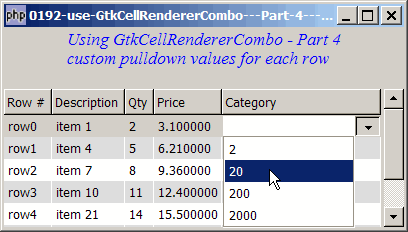
Solution
- Set up set_cell_data_func on the GtkCellRendererCombo.
- It is in the user-defined cell-display function that you populate the pulldown values of each row.
Sample Code
| 1 2 3 4 5 6 7 8 9 10 11 12 13 14 15 16 17 18 19 20 21 22 23 24 25 26 27 28 29 30 31 32 33 34 35 36 37 38 39 40 41 42 43 44 45 46 47 48 49 50 51 52 53 54 55 56 57 58 59 60 61 62 63 64 71 72 73 74 75 76 77 78 79 80 81 82 83 84 85 86 87 88 89 91 92 93 94 95 96 97 98 99 107 108 109 110 111 112 113 114 115 116 117 118 119 120 121 122 123 124 125 126 137 138 139 140 141 142 143 144 145 146 147 148 149 150 151 | <?php $window = new GtkWindow(); $window->set_size_request(400, 200); $window->connect_simple('destroy', array('Gtk','main_quit')); $window->add($vbox = new GtkVBox()); // display title $title = new GtkLabel("Using GtkCellRendererCombo - Part 4\n". "custom pulldown values for each row"); $title->modify_font(new PangoFontDescription("Times New Roman Italic 10")); $title->modify_fg(Gtk::STATE_NORMAL, GdkColor::parse("#0000ff")); $title->set_size_request(-1, 40); $vbox->pack_start($title, 0, 0); $vbox->pack_start(new GtkLabel(), 0, 0); // the 2D table $data = array( array('row0', 'item 1', 2, 3.1), array('row1', 'item 4', 5, 6.21), array('row2', 'item 7', 8, 9.36), array('row3', 'item 10', 11, 12.4), array('row4', 'item 21', 14, 15.5), array('row5', 'item 36', 17, 18.6), array('row6', 'item 42', 20, 21.73)); display_table($vbox, $data); $window->show_all(); Gtk::main(); function display_table($vbox, $data) { // Set up a scroll window $scrolled_win = new GtkScrolledWindow(); $scrolled_win->set_policy( Gtk::POLICY_AUTOMATIC, Gtk::POLICY_AUTOMATIC); $vbox->pack_start($scrolled_win); // creates the list store if (defined("GObject::TYPE_STRING")) { $model = new GtkListStore(GObject::TYPE_STRING, GObject::TYPE_STRING, GObject::TYPE_LONG, GObject::TYPE_DOUBLE, GObject::TYPE_STRING); } else { $model = new GtkListStore(Gtk::TYPE_STRING, Gtk::TYPE_STRING, Gtk::TYPE_LONG, Gtk::TYPE_DOUBLE, Gtk::TYPE_STRING); } $field_header = array('Row #', 'Description', 'Qty', 'Price'); // creates the view to display the list store $view = new GtkTreeView($model); $scrolled_win->add($view); // creates columns for ($col=0; $col<count($field_header); ++$col) { $cell_renderer = new GtkCellRendererText(); $column = new GtkTreeViewColumn($field_header[$col], $cell_renderer, 'text', $col); $column->set_cell_data_func($cell_renderer, "format_col", $col); $view->append_column($column); } // setup combo box $cell_renderer = new GtkCellRendererCombo(); $cell_renderer->set_property('text-column', 0); $cell_renderer->set_property('editable', true); $cell_renderer->connect('edited', 'on_combo', $model); $column = new GtkTreeViewColumn('Category', $cell_renderer, 'text', 4); $column->set_cell_data_func($cell_renderer, "format_col", 4); // note 1 $view->append_column($column); // setup selection $selection = $view->get_selection(); // get the selection associated with the view $selection->connect('changed', 'on_selection'); // pupulates the data for ($row=0; $row<count($data); ++$row) { $values = array(); for ($col=0; $col<count($data[$row]); ++$col) { $values[] = $data[$row][$col]; } $values[] = ''; $model->append($values); } } // self-defined function to display alternate row color function format_col($column, $cell, $model, $iter, $col_num) { $path = $model->get_path($iter); $row_num = $path[0]; if ($col_num==4) { $qty = $model->get_value($iter, 2); if (defined("GObject::TYPE_STRING")) { $category = new GtkListStore(GObject::TYPE_STRING); } else { $category = new GtkListStore(Gtk::TYPE_STRING); } $list = array($qty, $qty*10, $qty*100, $qty*1000); foreach($list as $choice) { $category->append(array($choice)); // note 2 } $cell->set_property('model', $category); } $row_color = ($row_num%2==1) ? '#dddddd' : '#ffffff'; $cell->set_property('cell-background', $row_color); } function on_combo($renderer, $path, $selection, $model) { $iter = $model->get_iter($path); $model->set($iter, 4, $selection); } // the function that is called when user selects a row function on_selection($selection) { list($model, $iter) = $selection->get_selected(); $desc = $model->get_value($iter, 1); $qty = $model->get_value($iter, 2); $price = $model->get_value($iter, 3); $grp = $model->get_value($iter, 4); echo "You have selected $desc: $qty ($price) category = $grp\n"; } ?> |
Output
As shown above.
Explanation
The above example makes use of the code in How to use GtkCellRendererCombo - Part 3 - process user selection?.
What's new here:
- Set up user-defined cell-display function on the GtkCellRendererCombo.
- Populate the pulldown list. In this example, we simply populate the pulldown list with 4 values: the qty, qty*10, qty*100 and qty*1000. In your actual application, you can populate these with values from mysql database.
Read more...