Problem
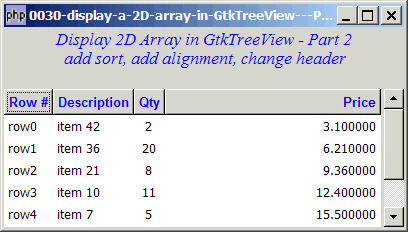
We have displayed a 2D array in a table in Part 1 and Part 2.
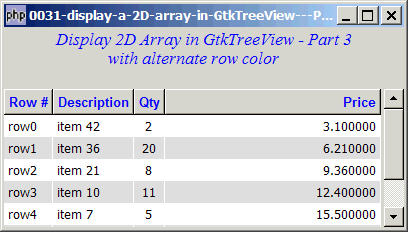
Now you would like to add in alternate row color as shown below:
Solution
In PHP-GTK1 you can do it simply with a one-liner GtkCList::set_background($row, $row_color). Not so straightforward in PHP-GTK2.
- Use GtkCelllayout::set_cell_data_func() to add your user-defined cell-display function.
- Get the current row number with GtkTreemodel::get_path().
- Test for odd and even row, and set the background color accordingly by setting the property of GtkCellrenderer::cell-background().
Sample Code
| 1 2 3 4 5 6 7 8 9 10 11 12 13 14 15 16 17 18 19 20 21 22 23 24 25 26 27 28 29 30 31 32 33 34 35 36 37 38 39 40 41 42 43 44 45 46 47 48 49 50 51 52 53 54 55 56 57 58 59 60 61 62 63 64 65 66 67 68 69 70 71 72 73 74 75 76 77 78 79 80 81 82 83 84 85 86 87 88 91 92 93 94 95 | <?php $window = new GtkWindow(); $window->set_size_request(400, 200); $window->connect_simple('destroy', array('Gtk','main_quit')); $window->add($vbox = new GtkVBox()); // display title $title = new GtkLabel("Display 2D Array in GtkTreeView - Part 3\n". " with alternate row color"); $title->modify_font(new PangoFontDescription("Times New Roman Italic 10")); $title->modify_fg(Gtk::STATE_NORMAL, GdkColor::parse("#0000ff")); $title->set_size_request(-1, 40); $vbox->pack_start($title, 0, 0); $vbox->pack_start(new GtkLabel(), 0, 0); // the 2D table $data = array( array('row0', 'item 42', 2, 3.1), array('row1', 'item 36', 20, 6.21), array('row2', 'item 21', 8, 9.36), array('row3', 'item 10', 11, 12.4), array('row4', 'item 7', 5, 15.5), array('row5', 'item 4', 17, 18.6), array('row6', 'item 3', 20, 21.73)); display_table($vbox, $data); $window->show_all(); Gtk::main(); function display_table($vbox, $data) { // Set up a scroll window $scrolled_win = new GtkScrolledWindow(); $scrolled_win->set_policy( Gtk::POLICY_AUTOMATIC, Gtk::POLICY_AUTOMATIC); $vbox->pack_start($scrolled_win); // Creates the list store if (defined("GObject::TYPE_STRING")) { $model = new GtkListStore(GObject::TYPE_STRING, GObject::TYPE_STRING, GObject::TYPE_LONG, GObject::TYPE_DOUBLE); } else { $model = new GtkListStore(Gtk::TYPE_STRING, Gtk::TYPE_STRING, Gtk::TYPE_LONG, Gtk::TYPE_DOUBLE); } $field_header = array('Row #', 'Description', 'Qty', 'Price'); $field_justification = array(0.0, 0.0, 0.5, 1.0); // Creates the view to display the list store $view = new GtkTreeView($model); $scrolled_win->add($view); // Creates the columns for ($col=0; $col<count($field_header); ++$col) { $cell_renderer = new GtkCellRendererText(); $cell_renderer->set_property("xalign", $field_justification[$col]); $column = new GtkTreeViewColumn($field_header[$col], $cell_renderer, 'text', $col); $column->set_alignment($field_justification[$col]); $column->set_sort_column_id($col); // set the header font and color $label = new GtkLabel($field_header[$col]); $label->modify_font(new PangoFontDescription("Arial Bold")); $label->modify_fg(Gtk::STATE_NORMAL, GdkColor::parse("#0000FF")); $column->set_widget($label); $label->show(); // setup self-defined function to display alternate row color $column->set_cell_data_func($cell_renderer, "format_col"); // note 1 $view->append_column($column); } // pupulates the data for ($row=0; $row<count($data); ++$row) { $values = array(); for ($col=0; $col<count($data[$row]); ++$col) { $values[] = $data[$row][$col]; } $model->append($values); } } // self-defined function to display alternate row color function format_col($column, $cell, $model, $iter) { $path = $model->get_path($iter); // note 2 $row_num = $path[0]; // note 2 $row_color = ($row_num%2==1) ? '#dddddd' : '#ffffff'; // note 3 $cell->set_property('cell-background', $row_color); // note 4 } ?> |
Output
Explanation
- Add your user-defined cell-display function when you set up the column. Note that this function will be called for each and every cell in your GtkTreeView.
- Note that
$pathis returned as an array (because the model can be used to store a tree structure). The row number is stored in the first element, hence$path[0]. - Set the row color for odd and even rows.
- Set the background color.
Related Links
- How to display a 2D array in GtkTreeView - Part 1?
- How to display a 2D array in GtkTreeView - Part 2 - set alignment and headers?
- How to display a 2D array in GtkTreeView - Part 4 - format cell content?
- How to display a 2D array in GtkTreeView - Part 5 - get user selection?
- How to display a 2D array in GtkTreeView - Part 6 - allow multiple rows selection?
- How to display bold and colored fonts in GtkTreeView using pango markup language?
- How to display a 2D array in GtkTreeView - Part 3 - with alternate row colors - Method 2?
- How to display a 2D array in GtkTreeView - Part 8 - with alternate fg and bg row colors - Method 2?
- How to display a 2D array in GtkTreeView - Part 8 - with alternate fg and bg row colors - Method 3 - set_attributes?
- How to display a 2D array in GtkTreeView - Part 8 - with alternate fg and bg row colors - Method 4 - add_attribute?
- How to display a 2D array in GtkTreeView - Part 4 - format cell content - Method 2?
Read more...