Problem
You have set up a combo box in a GtkTreeView in Part 1.
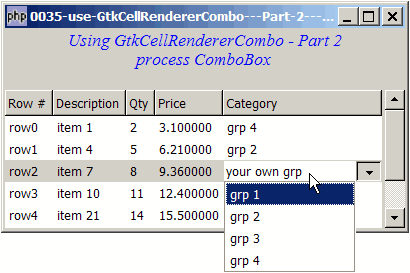
Now you would like to process the combo box when user selects from the list as shown below:
Solution
- Set up an event handler to respond to GtkCellrenderertext::edited(). This is the signal that is emitted when user selects something from the combo box.
- Set the value of the user selection in the data model with GtkListstore::set($iter, $column, $value).
Sample Code
| 1 2 3 4 5 6 7 8 9 10 11 12 13 14 15 16 17 18 19 20 21 22 23 24 25 26 27 28 29 30 31 32 33 34 35 36 37 38 39 40 41 42 43 44 45 46 47 48 49 50 51 52 53 54 55 56 57 58 59 60 61 62 63 64 65 66 67 68 69 70 71 72 73 74 75 76 77 78 79 80 81 82 83 84 85 86 87 88 89 90 91 93 94 95 96 97 98 99 102 103 104 105 106 | <?php $window = new GtkWindow(); $window->set_size_request(400, 200); $window->connect_simple('destroy', array('Gtk','main_quit')); $window->add($vbox = new GtkVBox()); // display title $title = new GtkLabel("Using GtkCellRendererCombo - Part 2\n". " process ComboBox"); $title->modify_font(new PangoFontDescription("Times New Roman Italic 10")); $title->modify_fg(Gtk::STATE_NORMAL, GdkColor::parse("#0000ff")); $title->set_size_request(-1, 40); $vbox->pack_start($title, 0, 0); $vbox->pack_start(new GtkLabel(), 0, 0); // the 2D table $data = array( array('row0', 'item 1', 2, 3.1), array('row1', 'item 4', 5, 6.21), array('row2', 'item 7', 8, 9.36), array('row3', 'item 10', 11, 12.4), array('row4', 'item 21', 14, 15.5), array('row5', 'item 36', 17, 18.6), array('row6', 'item 42', 20, 21.73)); display_table($vbox, $data); $window->show_all(); Gtk::main(); function display_table($vbox, $data) { // Set up a scroll window $scrolled_win = new GtkScrolledWindow(); $scrolled_win->set_policy( Gtk::POLICY_AUTOMATIC, Gtk::POLICY_AUTOMATIC); $vbox->pack_start($scrolled_win); // Creates the list store if (defined("GObject::TYPE_STRING")) { $model = new GtkListStore(GObject::TYPE_STRING, GObject::TYPE_STRING, GObject::TYPE_LONG, GObject::TYPE_DOUBLE, GObject::TYPE_STRING); } else { $model = new GtkListStore(Gtk::TYPE_STRING, Gtk::TYPE_STRING, Gtk::TYPE_LONG, Gtk::TYPE_DOUBLE, Gtk::TYPE_STRING); } $field_header = array('Row #', 'Description', 'Qty', 'Price'); // Creates the view to display the list store $view = new GtkTreeView($model); $scrolled_win->add($view); // Creates columns for ($col=0; $col<count($field_header); ++$col) { $cell_renderer = new GtkCellRendererText(); $column = new GtkTreeViewColumn($field_header[$col], $cell_renderer, 'text', $col); $view->append_column($column); } // set up the combobox $cell_renderer = new GtkCellRendererCombo(); if (defined("GObject::TYPE_STRING")) { $category = new GtkListStore(GObject::TYPE_STRING); } else { $category = new GtkListStore(Gtk::TYPE_STRING); } $list = array('grp 1', 'grp 2', 'grp 3', 'grp 4'); foreach($list as $choice) { $category->append(array($choice)); } $cell_renderer->set_property('model', $category); $cell_renderer->set_property('text-column', 0); $cell_renderer->set_property('editable', true); $cell_renderer->set_property('has-entry', true); // set up the event handler to process user selection from combobox $cell_renderer->connect('edited', 'on_combo', $model); // note 1 // create the column and add it to the tree view $column = new GtkTreeViewColumn('Category', $cell_renderer, 'text', 4); $view->append_column($column); // pupulates the data for ($row=0; $row<count($data); ++$row) { $values = array(); for ($col=0; $col<count($data[$row]); ++$col) { $values[] = $data[$row][$col]; } $values[] = ''; $model->append($values); } } // function that is called when user selects from combobox function on_combo($renderer, $path, $selection, $model) { // note 2 $iter = $model->get_iter($path); // note 3 $model->set($iter, 4, $selection); // note 4 } ?> |
Output
As shown above.
Explanation
- When user selects something from the combo box, php-gtk will emit a signal GtkCellrenderertext::edited(). So we set up a event handler to handle this. Note that we pass
$modelalong with the event handler. This is the data model that is associated with the tree view. We need this so that we can store the value that has been selected by the user. - Note that php-gtk actually gives you almost everything you need!
$pathtells you which row it is.$selectionis the value selected by the user. The last one,$modelis the user-defined argument that we have passed along when setting up the event handler (see note 1). - Get the iter from
$pathusing GtkTreemodel::get_iter(). An iter is just a pointer to a row in your data model. - With the
$iterabove, we can now set the value of the user selection in the data model with GtkListstore::set($iter, $column, $value). Note that if you don't set this back to the data model, the user selection will disappear once you move away and select another row.
Read more...