Problem
In How to left or right align GtkLabel in GtkWindow?, we've seen how to align GtkLabel using GtkMisc::set_alignment(). You can also align GtkLabels using GtkHBox's and GtkVBox's.
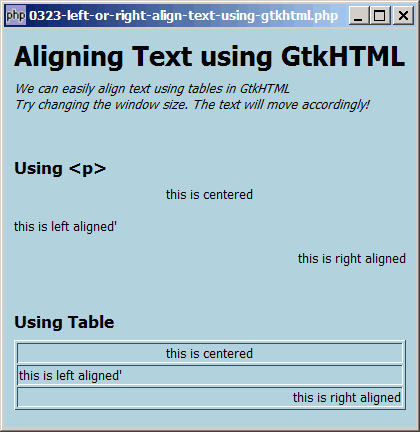
Using GtkHTML, it is extremely easy to align a bunch of text using either the <p> or <table> as shown below:
Solution
- Please take a look at the HTML code below. It's pretty straightforward alignment using HTML.
- What's interesting is that GtkHTML honors the attribute <table width=100%>. This means that as you change the window size, the right-aligned text will move accordingly to stay at the right margin!
Important Note:
- This only works for PHP-GTK2 compliled with the additional library GtkHTML.
- For linux, you have to recompile php-gtk2 to include this library.
- For windows, you may refer to the article How to install PHP-GTK2 on windows. The latest beta release from official php-gtk2 website comes complete with GtkHTML.
- In the
php.ini, don't forget to addphp-gtk.extensions = php_gtk_html2.dllto turn on GtkHTML. - Lastly, the most "tricky" part in running GtkHTML is that to run this script, you have to use gconfd-2 | php script.php. If you have installed the beta release of PHP-GTK2 on windows as outlined in this article, you will find the program gconfd-2.exe in the root directory of php-gtk.
- In the event that you cannot get this sample code to work, I would suggest that you try to do a fresh install of the beta-release of PHP-GTK2 (details here). It should work out-of-the-box (just need to add
php-gtk.extensions = php_gtk_html2.dllin php.ini as explained above). Note that you can still keep your original copy of php-gtk2 while having this new version. - You will most likely see the warning
(php.exe:5348): Gdk-WARNING **: gdkselection-win32.c:1068: OpenClipboard failed: Invalid window handle.. Not really sure how to fix this yet. The script seems to run ok, though.
Sample Code
| 1 2 3 4 5 6 7 13 14 15 16 23 24 25 26 27 28 29 30 31 32 33 34 35 36 37 38 39 40 41 42 44 45 46 47 48 | <?php $window = new GtkWindow(); $window->set_title($argv[0]); $window->set_size_request(412, 400); $window->connect_simple('destroy', array('Gtk','main_quit')); $window->add($vbox = new GtkVBox()); $html = new GtkHTML(); $vbox->pack_start($html); $html_text = "<body bgcolor=#B2D2DE><h1>Aligning Text using GtkHTML</h1> <p><i>We can easily align text using tables in GtkHTML<br> Try changing the window size. The text will move accordingly!</i></p> <h3>Using <p></h3> <p align=center>this is centered</p> <p align=left>this is left aligned'</p> <p align=right>this is right aligned</p> <h3>Using Table</h3> <table border=1 width=100%> <tr><td align=center>this is centered</td></tr> <tr><td align=left>this is left aligned'</td></tr> <tr><td align=right>this is right aligned</td></tr> </table> </body> "; $html->load_from_string($html_text); // note 1 $window->show_all(); Gtk::main(); ?> |
Output
As shown above.Explanation
The above code is exactly the same as that of How to create an html editor using gtkhtml - Part 1? (Only the HTML text if different).
- Display the html text using GtkHTML.
Note
Of course you could remove the border of the table by setting border=0
You might also want to compare the above with How to left or right align GtkLabel in GtkWindow? The effects are the same.
Related Links
- How to left or right align GtkLabel in GtkWindow?
- How to create an html editor using gtkhtml - Part 2?
- How to create an html editor using gtkhtml - Part 1?
- How to display tooltips in GtkTable?
- How to display html text using gtkhtml?
- How to create a php gtk browser using gtkhtml - Part 1?
- How to create a php gtk browser using gtkhtml - Part 2 - click on links?
- How to create a php gtk browser using gtkhtml - Part 3 - zoom in and out?
Read more...