Problem
In Part 1, I've showed you how to set up an HTML editor using GtkHTML.
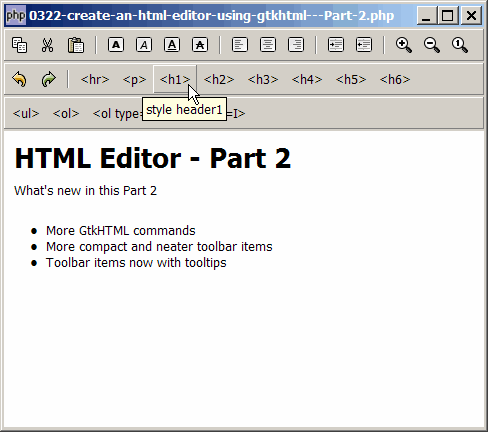
What's new in this Part 2:
- More GtkHTML commands
- More compact and neater toolbar items
- Toolbar items now with tooltips
Solution
- I've included more built-in GtkHTML commands as listed in the code below.
- As explained in Part 1, we execute the built-in GtkHTML command with $gtkhtml->command($command_name)?>
- Of particular interest is also the setup of the toolbar. I've revised the code a bit so that the toolbars are now more compact like that of Microsoft Word. Only the icons are displayed. Also, when the mouse is over a button, you will see a tooltip displayed.
Important Note:
- This only works for PHP-GTK2 compliled with the additional library GtkHTML.
- For linux, you have to recompile php-gtk2 to include this library.
- For windows, you may refer to the article How to install PHP-GTK2 on windows. The latest beta release from official php-gtk2 website comes complete with GtkHTML.
- In the
php.ini, don't forget to addphp-gtk.extensions = php_gtk_html2.dllto turn on GtkHTML. - Lastly, the most "tricky" part in running GtkHTML is that to run this script, you have to use gconfd-2 | php script.php. If you have installed the beta release of PHP-GTK2 on windows as outlined in this article, you will find the program gconfd-2.exe in the root directory of php-gtk.
- In the event that you cannot get this sample code to work, I would suggest that you try to do a fresh install of the beta-release of PHP-GTK2 (details here). It should work out-of-the-box (just need to add
php-gtk.extensions = php_gtk_html2.dllin php.ini as explained above). Note that you can still keep your original copy of php-gtk2 while having this new version. - You will most likely see the warning
(php.exe:5348): Gdk-WARNING **: gdkselection-win32.c:1068: OpenClipboard failed: Invalid window handle.. Not really sure how to fix this yet. The script seems to run ok, though.
Sample Code
| 1 2 3 4 5 6 7 8 9 10 11 12 13 14 15 16 17 18 19 20 21 22 23 24 25 26 27 29 30 31 32 33 34 35 36 37 38 39 40 41 42 43 44 45 46 47 48 49 50 51 52 53 54 55 56 57 58 59 60 68 69 70 71 78 79 80 81 82 83 84 85 86 87 88 89 90 91 92 93 94 95 96 97 98 99 100 101 102 103 105 106 107 108 109 110 111 112 113 114 115 116 117 118 119 121 122 123 124 125 126 127 128 129 130 131 132 133 134 135 136 137 138 139 140 141 142 | <?php $window = new GtkWindow(); $window->set_title($argv[0]); $window->set_size_request(480, 400); $window->connect_simple('destroy', array('Gtk','main_quit')); $window->add($vbox = new GtkVBox()); // define toolbar definition $tooltips = new GtkTooltips(); // note 1 $toolbar_definition = array( // note 2 'Copy' => 'copy', 'Cut' => 'cut', 'Paste' => 'paste', '<hr>', 'Bold' => 'bold-toggle', 'Italic' => 'italic-toggle', 'Underline' => 'underline-toggle', 'Strikethrough' => 'strikeout-toggle', '<hr>', 'JUSTIFY_LEFT' => 'align-left', 'JUSTIFY_CENTER' => 'align-center', 'JUSTIFY_RIGHT' => 'align-right', '<hr>', 'INDENT' => 'indent-more', 'UNINDENT' => 'indent-less', '<hr>', 'Zoom_In' => 'zoom-in', 'Zoom_Out' => 'zoom-out', 'Zoom_100' => 'zoom-reset', ); setup_toolbar($vbox, $toolbar_definition); $toolbar_definition = array( // note 2 'Undo' => 'undo', 'Redo' => 'redo', '<hr>', '<hr>' => 'insert-rule', '<p>' => 'insert-paragraph', '<h1>' => 'style-header1', '<h2>' => 'style-header2', '<h3>' => 'style-header3', '<h4>' => 'style-header4', '<h5>' => 'style-header5', '<h6>' => 'style-header6', ); setup_toolbar($vbox, $toolbar_definition); $toolbar_definition = array( // note 2 '<ul>' => 'style-itemdot', '<ol>' => 'style-itemdigit', '<ol type=A>' => 'style-itemalpha', '<ol type=I>' => 'style-itemroman', 't1', 't2' ); setup_toolbar($vbox, $toolbar_definition); $gtkhtml = new GtkHTML(); $vbox->pack_start($gtkhtml); $html_text = "<h1>HTML Editor - Part 2</h1> <p>What's new in this Part 2</p> <ul> <li>More GtkHTML commands</li> <li>More compact and neater toolbar items</li> <li>Toolbar items now with tooltips</li> <li></li> </ul> "; $gtkhtml->load_from_string($html_text); $gtkhtml->set_editable(true); $window->show_all(); Gtk::main(); // setup toolbar function setup_toolbar($container, $toolbar_definition) { global $tooltips; $toolbar = new GtkToolBar(); $toolbar->set_toolbar_style(Gtk::TOOLBAR_ICONS); // note 3 foreach($toolbar_definition as $item=>$command) { if (preg_match('/^\d+$/', $item)) { if ($command=='<hr>') $toolbar->insert(new GtkSeparatorToolItem(), -1); } else { $stock_image_name = 'Gtk::STOCK_'.strtoupper($item); if (defined($stock_image_name)) { $toolbar_item = GtkToolButton::new_from_stock( constant($stock_image_name)); $toolbar_item->set_homogeneous(0); $tooltip_text = str_replace('_', ' ', $item); $toolbar_item->set_tooltip($tooltips, $tooltip_text); // note 4 $toolbar->insert($toolbar_item, -1); $toolbar_item->connect('clicked', 'on_toolbar_button', $item, $command); } else { $toolbar_item = new GtkToolButton(new GtkLabel($item), $item); $tooltip_text = str_replace('-', ' ', $command); $toolbar_item->set_tooltip($tooltips, $tooltip_text); // note 4 $toolbar_item->set_homogeneous(0); $toolbar->insert($toolbar_item, -1); $toolbar_item->connect('clicked', 'on_toolbar_button', $item, $command); } } } $container->pack_start($toolbar, 0); } // process toolbar function on_toolbar_button($button, $item, $command) { echo "toolbar clicked: $item ($command)\n"; global $gtkhtml; $gtkhtml->command($command); } ?> |
Output
As shown above.Explanation
The above code is extended from the code in How to create an html editor using gtkhtml - Part 1?
What's new here:
- Create a new GtkTooltips.
- The toolbar definitions.
- Display icon only.
- Set the tooltip for each toolitem.
Note
Did you notice one important command missing from the above toolbar? Yes, it's the SAVE command!
I looked high and low for something that allows us to save the edited text to an HTML file. Seems like it's not available yet in PHP-GTK2.
Anyone has any clue...?
Related Links
- How to create an html editor using gtkhtml - Part 1?
- How to display tooltips in GtkTable?
- How to display html text using gtkhtml?
- How to create a php gtk browser using gtkhtml - Part 1?
- How to create a php gtk browser using gtkhtml - Part 2 - click on links?
- How to create a php gtk browser using gtkhtml - Part 3 - zoom in and out?
Read more...