Problem
GtkHTML comes with a lot of built-in features and functions.
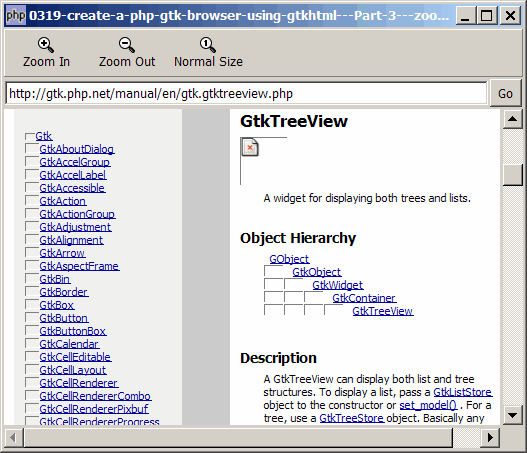
In Part 3 of this series, I'll show you how to allow the user to zoom in and out (i.e. increase or decrease the font) by clicking on the zoom in/out button in the toolbar as shown below:
Solution
- To zoom in, use $gtkhtml->zoom_in().
- To zoom out, use $gtkhtml->zoom_out().
- To reset zoom, use $gtkhtml->zoom_reset().
Important Note:
- This only works for PHP-GTK2 compliled with the additional library GtkHTML.
- For linux, you have to recompile php-gtk2 to include this library.
- For windows, you may refer to the article How to install PHP-GTK2 on windows. The latest beta release from official php-gtk2 website comes complete with GtkHTML.
- In the
php.ini, don't forget to addphp-gtk.extensions = php_gtk_html2.dllto turn on GtkHTML. - Lastly, the most "tricky" part in running GtkHTML is that to run this script, you have to use gconfd-2 | php script.php. If you have installed the beta release of PHP-GTK2 on windows as outlined in this article, you will find the program gconfd-2.exe in the root directory of php-gtk.
- In the event that you cannot get this sample code to work, I would suggest that you try to do a fresh install of the beta-release of PHP-GTK2 (details here). It should work out-of-the-box (just need to add
php-gtk.extensions = php_gtk_html2.dllin php.ini as explained above). Note that you can still keep your original copy of php-gtk2 while having this new version. - You will most likely see the warning
(php.exe:5348): Gdk-WARNING **: gdkselection-win32.c:1068: OpenClipboard failed: Invalid window handle.. Not really sure how to fix this yet. The script seems to run ok, though.
Sample Code
| 1 2 3 5 6 7 8 9 10 11 12 13 14 15 18 19 20 21 22 23 24 25 26 28 32 34 41 42 43 44 45 46 47 48 49 50 51 52 53 54 56 57 58 59 60 61 62 64 71 72 73 74 77 78 79 80 81 82 83 84 85 86 87 88 89 90 91 92 93 94 95 96 97 98 99 100 101 102 103 104 105 106 107 109 111 113 114 115 116 117 | <?php $window = new GtkWindow(); $window->set_title($argv[0]); $window->set_size_request(800, 640); $window->connect_simple('destroy', array('Gtk','main_quit')); $window->add($vbox = new GtkVBox()); // define toolbar definition $toolbar_definition = array('Zoom_In', 'Zoom_Out', 'Zoom_100'); setup_toolbar($vbox, $toolbar_definition); // note 1 $hbox = new GtkHBox(); $vbox->pack_start($hbox, 0); $hbox->pack_start($url_entry = new GtkEntry('http://gtk.php.net/')); $hbox->pack_start($go_button = new GtkButton('Go'), 0); $go_button->set_size_request(32, -1); $scrolled_win = new GtkScrolledWindow(); $scrolled_win->set_policy( Gtk::POLICY_AUTOMATIC,Gtk::POLICY_AUTOMATIC); $vbox->pack_start($scrolled_win); $gtkhtml = new GtkHTML(); $scrolled_win->add($gtkhtml); $gtkhtml->connect('url-requested', 'on_url_requested'); $gtkhtml->connect('link-clicked', 'on_link_clicked'); $url_entry->connect('activate', 'on_url_entry_activate', $go_button); $go_button->connect('clicked', 'on_go_button', $url_entry, $gtkhtml); $go_button->clicked(); $window->show_all(); Gtk::main(); function on_url_entry_activate($entry, $go_button) { $go_button->clicked(); } function on_go_button($button, $url_entry, $gtkhtml) { $url = $url_entry->get_text(); $html_text = file_get_contents($url); $gtkhtml->set_base($url); $gtkhtml->load_from_string($html_text); } function on_url_requested($gtkhtml, $url, $stream) { echo "image url = $url\n"; // load the image } function on_link_clicked($gtkhtml, $url) { global $url_entry, $go_button; $url_entry->set_text($url); $go_button->clicked(); } // setup toolbar function setup_toolbar($container, $toolbar_definition) { $toolbar = new GtkToolBar(); foreach($toolbar_definition as $item) { if ($item=='<hr>') { $toolbar->insert(new GtkSeparatorToolItem(), -1); } else { $stock_image_name = 'Gtk::STOCK_'.strtoupper($item); if (defined($stock_image_name)) { $toolbar_item = GtkToolButton::new_from_stock( constant($stock_image_name)); $toolbar->insert($toolbar_item, -1); $toolbar_item->connect('clicked', 'on_toolbar_button', $item); } } } $container->pack_start($toolbar, 0); } // process toolbar function on_toolbar_button($button, $item) { echo "toolbar clicked: $item\n"; global $gtkhtml; switch($item) { case 'Zoom_In': $gtkhtml->zoom_in(); break; // note 2 case 'Zoom_Out': $gtkhtml->zoom_out(); break; // note 3 case 'Zoom_100': $gtkhtml->zoom_reset(); // note 4 } } ?> |
Output
As shown above.Explanation
The above code is extended from the code in How to create a php gtk browser using gtkhtml - Part 2 - click on links?
We also make use of the code from How to set up toolbar? to display the toolbar.
What's new here:
- Set up the toolbar.
- Zoom in.
- Zoom out.
- Zoom reset.
Read more...