Problem
With the new PHP-GTK2 beta release, it's now a breeze to display html text with the use of GtkHTML.
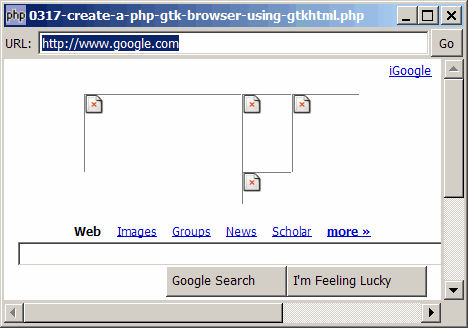
So let's try to build a php-gtk browser using GtkHTML as shown below:
Solution
- In the first row, we setup a GtkEntry for users to enter the url.
- When the user presses Enter or clicks the 'Go' button, we read the html text from the url and display it using the GtkHTML.
- Pay particular attention to how images are loaded in GtkHTML. It's handled by the signal 'url-requested'.
If this is the first time you use GtkHtml, please take a look at the article How to display html text using gtkhtml? that gives an introduction to the use of GtkHtml. Please also take note of the following.
Important Note:
- This only works for PHP-GTK2 compliled with the additional library GtkHTML.
- For linux, you have to recompile php-gtk2 to include this library.
- For windows, you may refer to the article How to install PHP-GTK2 on windows. The latest beta release from official php-gtk2 website comes complete with GtkHTML.
- In the
php.ini, don't forget to addphp-gtk.extensions = php_gtk_html2.dllto turn on GtkHTML. - Lastly, the most "tricky" part in running GtkHTML is that to run this script, you have to use gconfd-2 | php script.php. If you have installed the beta release of PHP-GTK2 on windows as outlined in this article, you will find the program gconfd-2.exe in the root directory of php-gtk.
- In the event that you cannot get this sample code to work, I would suggest that you try to do a fresh install of the beta-release of PHP-GTK2 (details here). It should work out-of-the-box (just need to add
php-gtk.extensions = php_gtk_html2.dllin php.ini as explained above). Note that you can still keep your original copy of php-gtk2 while having this new version. - You will most likely see the warning
(php.exe:5348): Gdk-WARNING **: gdkselection-win32.c:1068: OpenClipboard failed: Invalid window handle.. Not really sure how to fix this yet. The script seems to run ok, though.
Sample Code
| 1 2 3 5 6 7 8 9 10 11 12 13 14 15 16 17 18 19 20 21 23 27 36 37 38 39 40 41 42 43 44 45 46 47 48 49 51 52 53 54 55 56 57 59 60 61 62 63 64 65 66 67 68 69 70 71 72 73 74 75 76 77 | <?php $window = new GtkWindow(); $window->set_title($argv[0]); $window->set_size_request(800, 640); $window->connect_simple('destroy', array('Gtk','main_quit')); $window->add($vbox = new GtkVBox()); $hbox = new GtkHBox(); $vbox->pack_start($hbox, 0); $hbox->pack_start(new GtkLabel('URL: '), 0); $hbox->pack_start($url_entry = new GtkEntry('http://www.google.com')); $hbox->pack_start($go_button = new GtkButton('Go'), 0); $go_button->set_size_request(32, -1); $scrolled_win = new GtkScrolledWindow(); $scrolled_win->set_policy( Gtk::POLICY_AUTOMATIC,Gtk::POLICY_AUTOMATIC); $vbox->pack_start($scrolled_win); $gtkhtml = new GtkHTML(); // note 1 $scrolled_win->add($gtkhtml); $gtkhtml->connect('url-requested', 'on_url_requested'); // note 2 $url_entry->connect('activate', 'on_url_entry_activate', $go_button); // note 3 $go_button->connect('clicked', 'on_go_button', $url_entry, $gtkhtml); // note 4 $go_button->clicked(); $window->show_all(); Gtk::main(); function on_url_entry_activate($entry, $go_button) { $go_button->clicked(); // note 5 } function on_go_button($button, $url_entry, $gtkhtml) { $url = $url_entry->get_text(); // note 6 $html_text = file_get_contents($url); // note 7 $gtkhtml->set_base($url); $gtkhtml->load_from_string($html_text); // note 8 } function on_url_requested($gtkhtml, $url, $stream) { echo "image url = $url\n"; // note 9 // load the image $handle = fopen($url, "rb"); $img = ''; while (!feof($handle)) { $img .= fread($handle, 8192); } fclose($handle); // in C, we would then do this // gtk_html_stream_write($stream, $img, strlen($img)); // gtk_html_stream_close($stream, (strlen($img)<0) ? // Gtk::HTML_STREAM_ERROR:Gtk::HTML_STREAM_OK); // However, there's no GtkHTMLStream or similar method in GtkHTML. // So, how do we load the image in GtkHTML? } ?> |
Output
As shown above.Explanation
- Create a new GtkHTML.
- This is used to handle all the images. We are supposed to load the images in the signal handler.
- Allow users to press Enter in the GtkEntry.
- Handle button click on the Go button.
- Simulate a click on the Go button when the user presses Enter.
- Get the url from the GtkEntry.
- Retreive the contents from the specified url.
- Display it!
- That's all I can do now. Still trying to figure out how to display the image.
Note
Did you see that the images are not displayed? I'm still trying to figure out this part.
Do you have any clues...
Read more...