Problem
There are a list of pre-defined stock images as listed here.
You would like to create a list of buttons using these pre-defined stock images. On linux you will see this:
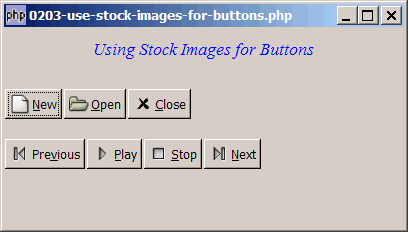
However, on winxp, some of you will only see the text labels without the graphics as shown below:
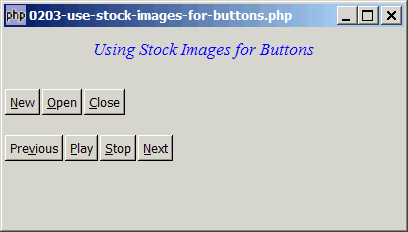
For windows users, you would like to see the stock images too.
Solution
- To create buttons with pre-defined stock images, use GtkButton::new_from_stock (stock_id).
- For windows users, in order to see the stock images, look for a file called
gtkrc. If you have used Gnope Installer to set up php-gtk2, it should be in<dir>\etc\gtk-2.0, where<dir>is the directory where you have installed php-gtk2. Open the file with an editor, on line 5, you should see a linegtk-button-images = 0. Change the0to1and save the file. Run the script again. You should be able to see the stock images now.
Sample Code
| 1 2 3 4 5 6 7 8 9 10 11 12 13 14 16 17 18 19 22 23 24 25 26 27 28 29 30 31 32 33 34 35 36 37 41 | <?php $window = new GtkWindow(); $window->set_size_request(400, 200); $window->connect_simple('destroy', array('Gtk','main_quit')); $window->add($vbox = new GtkVBox()); // display title $title = new GtkLabel("Using Stock Images for Buttons"); $title->modify_font(new PangoFontDescription("Times New Roman Italic 10")); $title->modify_fg(Gtk::STATE_NORMAL, GdkColor::parse("#0000ff")); $title->set_size_request(-1, 40); $title->set_justify(Gtk::JUSTIFY_CENTER); $alignment = new GtkAlignment(0.5, 0, 0, 0); $alignment->add($title); $vbox->pack_start($alignment, 0, 0); $vbox->pack_start(new GtkLabel(), 0, 0); // setup button $vbox->pack_start($hbox = new GtkHBox(), 0); $hbox->pack_start(GtkButton::new_from_stock(Gtk::STOCK_NEW), 0); // note 1 $hbox->pack_start(GtkButton::new_from_stock(Gtk::STOCK_OPEN), 0); // note 1 $hbox->pack_start(GtkButton::new_from_stock(Gtk::STOCK_CLOSE), 0); // note 1 $vbox->pack_start(new GtkLabel(), 0); $vbox->pack_start($hbox = new GtkHBox(), 0); $hbox->pack_start(GtkButton::new_from_stock(Gtk::STOCK_MEDIA_PREVIOUS), 0); $hbox->pack_start(GtkButton::new_from_stock(Gtk::STOCK_MEDIA_PLAY), 0); $hbox->pack_start(GtkButton::new_from_stock(Gtk::STOCK_MEDIA_STOP), 0); $hbox->pack_start(GtkButton::new_from_stock(Gtk::STOCK_MEDIA_NEXT), 0); $window->show_all(); Gtk::main(); ?> |
Output
As shown above.
Explanation
- Create the buttons with stock images.
Read more...