Problem
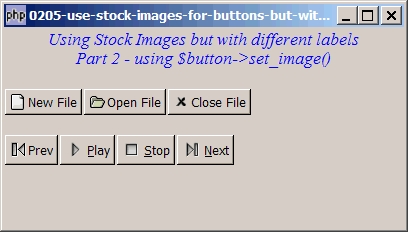
If you have only one image to be displayed on the left of the button, this article presents a second method to create buttons using pre-defined stock images but with different labels as shown below:
Solution
- Create a standard GtkButton.
- Load the stock image using GtkImage::new_from_stock().
- Set the image using GtkButton::set_image().
Sample Code
| 1 2 3 4 5 6 7 8 9 10 11 12 13 14 15 17 18 19 20 23 26 27 28 29 35 36 37 38 39 40 41 42 43 44 45 46 47 48 49 52 53 54 55 56 57 58 59 60 61 65 | <?php $window = new GtkWindow(); $window->set_size_request(400, 200); $window->connect_simple('destroy', array('Gtk','main_quit')); $window->add($vbox = new GtkVBox()); // display title $title = new GtkLabel("Using Stock Images but with different labels\n". "Part 2 - using \$button->set_image()"); $title->modify_font(new PangoFontDescription("Times New Roman Italic 10")); $title->modify_fg(Gtk::STATE_NORMAL, GdkColor::parse("#0000ff")); $title->set_size_request(-1, 40); $title->set_justify(Gtk::JUSTIFY_CENTER); $alignment = new GtkAlignment(0.5, 0, 0, 0); $alignment->add($title); $vbox->pack_start($alignment, 0, 0); $vbox->pack_start(new GtkLabel(), 0, 0); // setup button $vbox->pack_start($hbox = new GtkHBox(), 0); $hbox->pack_start(create_button(Gtk::STOCK_NEW, 'New File'), 0); $hbox->pack_start(create_button(Gtk::STOCK_OPEN, 'Open File'), 0); $hbox->pack_start(create_button(Gtk::STOCK_CLOSE, 'Close File'), 0); $vbox->pack_start(new GtkLabel(), 0); $vbox->pack_start($hbox = new GtkHBox(), 0); $hbox->pack_start(create_button(Gtk::STOCK_MEDIA_PREVIOUS, 'Prev'), 0); $hbox->pack_start(create_button(Gtk::STOCK_MEDIA_PLAY), 0); $hbox->pack_start(create_button(Gtk::STOCK_MEDIA_STOP), 0); $hbox->pack_start(create_button(Gtk::STOCK_MEDIA_NEXT), 0); $window->show_all(); Gtk::main(); function create_button($stock_id, $label='') { if ($label=='') { return GtkButton::new_from_stock($stock_id); } $button = new GtkButton($label); // note 1 $img=GtkImage::new_from_stock($stock_id, Gtk::ICON_SIZE_SMALL_TOOLBAR); // note 2 $button->set_image($img); // note 3 return $button; } ?> |
Output
As shown above.
Explanation
- Create a standard GtkButton.
- Load the stock image and pack it into the hbox.
- Set the image.
Note
You might feel that this method is a much easier one. Why bother with Method 1?
Well, if you have one image, and the image is to be placed to the left, this is a simpler method.
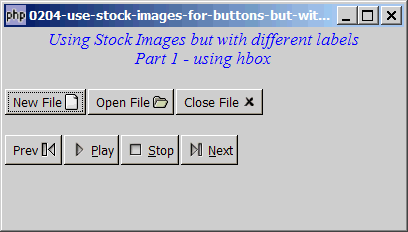
However, if you want more flexibility, then use Method 1. For example, if you would like the stock image (or any standard image such as gif, jpg, png) to be placed on the right side of the button as shown below:
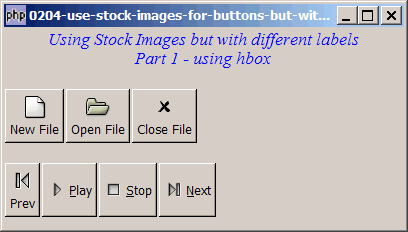
Or you want the stock image to appear on the top, and the label at the bottom like this. (p.s. Hmmm... this looks like a toolbar buttons now, doesn't it?)
Read more...