Problem
You have set up a dialog to get inputs from user using checkboxes in How to setup a dialog box of checkboxes - Part 1?
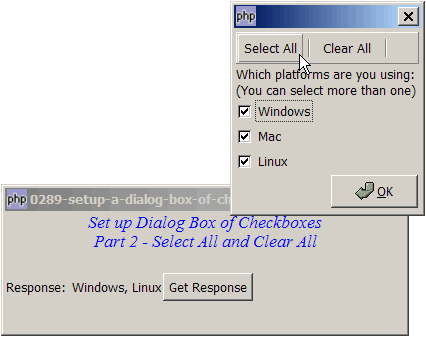
Suppose you would like to add two buttons "Check All" and "Clear All" that allow the users to check and clear all the checkboxes as shown below:
Solution
- We set up the two buttons "Check All" and "Clear All" using the GtkToolButton as outlined in How to set up toolbar?
- When the "Check All" button is clicked, we simply use $checkbox->set_active(1) to check all checkboxes.
- When the "Clear All" button is clicked, we use $checkbox->set_active(0) to uncheck all checkboxes.
Sample Code
| 1 2 3 4 5 6 7 8 9 10 11 12 13 14 15 16 18 19 20 21 22 23 24 25 26 27 28 29 30 31 32 33 34 35 36 37 38 39 40 41 42 43 46 47 48 49 50 51 52 53 54 55 56 57 58 59 60 61 63 64 65 67 68 69 70 71 72 73 74 76 78 79 80 81 82 83 84 85 86 87 88 89 90 91 92 93 94 95 96 97 98 99 105 106 107 108 109 110 111 112 113 114 115 116 117 118 119 120 121 122 123 124 125 126 127 128 129 130 131 132 133 134 135 136 138 140 141 142 143 144 145 146 148 151 152 154 155 156 157 158 159 160 161 162 163 165 167 168 169 170 171 172 173 174 175 176 177 178 179 180 181 | <?php $window = new GtkWindow(); $window->set_title($argv[0]); $window->set_size_request(400, 120); $window->connect_simple('destroy', array('Gtk','main_quit')); $window->add($vbox = new GtkVBox()); // display title $title = new GtkLabel("Set up Dialog Box of Checkboxes\n". "Part 2 - Select All and Clear All\n"); $title->modify_font(new PangoFontDescription("Times New Roman Italic 10")); $title->modify_fg(Gtk::STATE_NORMAL, GdkColor::parse("#0000ff")); $title->set_size_request(-1, 40); $title->set_justify(Gtk::JUSTIFY_CENTER); $alignment = new GtkAlignment(0.5, 0, 0, 0); $alignment->add($title); $vbox->pack_start($alignment, 0, 0); $vbox->pack_start(new GtkLabel(), 0, 0); $vbox->pack_start($hbox = new GtkHBox(), 0); $hbox->pack_start(new GtkLabel('Response: '), 0); $hbox->pack_start($response = new GtkLabel(), 0); $hbox->pack_start($button = new GtkButton('Get Response'), 0); $button->connect('clicked', 'on_click'); $window->show_all(); Gtk::main(); function on_click() { setup_dialog(); } function setup_dialog() { $dialog = new GtkDialog(); $dialog->set_title(''); $toolbar_definition = array('Select All', '<hr>', 'Clear All', '<hr>'); // note 1 setup_toolbar($dialog->vbox, $toolbar_definition); $dialog->vbox->pack_start(new GtkLabel("Which platforms are you using: \n". "(You can select more than one)")); global $checkbox1, $checkbox2, $checkbox3; $checkbox1 = setup_checkbox('Windows'); $checkbox2 = setup_checkbox('Mac'); $checkbox3 = setup_checkbox('Linux'); // pack them inside vbox $dialog->vbox->pack_start($checkbox1, 0, 0); $dialog->vbox->pack_start($checkbox2, 0, 0); $dialog->vbox->pack_start($checkbox3, 0, 0); $dialog->vbox->pack_start($hbox2 = new GtkHBox()); $button_ok = GtkButton::new_from_stock(Gtk::STOCK_OK); $button_ok->set_size_request(87, 33); $hbox2->pack_start(new GtkLabel()); $hbox2->pack_start($button_ok, 0); $button_ok->connect('clicked', 'on_ok_button', $dialog); $dialog->set_has_separator(false); $dialog->action_area->set_size_request(-1, 1); $dialog->show_all(); global $selected_radio, $selected_radio_value; $selected_radio = $selected_radio_value = ''; $dialog->run(); $dialog->destroy(); global $response, $selections; $response->set_text(implode(', ', $selections)); } function on_ok_button($button, $dialog) { global $checkbox1, $checkbox2, $checkbox3; $status1 = $checkbox1->get_active()?$checkbox1->get_label(): ''; $status2 = $checkbox2->get_active()?$checkbox2->get_label(): ''; $status3 = $checkbox3->get_active()?$checkbox3->get_label(): ''; global $selections; $selections = array(); if ($status1!='') $selections[] = $status1; if ($status2!='') $selections[] = $status2; if ($status3!='') $selections[] = $status3; if (count($selections)==0) { alert("Please make a selection."); } else { $dialog->destroy(); } } function setup_checkbox($label) { $checkbox = new GtkCheckButton($label); $checkbox->connect('toggled', "on_toggle"); return $checkbox; } function on_toggle($checkbox) { $label = $checkbox->get_label(); $active = $checkbox->get_active(); if ($active) echo "You have selected: $label\n"; } // display popup alert box function alert($msg) { // note 1 $dialog = new GtkDialog('Alert', null, Gtk::DIALOG_MODAL); $dialog->set_position(Gtk::WIN_POS_CENTER_ALWAYS); $top_area = $dialog->vbox; $top_area->pack_start($hbox = new GtkHBox()); $stock = GtkImage::new_from_stock(Gtk::STOCK_DIALOG_WARNING, Gtk::ICON_SIZE_DIALOG); $hbox->pack_start($stock, 0, 0); $hbox->pack_start(new GtkLabel($msg)); $dialog->add_button(Gtk::STOCK_OK, Gtk::RESPONSE_OK); $dialog->set_has_separator(false); $dialog->show_all(); $dialog->set_keep_above(1); $dialog->run(); $dialog->destroy(); } // setup toolbar function setup_toolbar($vbox, $toolbar_definition) { $toolbar = new GtkToolBar(); $vbox->pack_start($toolbar, 0, 0); foreach($toolbar_definition as $item) { if ($item=='<hr>') { $toolbar->insert(new GtkSeparatorToolItem(), -1); } else { $stock_image_name = 'Gtk::STOCK_'.strtoupper($item); if (defined($stock_image_name)) { $toolbar_item = GtkToolButton::new_from_stock(constant($stock_image_name)); } else { $toolbar_item = new GtkToolButton(null, $item); print "item = $item\n"; } $toolbar->insert($toolbar_item, -1); $toolbar_item->connect('clicked', 'on_toolbar_button', $item); } } } // process toolbar function on_toolbar_button($button, $item) { echo "toolbar clicked: $item\n"; global $checkbox1, $checkbox2, $checkbox3; if ($item=='Select All') { // note 2 $checkbox1->set_active(1); $checkbox2->set_active(2); $checkbox3->set_active(3); } elseif ($item=='Clear All') { // note 3 $checkbox1->set_active(0); $checkbox2->set_active(0); $checkbox3->set_active(0); } } ?> |
Output
As shown above.Explanation
The above code is an extension of How to setup a dialog box of checkboxes - Part 1?.
We also make use of the code from How to set up toolbar? to setup and process the toolbar.
What's new here:
- Set up the toolbar.
- Check all checkboxes.
- Clear all checkboxes.
Related Links
- How to setup a dialog box of checkboxes - Part 1?
- How to setup a dialog box of radio buttons - Part 1?
- How to setup a dialog box of radio buttons - Part 2 - make sure user selects?
- How to setup a dialog box - Part 1 - hello dialog?
- How to setup a dialog box - Part 2 - simple yes no dialog?
- How to setup a dialog box - Part 3 - set up buttons manually?
- How to setup a dialog box - Part 4 - non integer response id?
- How to setup a dialog box - Part 5 - get text entry?
- How to make a dialog stay for invalid input - Part 1?
Read more...