Problem
Suppose you have setup a dialog box similar to the example How to setup a dialog box - Part 2 - simple yes no dialog?.
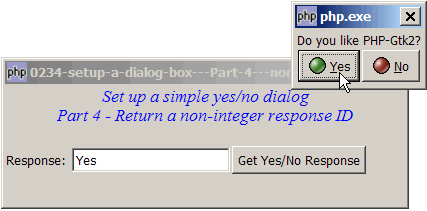
Instead of returning 100 and 200, you would like to return 'Yes' and 'No' respectively (i.e. non-integer response IDs) for the buttons as shown below:
Solution
If you use the method GtkDialog::response() to exit the dialog, you will find that the response ID has to be an integer. You cannot return a response with a non-integer response.
To return a non-integer response, we have to set up the dialog manually.
- Set up the buttons manually as outlined in the article How to setup a dialog box - Part 3 - set up buttons manually?
- In the button click event handler, store the response ID somewhere e.g. in a global variable.
- Destroy the dialog manually with GtkObject::destroy().
Sample Code
| 1 2 3 4 5 6 7 8 9 10 11 12 13 14 15 16 18 19 20 21 22 23 24 25 26 27 28 29 30 31 32 33 34 35 36 37 38 39 40 41 42 43 44 45 46 47 48 49 50 51 53 54 55 56 57 58 59 60 61 62 64 66 67 68 69 70 | <?php $window = new GtkWindow(); $window->set_title($argv[0]); $window->set_size_request(400, 120); $window->connect_simple('destroy', array('Gtk','main_quit')); $window->add($vbox = new GtkVBox()); // display title $title = new GtkLabel("Set up a simple yes/no dialog\n". "Part 4 - Return a non-integer response ID"); $title->modify_font(new PangoFontDescription("Times New Roman Italic 10")); $title->modify_fg(Gtk::STATE_NORMAL, GdkColor::parse("#0000ff")); $title->set_size_request(-1, 40); $title->set_justify(Gtk::JUSTIFY_CENTER); $alignment = new GtkAlignment(0.5, 0, 0, 0); $alignment->add($title); $vbox->pack_start($alignment, 0, 0); $vbox->pack_start(new GtkLabel(), 0, 0); $vbox->pack_start($hbox = new GtkHBox(), 0); $hbox->pack_start(new GtkLabel('Response: '), 0); $hbox->pack_start($response = new GtkEntry(), 0); $hbox->pack_start($button = new GtkButton('Get Yes/No Response'), 0); $button->connect('clicked', 'on_click'); $window->show_all(); Gtk::main(); function on_click() { setup_yes_no_dialog(); } function setup_yes_no_dialog() { $dialog = new GtkDialog(); $label = new GtkLabel("Do you like PHP-Gtk2?"); $dialog->vbox->pack_start($label); $button_yes = GtkButton::new_from_stock(Gtk::STOCK_YES); $button_no = GtkButton::new_from_stock(Gtk::STOCK_NO); $button_yes->connect('clicked', 'on_ok_button', $dialog, 'Yes'); // note 1 $button_no->connect('clicked', 'on_ok_button', $dialog, 'No'); // note 2 $hbox = new GtkHBox(); $dialog->vbox->pack_start($hbox); $hbox->pack_start($button_yes); $hbox->pack_start($button_no); $dialog->set_has_separator(false); $dialog->action_area->set_size_request(-1, 1); $dialog->show_all(); $dialog->run(); $dialog->destroy(); global $response, $response_str; $response->set_text($response_str); // note 5 } function on_ok_button($button, $dialog, $response_id) { global $response_str; $response_str = $response_id; // note 3 $dialog->destroy(); // note 4 } ?> |
Output
As shown above.Explanation
We make use of the code from How to setup a dialog box - Part 3 - set up buttons manually? to manually set up the Yes/No buttons.
What's new here:
- Create the Yes button with a response ID of 'Yes'.
- Create the No button with a response ID of 'No'.
- Store the response ID in the global variable
$response. - Destroy the dialog.
- Echo the response in the GtkEntry, which is stored in the global variable
$response_str.
Related Links
- How to setup a dialog box - Part 1 - hello dialog?
- How to setup a dialog box - Part 2 - simple yes no dialog?
- How to setup a dialog box - Part 3 - set up buttons manually?
- How to setup a dialog box - Part 5 - get text entry?
- How to setup a dialog box of radio buttons - Part 1?
- How to setup a dialog box of radio buttons - Part 2 - make sure user selects?
- How to setup a dialog box of checkboxes - Part 1?
- How to setup a dialog box of checkboxes - Part 2 - check all and clear all?
- How to make a dialog stay for invalid input - Part 1?
- How to make a dialog stay for invalid input - Part 2 - ESC exit dialog?
- How to popup a dialog to select from list - Part 1 - select and click OK?
- How to popup a dialog to select from list - Part 2 - select with double click?
- How to popup a dialog to select from list - Part 3 - select by pressing enter?
- How to popup a dialog to select from list with search fields - Part 1?
Read more...