Problem
To understand GtkDialog a little better, we will look at our second example to produce exactly the same output as the GtkDialog constructor example in the offical PHP-GTK2 documentation.
The example shows how to set up a simple yes-no dialog box as shown below:
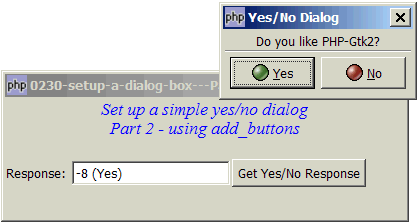
Solution
- The offical PHP-GTK2 documentation has a GtkDialog constructor example. It shows you how you can easily set up a GtkDialog by plugging in the title for the dialog box, and an array specifying the buttons in the GtkDialog constructor, the dialog box will be "magically" set up for you. Clicking the buttons will automatically close the button and returns a response code.
- The problem is it shows you how (to set up the dialog box), but doesn't explain the why's. For example, what if you do not want the button to close the dialog box automatically when you click on any of the buttons? You want the dialog box to close if and only if the validation checks return no errors. Also, what if you want to have some text appearing just below the buttons?
- To be able to do more advanced stuff using GtkDialog, the key is to understand that a GtkDialog is just like a GtkWindow. Yes, it's that simple!
- I've reworked the GtkDialog constructor example in the offical PHP-GTK2 documentation so that it starts with a plain
new GtkDialog(), just like we start a new window withnew GtkWindow(). - Once we have an empty GtkDialog, we first stuff whatever we want to the top area, which is just a standard vbox.
- Then we add buttons to the action area. This can be easily done using the method GtkDialog::add_buttons().
$dialog->run()will return the response code of the button that the user has clicked.- Create a new dialog.
- Create and stuff the question (as a GtkLabel) in the top area.
- Add the buttons to the action area.
- Run the dialog.
- Destroy the dialog.
- Process the response.
- Echo the response in the GtkEntry. Note that
RESPONSE_YEShas an integer value of -8.RESPONSE_YEShas an integer value of -9. - How to setup a dialog box - Part 1 - hello dialog?
- How to setup a dialog box - Part 3 - set up buttons manually?
- How to setup a dialog box - Part 4 - non integer response id?
- How to setup a dialog box - Part 5 - get text entry?
- How to setup a dialog box of radio buttons - Part 1?
- How to setup a dialog box of radio buttons - Part 2 - make sure user selects?
- How to setup a dialog box of checkboxes - Part 1?
- How to setup a dialog box of checkboxes - Part 2 - check all and clear all?
- How to make a dialog stay for invalid input - Part 1?
- How to make a dialog stay for invalid input - Part 2 - ESC exit dialog?
- How to popup a dialog to select from list - Part 1 - select and click OK?
- How to popup a dialog to select from list - Part 2 - select with double click?
- How to popup a dialog to select from list - Part 3 - select by pressing enter?
- How to popup a dialog to select from list with search fields - Part 1?
Sample Code
| 1 2 3 4 5 6 7 8 9 10 11 12 13 14 15 16 18 19 20 21 22 23 24 25 26 27 28 29 30 31 32 33 34 35 36 37 38 39 40 44 45 46 47 48 49 51 52 53 54 55 57 58 60 61 62 64 65 66 67 68 69 70 | <?php $window = new GtkWindow(); $window->set_title($argv[0]); $window->set_size_request(400, 120); $window->connect_simple('destroy', array('Gtk','main_quit')); $window->add($vbox = new GtkVBox()); // display title $title = new GtkLabel("Set up a simple yes/no dialog\n". "Part 2 - using add_buttons"); $title->modify_font(new PangoFontDescription("Times New Roman Italic 10")); $title->modify_fg(Gtk::STATE_NORMAL, GdkColor::parse("#0000ff")); $title->set_size_request(-1, 40); $title->set_justify(Gtk::JUSTIFY_CENTER); $alignment = new GtkAlignment(0.5, 0, 0, 0); $alignment->add($title); $vbox->pack_start($alignment, 0, 0); $vbox->pack_start(new GtkLabel(), 0, 0); $vbox->pack_start($hbox = new GtkHBox(), 0); $hbox->pack_start(new GtkLabel('Response: '), 0); $hbox->pack_start($response = new GtkEntry(), 0); $hbox->pack_start($button = new GtkButton('Get Yes/No Response'), 0); $button->connect('clicked', 'on_click'); $window->show_all(); Gtk::main(); function on_click() { setup_yes_no_dialog(); } function setup_yes_no_dialog() { $dialog = new GtkDialog(); // note 1 $dialog->set_title('Yes/No Dialog'); $label = new GtkLabel("Do you like PHP-Gtk2?"); $dialog->vbox->pack_start($label); // note 2 $dialog->add_buttons(array( // note 3 Gtk::STOCK_YES, Gtk::RESPONSE_YES, // Gtk::STOCK_NO, Gtk::RESPONSE_NO // )); // $dialog->show_all(); $response_id = $dialog->run(); // note 4 $dialog->destroy(); // note 5 global $response; switch($response_id) { // note 6 case Gtk::RESPONSE_YES: $response->set_text("$response_id (Yes)"); // note 7 break; case Gtk::RESPONSE_NO: $response->set_text("$response_id (No)"); break; } } ?> |
Read more...