Problem
In HTML, by default, radio buttons are unselected until the user selects one. However, in php-gtk2, it will always "make sure" one of the grouped radio buttons is selected, no matter how much you try to unselect them.
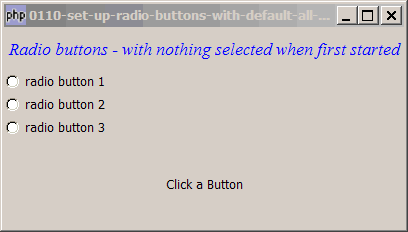
This example shows you how to achieve the same effect as the default behavior in HTML, that is, when the form is first displayed, all buttons are unselected until the user selects one (so that the user is required to choose one of the radio buttons), as shown below:
Solution
No matter what, php-gtk2 will make sure that one of the radio buttons is selected. So the trick here is to create an additional radio button in the group, but don't show this button. The button is actually selected by php-gtk2 but the user doesn't see it because it's hidden.
Sample Code
| 1 2 3 4 5 6 7 8 9 10 11 12 13 14 15 16 17 18 19 20 21 22 23 24 25 26 27 28 29 30 31 32 33 34 35 36 37 38 39 40 41 42 43 44 46 47 48 49 50 | <?php $window = new GtkWindow(); $window->set_size_request(400, 200); $window->connect_simple('destroy', array('Gtk','main_quit')); $window->add($vbox = new GtkVBox()); // display title // display title $title = new GtkLabel("Radio buttons - with nothing selected when first started"); $title->modify_font(new PangoFontDescription("Times New Roman Italic 10")); $title->modify_fg(Gtk::STATE_NORMAL, GdkColor::parse("#0000ff")); $title->set_size_request(-1, 40); $vbox->pack_start($title, 0, 0); // setup grouped radio buttons $radio0 = setup_radio(null, 'radio button 0', '100'); // note 1 $radio1 = setup_radio($radio0, 'radio button 1', '101'); $radio2 = setup_radio($radio0, 'radio button 2', '102'); $radio3 = setup_radio($radio0, 'radio button 3', '103'); // pack them inside vbox $vbox->pack_start($radio1, 0, 0); // note 2 $vbox->pack_start($radio2, 0, 0); // note 2 $vbox->pack_start($radio3, 0, 0); // note 2 // add a status area $vbox->pack_start($status_area = new GtkLabel('Click a Button')); // function to simplify the display of grouped radio buttons function setup_radio($radio_button_grp, $button_label, $button_value) { $radio = new GtkRadioButton($radio_button_grp, $button_label); $radio->connect('toggled', "on_toggle", $button_value); return $radio; } // call-back function when user pressed a radio button function on_toggle($radio, $value) { // note 5 global $status_area; $label = $radio->child->get_label(); // note 6 $active = $radio->get_active(); // note 7 print "bp101. $label: $active\n"; if ($active) $status_area->set_text("radio button pressed: $label (value = $value)\n"); } $window->show_all(); Gtk::main(); ?> |
Output
As shown above.Explanation
This example makes use of the code in How to display and process grouped radio buttons?
What's new here.- Set up an additional radio button.
- Pack all buttons into the vbox, except this one.
Read more...