Problem
You want to display grouped radio buttons as shown below:
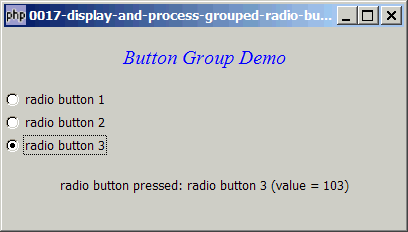
Solution
- Display radio buttons using GtkRadiobutton.
- Find out the status with GtkTogglebutton::get_active().
Sample Code
| 1 2 3 4 5 6 7 8 9 10 11 12 13 14 15 16 17 18 19 20 21 22 23 24 25 26 27 28 29 30 31 32 33 34 35 36 37 38 39 40 41 42 43 44 45 | <?php $window = new GtkWindow(); $window->set_size_request(400, 200); $window->connect_simple('destroy', array('Gtk','main_quit')); $window->add($vbox = new GtkVBox()); // display title $title = new GtkLabel(); $title->set_markup('<span color="blue" font_desc="Times New Roman Italic 12"> Button Group Demo</span>'); $vbox->pack_start($title); // setup grouped radio buttons $radio1 = setup_radio(null, 'radio button 1', '101'); // note 1 $radio2 = setup_radio($radio1, 'radio button 2', '102'); // note 2 $radio3 = setup_radio($radio1, 'radio button 3', '103'); // pack them inside vbox $vbox->pack_start($radio1, 0, 0); $vbox->pack_start($radio2, 0, 0); $vbox->pack_start($radio3, 0, 0); // add a status area $vbox->pack_start($status_area = new GtkLabel('Click a Button')); // function to simplify the display of grouped radio buttons function setup_radio($radio_button_grp, $button_label, $button_value) { // note 3 $radio = new GtkRadioButton($radio_button_grp, $button_label); $radio->connect('toggled', "on_toggle", $button_value); // note 4 return $radio; } // call-back function when user pressed a radio button function on_toggle($radio, $value) { // note 5 global $status_area; $label = $radio->child->get_label(); // note 6 $active = $radio->get_active(); // note 7 if ($active) $status_area->set_text("radio button pressed: $label (value = $value)\n"); // note 8 } $window->show_all(); Gtk::main(); ?> |
Output
As shown above.Explanation
- For
new GtkRadioButton, usenullfor the first radio button of the group. - For subsequent buttons, put the pointer to the first radio button (in this case
$radio1) as the first argument tonew GtkRadioButton. PHP-GTK2 will then group all these into the same group. - Wrote this small function to save some typing and make the codes cleaner.
- Set up the callback function when the radio button is toggled. Note that we also pass along the button value.
- This is the callback function that is being called when a radio button is being toggled.
- Get the label of the radio button.
- Check if the radio button is toggled.
- If yes, display the label and value in the status area. Note that we have the corresponding value of the radio button (
$value) because we have set it up in [4].
Notes
This example simulates what we have always been doing in HTML:<input type="radio" value="101" />radio button 1
Each radio button could have a label and a corresponding value.
Read more...