Problem
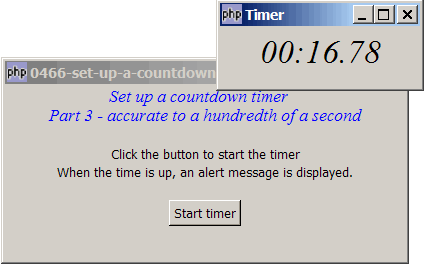
The method we've used in How to set up a countdown timer - Part 2 - a more accurate timer? allows us to set up a countdown timer accurate to a hundredth of a second as shown below:
Solution
- We make use of the same technique as described in Part 2.
- The only difference is that we have changed the interval of the timeout event from 1000ms (i.e. 1 second) to 10ms (i.e. hundredth of a second).
Sample Code
| 1 2 3 4 5 6 7 8 9 10 11 12 13 14 15 16 17 18 19 20 21 22 23 24 25 26 27 28 29 30 31 32 33 34 35 36 37 38 39 40 41 42 43 44 45 46 47 49 52 53 54 55 56 57 58 59 60 62 63 64 65 66 67 68 69 70 72 73 76 77 78 79 80 81 82 83 84 87 88 89 90 91 92 94 95 96 97 98 99 100 101 102 106 110 111 112 113 114 115 116 117 118 119 120 121 122 123 125 126 127 128 129 130 131 132 | <?php $window = new GtkWindow(); $window->set_title($argv[0]); $window->set_size_request(400, 175); $window->connect_simple('destroy', array('Gtk','main_quit')); $window->add($vbox = new GtkVBox()); // display title $title = new GtkLabel(" Set up a countdown timer\n". "Part 3 - accurate to a hundredth of a second"); $title->modify_font(new PangoFontDescription("Times New Roman Italic 10")); $title->modify_fg(Gtk::STATE_NORMAL, GdkColor::parse("#0000ff")); $title->set_size_request(-1, 40); $vbox->pack_start($title, 0, 0); $vbox->pack_start(new GtkLabel(), 0, 0); $vbox->pack_start(new GtkLabel('Click the button to start the timer'), 0, 0); $vbox->pack_start(new GtkLabel('When the time is up, an alert message is displayed.'), 0, 0); $vbox->pack_start(new GtkLabel(), 0, 0); $vbox->pack_start($hbox = new GtkHBox(), 0, 0); $hbox->pack_start($button = new GtkButton('Start timer'), 1, 0); $vbox->pack_start(new GtkLabel()); $button->connect('clicked', 'start_timer'); $window->show_all(); Gtk::main(); // display an alert dialog box function alert($msg) { $dialog = new GtkDialog('Alert', null, Gtk::DIALOG_MODAL); $dialog->set_position(Gtk::WIN_POS_CENTER_ALWAYS); $top_area = $dialog->vbox; $top_area->pack_start($hbox = new GtkHBox()); $stock = GtkImage::new_from_stock(Gtk::STOCK_DIALOG_WARNING, Gtk::ICON_SIZE_DIALOG); $hbox->pack_start($stock, 0, 0); $hbox->pack_start(new GtkLabel($msg)); $dialog->add_button(Gtk::STOCK_OK, Gtk::RESPONSE_OK); $dialog->set_has_separator(false); $dialog->show_all(); $dialog->run(); $dialog->destroy(); } function start_timer($button) { $do_long_task = new DoLongTask(); $do_long_task->total_time = 10; $do_long_task->process_task(); $do_long_task->timeout_ID = Gtk::timeout_add(10, array(&$do_long_task, 'process_task')); // note 1 } class DoLongTask { var $progress; var $dialog; var $subtask_count = 0; var $max_task_count = 10; // note 2 var $timeout_ID; var $start_time; function DoLongTask() { // setup a dialog containing progress bar $dialog = new GtkDialog('Timer', null, Gtk::DIALOG_MODAL); // create a new dialog $top_area = $dialog->vbox; $dialog->set_size_request(200, 60); $this->progress = new GtkLabel(); $this->progress->modify_font(new PangoFontDescription("Times New Roman Italic 20")); $top_area->pack_start($this->progress); $dialog->set_has_separator(false); $dialog->show_all(); // show the dialog $this->dialog = $dialog; // keep a copy of the dialog ID $dialog->connect('delete-event', array( &$this, "on_delete_event")); $this->start_time = microtime(1); } // this is where you process your task function process_task() { $elapsed_time = microtime(1)-$this->start_time; $remaining_time = $this->total_time - $elapsed_time; if ($remaining_time>=0) { $remaining_time_min = intval($remaining_time / 60); $remaining_time_sec = $remaining_time % 60; $remaining_time_hsec = $remaining_time - intval($remaining_time); $remaining_time_hsec = round($remaining_time_hsec * 100); $remaining_time_hsec = str_pad($remaining_time_hsec, 2, STR_PAD_LEFT, '0'); // note 3 $this->progress->set_text(date('i:s', $remaining_time). '.' . $remaining_time_hsec); while (Gtk::events_pending()) {Gtk::main_iteration();} return true; // not yet! } else { $this->progress->set_text('00:00.00'); alert("time's up!"); $this->dialog->destroy(); // yes, all done. close the dialog Gtk::timeout_remove($this->timeout_ID); return false; } } // function that is called when user closes the timer function on_delete_event($widget, $event) { $this->dialog->destroy(); Gtk::idle_remove($this->timeout_ID); // any other clean-up that you may want to do return true; } } ?> |
Output
As shown above.Explanation
The above code is based on How to set up a countdown timer - Part 2 - a more accurate timer?
What's new here:
- Set the timeout event at 10ms interval.
- Set the total time in seconds. Here I set it at 10 seconds.
- Calculate the remaining time to the hundredth of a second.
Related Links
- How to set up a countdown timer - Part 1?
- How to set up a countdown timer - Part 2 - a more accurate timer?
- How to set up a stopwatch accurate to hundredth of a second?
- How to display progress bar while processing long task - Part 2 using_idle_add?
- How to display progress bar while processing long task - Part 3 - auto begin processing when program starts?
- How to display a popup alert for required fields - Part 1?
Read more...