Problem
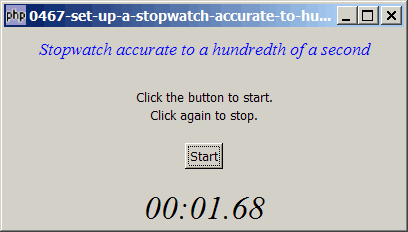
The method we've used in How to set up a countdown timer - Part 3 - accurate to hundredth of a second? allows us to set up a stopwatch accurate to a hundredth of a second as shown below:
Solution
- We make use of the same technique as described in How to set up a countdown timer - Part 3 - accurate to hundredth of a second?.
Sample Code
| 1 2 3 4 5 6 7 8 9 10 11 12 13 14 15 16 17 18 19 20 21 22 23 24 25 26 27 28 29 30 31 32 33 34 35 36 37 38 39 40 41 42 43 44 45 46 48 49 50 51 52 53 54 55 56 57 58 59 60 61 62 63 | <?php $window = new GtkWindow(); $window->set_title($argv[0]); $window->set_size_request(400, 200); $window->connect_simple('destroy', array('Gtk','main_quit')); $window->add($vbox = new GtkVBox()); // display title $title = new GtkLabel("Stopwatch accurate to a hundredth of a second"); $title->modify_font(new PangoFontDescription("Times New Roman Italic 10")); $title->modify_fg(Gtk::STATE_NORMAL, GdkColor::parse("#0000ff")); $title->set_size_request(-1, 40); $vbox->pack_start($title, 0); $vbox->pack_start(new GtkLabel(), 0); $vbox->pack_start(new GtkLabel('Click the button to start.'), 0); $vbox->pack_start(new GtkLabel('Click again to stop.'), 0); $vbox->pack_start(new GtkLabel(), 0, 0); $vbox->pack_start($hbox = new GtkHBox(), 0, 0); $hbox->pack_start($button = new GtkButton('Start'), 1, 0); $vbox->pack_start(new GtkLabel()); $button->connect('clicked', 'on_button'); $progress = new GtkLabel(); $progress->modify_font(new PangoFontDescription("Times New Roman Italic 20")); $vbox->pack_start($progress); $window->show_all(); Gtk::main(); function on_button($button) { global $timeout_ID; if ($button->get_label() == 'Start') { global $start_time; $start_time = microtime(1); $timeout_ID = Gtk::timeout_add(1, 'process_task'); // note 1 $button->set_label('Stop'); } else { Gtk::timeout_remove($timeout_ID); $button->set_label('Start'); return false; } } function process_task() { global $start_time; $elapsed_time = microtime(1) - $start_time; $elapsed_time_min = intval($elapsed_time / 60); $elapsed_time_sec = $elapsed_time % 60; $elapsed_time_hsec = $elapsed_time - intval($elapsed_time); $elapsed_time_hsec = round($elapsed_time_hsec * 100); $elapsed_time_hsec = str_pad($elapsed_time_hsec, 2, STR_PAD_LEFT, '0'); // note 2 global $progress; $progress->set_text(date('i:s', $elapsed_time). '.' . $elapsed_time_hsec); while (Gtk::events_pending()) {Gtk::main_iteration();} return true; } ?> |
Output
As shown above.Explanation
The above code is based on How to set up a countdown timer - Part 3 - accurate to hundredth of a second?
What's new here:
- Note that I set the timeout event at 1 order magnitude higher, i.e. at 1ms interval. This is because I feel the timeout event may get delayed sometimes if the system is busy or the event queue is long. If the stopwatch were to be accurate to a hundredth of a second, it's better to set the timeout event an order of magnitude higher than the desired accuracy.
- Calculate the elapsed time to the hundredth of a second.
Comments
A question: can I add var hours? in the example only is seconds and minutes. I want hours!..
Thanks,
RSS feed for comments to this post