Problem
This is in response to cbell's post titled "Start processing automatically".
He has a program that does a bunch of stuff with a database and displays a progress bar as it proceeds. Currently the program is set up to begin processing when a button on the main window is clicked.
However he would like the program to begin processing as soon as it is started as shown below:
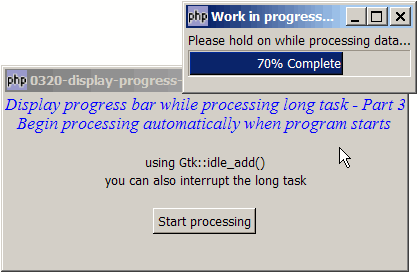
Solution
- You do not need to change any part of your code.
- All you need is to manually generate a click on the process button with GtkButton::clicked().
- Do this after you call
$window->show_all()and before callingGtk::main(). - In this example, you will find that you can just generate the button click with
$button->clicked(). - However, you may find that this doesn't necessarily work for all applications.
- Here is a useful "trick" that you can learn from this example: generate the button click using
Gtk::idle_add(array($button, 'clicked')). In plain English, this means: let the control pass to the next statement (which isGtk::main()) immediately, and generate a 'click' signal when you are free.
Sample Code
| 1 2 3 4 5 6 7 8 9 10 11 12 13 14 15 16 17 18 19 20 21 22 23 24 25 26 27 28 29 30 31 32 33 34 35 36 37 38 39 40 41 42 43 44 45 46 47 48 49 51 52 53 54 55 56 57 58 59 60 61 62 65 66 67 68 69 70 71 72 73 74 75 76 77 78 79 80 81 82 83 84 85 86 87 88 89 90 91 92 93 94 96 97 98 99 100 101 102 103 | <?php $window = new GtkWindow(); $window->set_size_request(400, 175); $window->connect_simple('destroy', array('Gtk','main_quit')); $window->add($vbox = new GtkVBox()); // display title $title = new GtkLabel("Display progress bar ". "while processing long task - Part 3\n". " Begin processing automatically when program starts"); $title->modify_font(new PangoFontDescription("Times New Roman Italic 10")); $title->modify_fg(Gtk::STATE_NORMAL, GdkColor::parse("#0000ff")); $title->set_size_request(-1, 40); $vbox->pack_start($title, 0, 0); $vbox->pack_start(new GtkLabel(), 0, 0); $vbox->pack_start(new GtkLabel('using Gtk::idle_add()'), 0, 0); $vbox->pack_start(new GtkLabel('you can also interrupt the long task'), 0, 0); $vbox->pack_start(new GtkLabel(), 0, 0); $vbox->pack_start($hbox = new GtkHBox(), 0, 0); $hbox->pack_start($button = new GtkButton('Start processing'), 1, 0); $vbox->pack_start(new GtkLabel()); $button->connect('clicked', 'start_processing'); $window->show_all(); Gtk::idle_add(array($button, 'clicked')); // note 1 Gtk::main(); function start_processing($button) { $do_long_task = new DoLongTask(); $do_long_task->idle_ID = Gtk::idle_add( array(&$do_long_task, 'process_task')); } class DoLongTask { var $progress_bar; var $dialog; var $subtask_count = 0; var $max_task_count = 10; var $idle_ID; function DoLongTask() { // setup a dialog containing progress bar $dialog = new GtkDialog('Work in progress...', null, Gtk::DIALOG_MODAL); $top_area = $dialog->vbox; $top_area->pack_start(new GtkLabel( 'Please hold on while processing data...')); $this->progress_bar = new GtkProgressBar(); $this->progress_bar->set_orientation(Gtk::PROGRESS_LEFT_TO_RIGHT); $top_area->pack_start($this->progress_bar, 0, 0); $dialog->set_has_separator(false); $dialog->show_all(); $this->dialog = $dialog; $dialog->connect('delete-event', array( &$this, "on_delete_event")); } // this is where you process your task function process_task() { echo "processing subtask $this->subtask_count: "; for ($i=0; $i<10; ++$i) { usleep(50000); // sleep for half a second print "."; } print "\n"; ++$this->subtask_count; $percent_complete = $this->subtask_count/$this->max_task_count; $percent_complete2 = number_format( $this->subtask_count/$this->max_task_count*100,0); $this->progress_bar->set_fraction($percent_complete); $this->progress_bar->set_text($percent_complete2.'% Complete'); while (Gtk::events_pending()) {Gtk::main_iteration();} if ($this->subtask_count < $this->max_task_count) { // task completed? return true; // not yet! } else { $this->dialog->destroy(); // yes, all done. close the dialog Gtk::idle_remove($this->idle_ID); // inform php-gtk that we're done return false; } } // function that is called when user closes the progress bar dialog function on_delete_event($widget, $event) { $this->dialog->destroy(); // close the dialog Gtk::idle_remove($this->idle_ID); // inform php-gtk that we're done // any other clean-up that you may want to do return true; } } ?> |
Output
As shown above.Explanation
The entire code is exactly the same as that of How to display progress bar while processing long task - Part 2 using_idle_add?
The only difference is the addition of the following line:
- Manually generate the 'clicked' signal on the process button.
Read more...