Problem
You want to put a clickable link in GtkLabel. In Part 1, you have the clickable link displayed.
However, as shown in the figure below, you would like to have some message being displayed (e.g. the url) in a status area at the bottom of the window when the user hovers over the link (similar to a web browser).
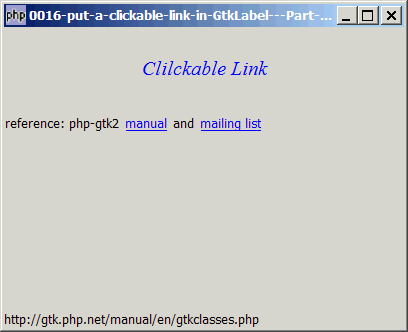
Solution
- Use the signal enter-notify-event to detect when a mouse hovers the link.
- Use the signal leave-notify-event to detect when a mouse leaves the link.
Sample Code
| 1 2 3 4 5 6 7 8 9 10 11 12 13 14 15 16 17 18 19 20 21 22 23 24 25 26 27 28 29 30 31 32 33 34 35 36 37 38 39 40 41 42 43 44 45 46 47 48 49 50 51 52 53 54 55 56 57 58 59 60 61 62 63 | <?php $window = new GtkWindow(); $window->set_size_request(400, 300); $window->connect_simple('destroy', array('Gtk','main_quit')); $window->add($vbox = new GtkVBox()); // displays a title $title = new GtkLabel(); $title->set_markup('<span color="blue" font_desc="Times New Roman Italic 12"> Clilckable Link</span>'); $title->set_size_request(-1, 80); $title->set_alignment(0.5, 0.5); $vbox->pack_start($title, 0, 0); // note 7 // create the clickable label $clickable_label = new GtkHBox(); $clickable_label->set_size_request(-1, 24); $vbox->pack_start($clickable_label,0 ,0); $clickable_label->pack_start(new GtkLabel("reference: php-gtk2 "), 0, 0); $clickable_label->pack_start(make_link("manual", "http://gtk.php.net/manual/en/gtkclasses.php"), 0, 0); $clickable_label->pack_start(new GtkLabel(" and "), 0, 0); $clickable_label->pack_start(make_link("mailing list", "http://www.nabble.com/Php---GTK---General-f171.html"), 0, 0); $vbox->pack_start(new GtkLabel('')); // note 6 $status = new GtkLabel(''); // note 1 $status->set_alignment(0, 0); $vbox->pack_start($status, 0, 0); // function to setup the link function make_link($title, $url) { $label = new GtkLabel($title); $label->set_markup('<span color="blue"><u>'.$title."</u></span>"); $eventbox = new GtkEventBox; $eventbox->add($label); $eventbox->connect('button-press-event', 'link_clicked', $title, $url); $eventbox->connect('enter-notify-event', 'link_hover', $title, $url); // note 2 $eventbox->connect('leave-notify-event', 'link_leave', $title, $url); // note 3 return $eventbox; } // call-back function when user click on the link function link_clicked($widget, $event, $title, $url) { print "title = $title\n"; print "url = $url\n"; // do your action here, e.g. launch the url in browser } function link_hover($widget, $event, $title, $url) { // note 4 global $status; $status->set_text($url); } function link_leave($widget, $event, $title, $url) { // note 5 global $status; $status->set_text(''); } $window->show_all(); Gtk::main(); ?> |
Output
As shown above.Explanation
Please refer to Part 1 first which explains how to display a clickable link in GtkLabel.
What's new here in Part 2:
- Sets up the status area
- This basically says call the function "link_hover" when the mouse enters the link. Note that we also pass along two user-defined data (
$titleand$url) when the function is being called. - This says call the function "link_leave" when the mouse leaves the link.
- This is the "link_hover" function, which simply displays the
$urlin the status area when the mouse hovers over the link. - This is the "link_leave" function, which simply clears the status area when the mouse leaves the link.
Notes
Notes on layout:- Try to enlarge the window. You can see that the status area will always stay at the bottom of the window. Observe how we achieve this with just this one statement:
- Also note how we "force" the title to stay up there with:
$vbox->pack_start(new GtkLabel(''));
$title->set_size_request(-1, 80);
$title->set_alignment(0.5, 0.5);
$vbox->pack_start($title, 0, 0);
The set_alignment ensures that there's some vertical gap between the title and the top of the margin. Without this, you will find that the title will "stick" to the top margin.
Read more...