Problem
You want to put a clickable link in GtkLabel as shown below:
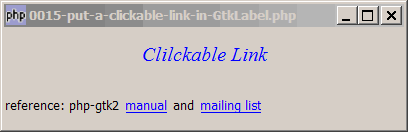
Solution
GtkLabel does not respond to button-press-event.
However, a GtkEventBox does.
So just put the GtkLabel inside the GtkEventBox, and you have a clickable label!
Sample Code
| 1 2 3 4 5 6 7 8 9 10 11 12 13 14 15 16 17 18 19 20 21 22 23 24 25 26 27 28 29 30 31 32 33 34 35 36 37 38 39 40 41 42 | <?php $window = new GtkWindow(); $window->set_size_request(400, 100); $window->connect_simple('destroy', array('Gtk','main_quit')); $window->add($vbox = new GtkVBox()); // displays a title $title = new GtkLabel(); $title->set_markup('<span color="blue" font_desc="Times New Roman Italic 12"> Clilckable Link</span>'); $vbox->pack_start($title); // create the clickable label $clickable_label = new GtkHBox(); // note 1 $vbox->pack_start($clickable_label); $clickable_label->pack_start(new GtkLabel("reference: php-gtk2 "), 0, 0); $clickable_label->pack_start(make_link("manual", "http://gtk.php.net/manual/en/gtkclasses.php"), 0, 0); $clickable_label->pack_start(new GtkLabel(" and "), 0, 0); $clickable_label->pack_start(make_link("mailing list", "http://www.nabble.com/Php---GTK---General-f171.html"), 0, 0); // function to setup the link function make_link($title, $url) { $label = new GtkLabel($title); $label->set_markup('<span color="blue"><u>'.$title."</u></span>"); $eventbox = new GtkEventBox; // note 2 $eventbox->add($label); $eventbox->connect('button-press-event', 'link_clicked', $title, $url); // note 3 return $eventbox; } // call-back function when user click on the link function link_clicked($widget, $event, $title, $url) { // note 4 print "title = $title\n"; print "url = $url\n"; // do your action here, e.g. launch the url in browser } $window->show_all(); Gtk::main(); ?> |
Output
As shown above.Explanation
- Create a GtkHBox to join up normal text and links.
- As explained above, a
GtkLabelcannot detect mouse click. So we need to create a GtkEventBox, place the label in the eventbox, and capture the mouse click through the EventBox. - Note that we can pass user-defined information along when setting up the call-back functions, in this case
$titleand$url. In this way, we can write just one call-back functions to handle all the links, instead of one call-back function for each link. - This is the call-back function that is called when user click on the link. Here it just displays
$titleand$urlin the command window. You can add your code here to perform some actions.
Read more...