Problem
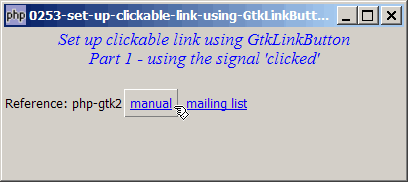
You would like to set up a clickable link using the new widget GtkLinkButton available in gtk+2.10 and above as shown below:
Solution
- The link button is a subclass of GtkButton. We use it just like a standard GtkButton.
- Create a link button with the constructor
GtkLinkButton($label). - To capture button clicks, we register the signal 'clicked' on the link button.
Important Note: This only works for PHP-GTK2 compliled with gtk+ v2.10 and above. If you are using an older version, for linux, you may follow the step-by-step instructions to recompile php-gtk2 with gtk+ v2.10. For windows, please refer to How to install php gtk2 on windows? You may also want to take a look here to see some of the new exciting PHP-GTK2 Functionalities.
Sample Code
| 1 2 3 4 5 6 7 8 9 10 11 12 13 14 15 16 18 19 20 21 22 23 24 25 26 27 28 30 31 32 33 34 35 36 37 38 39 40 42 43 44 45 46 47 | <?php $window = new GtkWindow(); $window->set_title($argv[0]); $window->set_size_request(400, 150); $window->connect_simple('destroy', array('Gtk','main_quit')); $window->add($vbox = new GtkVBox()); // display title $title = new GtkLabel("Set up clickable link using GtkLinkButton\n". "Part 1 - using the signal 'clicked'"); $title->modify_font(new PangoFontDescription("Times New Roman Italic 10")); $title->modify_fg(Gtk::STATE_NORMAL, GdkColor::parse("#0000ff")); $title->set_size_request(-1, 40); $title->set_justify(Gtk::JUSTIFY_CENTER); $alignment = new GtkAlignment(0.5, 0, 0, 0); $alignment->add($title); $vbox->pack_start($alignment, 0, 0); $vbox->pack_start(new GtkLabel(), 0, 0); // link button $hbox = new GtkHBox(); $vbox->pack_start($hbox, false, false); $link_button1 = new GtkLinkButton("manual"); // note 1 $link_button2 = new GtkLinkBUtton("mailing list"); // note 1 $hbox->pack_start(new GtkLabel("Reference: php-gtk2"), false); $hbox->pack_start($link_button1, false); $hbox->pack_start($link_button2, false); // set up signal handler $link_button1->connect('clicked', 'on_linkbutton', // note 2 "http://gtk.php.net/manual/en/gtkclasses.php"); $link_button2->connect('clicked', 'on_linkbutton', // note 2 "http://www.nabble.com/Php---GTK---General-f171.html"); $window->show_all(); Gtk::main(); function on_linkbutton($linkbutton, $url) { $shell = new COM('WScript.Shell'); // note 3 $shell->Run('cmd /c start "" "' . $url . '"', 0, FALSE); // note 3 unset($shell); // note 3 } ?> |
Output
As shown above.Explanation
- Create the link button.
- Register the signal 'clicked'.
- Note that if you're running this example on linux, please comment out these 3 lines and replace with the system command to launch your favorite browser.
Note
- Note that for a link button, it is a button. And you will see the shape of the button when the cursor is over the button.
- You might want to compare this with the example How to put a clickable link in GtkLabel - Part 2? This one is a clickable label, and you will not see the shape of the button.
Related Links
- How to set up clickable link using GtkLinkButton - Part 2 - using set_uri_hook?
- How to change cursor over clickable GtkLabel - Part 1 - using pre defined cursors?
- How to change cursor over clickable GtkLabel - Part 2 - using image file?
- How to change cursor over clickable GtkLabel - Part 3 - using xpm data?
- How to launch external app in winxp without the flashing of cmd window?
- How to put a clickable link in GtkLabel - Part 1?
- How to put a clickable link in GtkLabel - Part 2?
Read more...