Problem
This is in response to Andreas' Post titled "Possible to add not tiled backgrounds".
Suppose you want to have a single background image that always stayed at the bottom right corner of a GtkWindow (no matter how the user changes the window size).
This article presents a more advanced and flexible solution that uses GdkDrawable::draw_pixbuf().
Also, I purposely chose an example (using the sample code from How to align GtkEntry fields - Part 2?) with a mixture of GtkVBox, GtkTable, GtkLabel and GtkEntry to show that this method works with any GtkWindow contents as shown below:
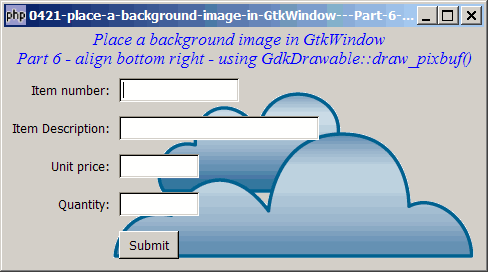
Solution
- We use exactly the same technique as outlined in How to place a background image in GtkWindow - Part 5 - align top left - using GdkDrawable draw_pixbuf?
- The 5th and 6th argument of the method GdkDrawable::draw_pixbuf() allows you to specify where you want to place the image.
- In this example, we leave a 10-pixel margin between the background image and the bottom-right margins of the window.
Sample Code
Note: The following image file is required by the sample code below. Please save a copy of the image files and put them in the same directory where you store the sample code.
 | sample6_360a.png |
| 1 2 3 4 5 6 7 8 9 10 11 12 13 14 15 16 17 18 19 20 21 22 23 24 25 26 27 28 29 30 32 33 34 35 36 37 38 39 40 41 42 43 44 45 46 47 48 49 50 52 54 55 56 57 58 59 60 61 62 63 64 65 66 67 68 69 70 71 77 78 79 80 82 83 84 85 86 87 88 | <?php $window = new GtkWindow(); $window->set_size_request(480, 240); $window->connect_simple('destroy', array('Gtk','main_quit')); $window->add($vbox = new GtkVBox()); // display title $title = new GtkLabel( " Place a background image in GtkWindow\n". "Part 6 - align bottom right - using GdkDrawable::draw_pixbuf()"); $title->modify_font(new PangoFontDescription("Times New Roman Italic 10")); $title->modify_fg(Gtk::STATE_NORMAL, GdkColor::parse("#0000ff")); $title->set_size_request(-1, 40); $vbox->pack_start($title, 0, 0); $fields = array('Item number', 'Item Description', 'Unit price', 'Quantity'); $field_size = array(120, 200, 80, 80); $entry = array(); // to store the text entries $table = new GtkTable(); display_table($table, $fields, $field_size); // display the table $vbox->pack_start($table); // create a submit button $button = new GtkButton('Submit'); $button->set_size_request(60, 28); $button->connect('clicked', 'on_click'); $row = count($fields); $alignment = new GtkAlignment(0, 0.5, 0, 0); $alignment->add($button); $table->attach($alignment, 1, 2, $row, $row+1); $window->connect('expose_event', 'expose_event'); // note 1 $window->show_all(); Gtk::main(); function display_table($table, $fields, $field_size) { global $entry; $row = 0; foreach ($fields as $field) { $label = new GtkLabel(" $field: "); $alignment = new GtkAlignment(1, .5, 0, 0); $alignment->add($label); $table->attach($alignment, 0, 1, $row, $row+1, Gtk::FILL, Gtk::SHRINK, 0, 0); $entry[$row] = new GtkEntry(); $alignment = new GtkAlignment(0, .5, 0, 0); $alignment->add($entry[$row]); $entry[$row]->set_size_request($field_size[$row], -1); $table->attach($alignment, 1, 2, $row, $row+1); ++$row; } } function on_click($button) { global $fields, $entry; $i=0; foreach($fields as $field) { echo "$field: ".$entry[$i]->get_text()."\n"; ++$i; } } function expose_event($widget, $event) { $pixbuf = GdkPixbuf::new_from_file("sample6_360a.png"); // note 2 $w = $pixbuf->get_width(); $h = $pixbuf->get_height(); $dest_x = $widget->allocation->width - $w - 10; // note 3 $dest_y = $widget->allocation->height - $h - 10; // note 3 $widget->window->draw_pixbuf($widget->style->bg_gc[Gtk::STATE_NORMAL], $pixbuf, 0, 0, $dest_x, $dest_y); // note 4 if($widget->get_child() != null) $widget->propagate_expose($widget->get_child(), $event); return true; } ?> |
Output
As shown above.Explanation
We make use of the base code from How to align GtkEntry fields - Part 2? which contains a mixture of GtkVBox, GtkTable, GtkLabel and GtkEntry.
What's new here:
- Register for the signal 'expose_event'.
- Load the background image. This works with all standard image file format such as .gif, .jpg or .png.
- Calculate where to place the background image. Note that here we leave a 10-pixel margins between the image and the bottom-right margins.
- Surprised by this one-liner?! Yes, this is the line that sets the background image! This works for the alpha/Gnope version too!
Note
Try compare this method with that described in How to place a background image in GtkWindow - Part 4 - align bottom right - using GtkStyle? and you'll understand why this method is more advanced and seemingly "better":
- Did you notice that this method supports transparencies in .png and .gif file?
- As we're drawing each image directly onto the underlying GdkWindow, there's no issue of tiled images.
- You can use the image file as-is. When using the GtkStyle method, you have to "pad" the image to 1920x1200.
- You can position the image to the exact location you want.
- Try changing the window size. Unlike the method described in How to place a background image in GtkWindow - Part 4 - align bottom right - using GtkStyle? with this method, you will find that the background image will always stay at the bottom right of the window.
Related Links
- How to place a background image in GtkWindow - Part 2 - tiled background image?
- How to place a background image in GtkWindow - Part 3 - align top left - using GtkStyle?
- How to place a background image in GtkWindow - Part 4 - align bottom right - using GtkStyle?
- How to place a background image in GtkWindow - Part 5 - align top left - using GdkDrawable draw_pixbuf?
- How to change background image on the fly?
Read more...