Problem
This is in response to Andreas' Post titled "Possible to add not tiled backgrounds".
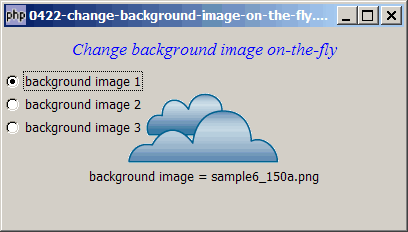
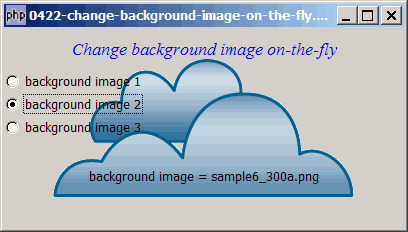
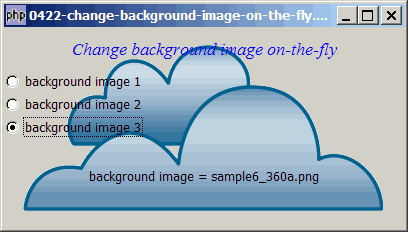
Suppose you would like to allow your users to select from a list of available background images, or set their own background image as shown below:
Solution
- We use exactly the same technique as outlined in How to place a background image in GtkWindow - Part 6 - align bottom right - GdkDrawable draw_pixbuf?
- Just load the selected background image and set it using the method
GdkDrawable::draw_pixbuf().
Sample Code
Note: The following image files are required by the sample code below. Please save a copy of the image files and put them in the same directory where you store the sample code.
 | sample6_150a.png |
 | sample6_300a.png |
 | sample6_360a.png |
| 1 2 3 4 5 6 7 12 13 14 15 16 17 18 19 20 21 22 23 24 25 26 27 28 29 30 31 32 33 34 35 36 37 38 39 40 41 42 43 44 45 46 47 48 49 50 51 52 53 54 55 56 61 62 65 66 67 68 75 76 77 78 79 80 | <?php $window = new GtkWindow(); $window->set_size_request(400, 200); $window->connect_simple('destroy', array('Gtk','main_quit')); $window->add($vbox = new GtkVBox()); // display title $title = new GtkLabel("Change background image on-the-fly"); $title->modify_font(new PangoFontDescription("Times New Roman Italic 10")); $title->modify_fg(Gtk::STATE_NORMAL, GdkColor::parse("#0000ff")); $title->set_size_request(-1, 40); $vbox->pack_start($title, 0, 0); // setup grouped radio buttons $backgd_img = 'sample6_150a.png'; $radio1 = setup_radio(null, 'background image 1', 'sample6_150a.png'); // note 1 $radio2 = setup_radio($radio1, 'background image 2', 'sample6_300a.png'); // note 1 $radio3 = setup_radio($radio1, 'background image 3', 'sample6_360a.png'); // note 1 // pack them inside vbox $vbox->pack_start($radio1, 0, 0); $vbox->pack_start($radio2, 0, 0); $vbox->pack_start($radio3, 0, 0); // add a status area $vbox->pack_start($status_area = new GtkLabel('Click a Button')); $window->connect('expose_event', 'expose_event'); // note 2 $window->show_all(); Gtk::main(); // set up radio buttons function setup_radio($radio_button_grp, $button_label, $button_value) { $radio = new GtkRadioButton($radio_button_grp, $button_label); $radio->connect('toggled', "on_toggle", $button_value); return $radio; } function on_toggle($radio, $value) { global $status_area; $label = $radio->child->get_label(); $active = $radio->get_active(); if ($active) $status_area->set_text("background image = $value\n"); global $backgd_img; $backgd_img = $value; // note 3 } function expose_event($widget, $event) { global $backgd_img; $pixbuf = GdkPixbuf::new_from_file($backgd_img); // note 4 $w = $pixbuf->get_width(); $h = $pixbuf->get_height(); $dest_x = ($widget->allocation->width - $w)/2; // note 5 $dest_y = ($widget->allocation->height - $h)/2; // note 5 $widget->window->draw_pixbuf($widget->style->bg_gc[Gtk::STATE_NORMAL], $pixbuf, 0, 0, $dest_x, $dest_y, $w, $h); // note 6 $widget->window->invalidate_rect($widget->allocation, true); // note 7 if($widget->get_child() != null) $widget->propagate_expose($widget->get_child(), $event); return true; } ?> |
Output
As shown above.Explanation
We make use of the code from How to display and process grouped radio buttons? to set up the selection of background image using radio buttons.
What's new here:
- Set up your list of background images here.
- Register for the signal 'expose_event'.
- Take note of the filename of the background image selected by user.
- Load the corresponding background image.
- Calculate where to place the background image. In this example, we set up such that the background image is always placed at the centre of the window, no matter how the user resizes the window.
- Set the background image!
- This line caused me half a day to figure out! Try commenting out this line, and you'll understand why...!
Related Links
- How to place a background image in GtkWindow - Part 2 - tiled background image?
- How to place a background image in GtkWindow - Part 3 - align top left - using GtkStyle?
- How to place a background image in GtkWindow - Part 4 - align bottom right - using GtkStyle?
- How to place a background image in GtkWindow - Part 5 - align top left - using GdkDrawable draw_pixbuf?
- How to place a background image in GtkWindow - Part 6 - align bottom right - GdkDrawable draw_pixbuf?
Read more...