Problem
Suppose your current application requires editing of items in treeview. There are many ways of doing this. In the article How to edit items in GtkTreeView - using popup dialog?, we used a popup form. On double-clicking a row, a popup dialog is displayed for editing.
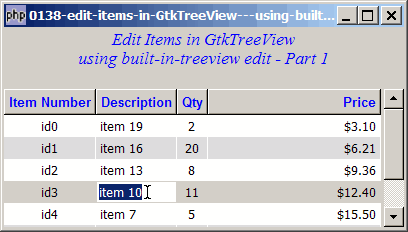
In this article, we let user edit directly in the treeview as shown below:
Solution
- To allow editing, we just need to set the property GtkCellRendererText::editable to
true. - We register the signal GtkCellRendererText::edited to know when editing is done - so that we can update the modfied value back to the model.
Sample Code
| 1 2 3 4 5 6 7 8 9 10 11 12 13 14 15 17 18 19 20 21 22 23 24 25 26 27 28 29 30 31 32 33 34 35 36 37 38 39 40 41 42 43 44 45 46 47 48 49 50 51 52 53 54 55 56 57 58 59 60 61 62 63 64 65 66 67 68 69 70 71 72 73 74 75 76 77 78 79 80 81 82 83 84 85 86 87 88 89 90 91 92 93 95 96 97 98 99 100 101 102 103 104 105 106 107 108 109 110 111 112 113 114 115 116 118 119 120 121 122 123 | <?php $window = new GtkWindow(); $window->set_size_request(400, 200); $window->connect_simple('destroy', array('Gtk','main_quit')); $window->add($vbox = new GtkVBox()); // display title $title = new GtkLabel("Edit Items in GtkTreeView\n". "using built-in-treeview edit - Part 1"); $title->modify_font(new PangoFontDescription("Times New Roman Italic 10")); $title->modify_fg(Gtk::STATE_NORMAL, GdkColor::parse("#0000ff")); $title->set_size_request(-1, 40); $title->set_justify(Gtk::JUSTIFY_CENTER); $alignment = new GtkAlignment(0.5, 0, 0, 0); $alignment->add($title); $vbox->pack_start($alignment, 0, 0); $vbox->pack_start(new GtkLabel(), 0, 0); // the 2D table $data = array( array('id0', 'item 42', 2, 3.1), array('id1', 'item 36', 20, 6.21), array('id2', 'item 21', 8, 9.36), array('id3', 'item 10', 11, 12.4), array('id4', 'item 7', 5, 15.5), array('id5', 'item 4', 17, 18.6), array('id6', 'item 3', 20, 21.73)); display_table ($vbox, $data); $window->show_all(); Gtk::main(); function display_table($vbox, $data) { // Set up a scroll window $scrolled_win = new GtkScrolledWindow(); $scrolled_win->set_policy( Gtk::POLICY_AUTOMATIC, Gtk::POLICY_AUTOMATIC); $vbox->pack_start($scrolled_win); // Creates the list store if (defined("GObject::TYPE_STRING")) { $model = new GtkListStore(GObject::TYPE_STRING, GObject::TYPE_STRING, GObject::TYPE_LONG, GObject::TYPE_DOUBLE); } else { $model = new GtkListStore(Gtk::TYPE_STRING, Gtk::TYPE_STRING, Gtk::TYPE_LONG, Gtk::TYPE_DOUBLE); } $field_header = array('Item Number', 'Description', 'Qty', 'Price'); $field_justification = array(0.5, 0.0, 0.5, 1.0); // Creates the view to display the list store $view = new GtkTreeView($model); $scrolled_win->add($view); // Creates the columns for ($col=0; $col<count($field_header); ++$col) { $cell_renderer = new GtkCellRendererText(); $cell_renderer->set_property("xalign", $field_justification[$col]); $cell_renderer->set_property('editable', true); // note 1 $cell_renderer->connect("edited", "on_edit_done", $view, $col); // note 2 $column = new GtkTreeViewColumn($field_header[$col], $cell_renderer, 'text', $col); $column->set_alignment($field_justification[$col]); $column->set_sort_column_id($col); // set the header font and color $label = new GtkLabel($field_header[$col]); $label->modify_font(new PangoFontDescription("Arial Bold")); $label->modify_fg(Gtk::STATE_NORMAL, GdkColor::parse("#0000FF")); $column->set_widget($label); $label->show(); // setup self-defined function to display alternate row color $column->set_cell_data_func($cell_renderer, "format_col", $col); $view->append_column($column); } // pupulates the data for ($row=0; $row<count($data); ++$row) { $values = array(); for ($col=0; $col<count($data[$row]); ++$col) { $values[] = $data[$row][$col]; } $model->append($values); } $selection = $view->get_selection(); $selection->connect('changed', 'on_selection'); } function format_col($column, $cell, $model, $iter, $col_num) { $path = $model->get_path($iter); $row_num = $path[0]; if ($col_num==3) { $amt = $model->get_value($iter, 3); $cell->set_property('text', '$'.number_format($amt,2)); } $row_color = ($row_num%2==1) ? '#dddddd' : '#ffffff'; $cell->set_property('cell-background', $row_color); } function on_selection($selection) { list($model, $iter) = $selection->get_selected(); $desc = $model->get_value($iter, 1); $qty = $model->get_value($iter, 2); $price = $model->get_value($iter, 3); print "You have selected $desc: $qty ($price)\n"; } function on_edit_done($cell, $path, $new_text, $view, $col){ $model=$view->get_model(); // note 3 $iter = $model->get_iter_from_string($path); // note 4 $model->set($iter, $col, $new_text); // note 5 } ?> |
Output
As shown above.
Explanation
- Allow editing.
- Register 'edited' signal to know when the user has finished editing.
- Get the model.
- Get the iter.
- Update the new value back to the model.
Note
- You can begin editing a field by clicking the field, by pressing Enter, or by pressing Space.
- You can end the edit by clicking another field or by pressing Enter.
- If you click on any field in the last column (Price), and just press return, you will find that the price changed to $0.00. This is because of the '$' sign in front of the number. We'll fix this in Part 2.
You may also want to compare this method with How to edit items in GtkTreeView - using popup dialog?
Read more...