Problem
You would like to display a directory tree (or folder contents) using a GtkTreeView as shown below:
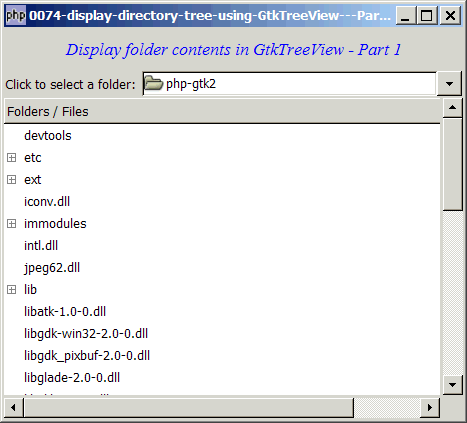
Solution
- We let the user select the folder with GtkFileChooserButton.
- The directory tree is stored using GtkTreestore, and displayed using GtkTreeview.
Sample Code
Note 1: If you select "C:\", the program will run, but it will take a long time. You will see the processing, though, in the command window.
Note 2: On windows, you may see a warning "Gtk-WARNING: Could not find the icon 'stock_unknown'. The 'hicolor' theme
was not found either, perhaps you need to install it." This is from the GtkFileChooserButton. It's just a warning. You may ignore it, or go ahead and install it.
| 1 2 4 5 6 7 8 9 10 11 12 13 14 15 16 17 18 19 20 21 22 23 24 25 26 28 29 30 31 32 33 34 35 36 37 38 39 40 41 42 43 44 45 46 49 50 52 53 54 55 56 57 58 59 60 61 62 63 64 65 66 67 68 69 70 71 72 73 74 75 76 77 78 81 82 83 84 85 86 87 88 | <?php $window = new GtkWindow(); $window->connect_simple('destroy', array('Gtk','main_quit')); $window->add($vbox = new GtkVBox()); // display title $title = new GtkLabel("Display folder contents in GtkTreeView - Part 1"); $title->modify_font(new PangoFontDescription("Times New Roman Italic 10")); $title->modify_fg(Gtk::STATE_NORMAL, GdkColor::parse("#0000ff")); $title->set_size_request(-1, 40); $vbox->pack_start($title, 0, 0); $vbox->pack_start($hbox = new GtkHBox()); $hbox->pack_start(new GtkLabel('Click to select a folder: '), 0, 0); // set up model if (defined("GObject::TYPE_STRING")) { $model = new GtkTreeStore(GObject::TYPE_STRING); // note 1 } else { $model = new GtkTreeStore(Gtk::TYPE_STRING); // note 1 } // set up file chooser button $file_chooser_button = new GtkFileChooserButton('Select the Folder', Gtk::FILE_CHOOSER_ACTION_SELECT_FOLDER); $file_chooser_button->set_size_request(320, -1); $file_chooser_button->connect('selection-changed', 'on_selection_changed'); // note 2 on_selection_changed($file_chooser_button); // note 3 $hbox->pack_start($file_chooser_button, 0, 0); // set up scroll window $scrolled_win = new GtkScrolledWindow(); $scrolled_win->set_policy( Gtk::POLICY_AUTOMATIC, Gtk::POLICY_AUTOMATIC); $vbox->pack_start($scrolled_win); // set up treeview $view = new GtkTreeView($model); // note 4 $scrolled_win->add($view); $view->set_size_request(400, 320); //set up treeview columns $cell_renderer = new GtkCellRendererText(); $view->append_column(new GtkTreeViewColumn('Folders / Files', $cell_renderer, 'text', 0)); // note 5 //display it $window->show_all(); Gtk::main(); function on_selection_changed($button) { $folder = $button->get_current_folder(); echo "new folder: $folder\n"; populate_tree($folder); // note 6 } function populate_tree($folder) { // note 6 global $model; $model->clear(); $root = $folder; $dir_list = array($root); // stores the directory list as queue $nodes = array(); $nodes[$root] = null; while(count($dir_list)>0) { $dir = array_shift($dir_list); // get the first entry in directory queue echo "folder = $dir\n"; if ($handle = opendir($dir)) { while (false !== ($file = readdir($handle))) { if ($file != "." && $file != "..") { $fullpath = $dir.'/'.$file; $nodes[$fullpath] = $model->append($nodes[$dir], array($file)); // note 7 if (is_dir($fullpath)) { // is it a directory? array_push($dir_list, $fullpath); // yes, queue it in the dir list } } } closedir($handle); } } } ?> |
Output
As shown above.Explanation
- Set up the tree model. Here only one field is required - a string to store the folder name or filename.
- Inform us when the user has finished selecting a folder.
- Force an update of the model and treeview during the first pass. Try comment this out and you will know what I mean.
- Binds the model to the treeview.
- There's only one column - to display the folder name or filename.
- The function
populate_treesimply reads the entire folder content and stuff it in the tree model. - Add the new folder or filename to the tree model.
Related Links
- How to display directory tree using GtkTreeView - Part 2 - add folder icon?
- How to display directory tree using GtkTreeView - Part 3 - add selection box?
- How to display directory tree using GtkTreeView - Part 4 - add tooltips?
- How to display directory tree using GtkTreeView - Part 5 - add context sensitive popup menu on right mouse click?
- How to display a tree structure from array?
- How to display a 2D array in GtkTreeView - Part 5 - get user selection?
- How to open a file with GtkFileChooser?
- How to save a file with GtkFileChooser - Part 1?
- How to save a file with GtkFileChooser - Part 2?
Read more...