Problem
When the user select File Open from the menu, you would like to allow the user to select the file with a file chooser dialog as shown below:
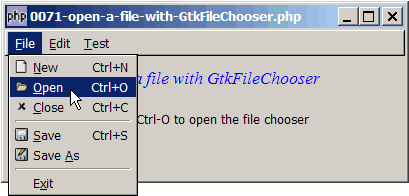
Solution
- We create a file chooser dialog with GtkFilechooserdialog.
- We use it just like a standard GtkDialog, that is, you create it, show it, run it, get the selected file and destroy it.
- To retrieve the selected file, use
GtkFileChooser::get_filename, use GtkFileChooser::get_filename().
Sample Code
| 1 2 3 4 5 6 7 8 9 10 11 12 13 14 15 16 17 18 19 21 22 23 24 25 27 28 31 32 33 34 35 36 37 38 39 40 41 42 43 45 46 47 51 52 53 54 55 56 57 58 59 61 62 63 64 65 67 68 69 70 71 72 73 74 75 76 77 78 79 80 81 82 83 86 88 89 90 91 92 93 99 100 101 102 106 107 108 109 111 112 113 114 115 116 117 118 119 120 121 123 124 125 126 127 128 129 130 131 132 133 134 135 138 139 140 141 142 143 144 145 146 147 148 154 155 157 159 160 161 162 163 164 166 173 174 175 177 178 179 183 184 185 186 187 188 190 193 194 200 201 202 203 204 205 206 207 208 | <?php $window = new GtkWindow(); $window->set_size_request(400, 150); $window->connect_simple('destroy', array('Gtk','main_quit')); $window->add($vbox = new GtkVBox()); $accel_group = new GtkAccelGroup(); $window->add_accel_group($accel_group); // define menu definition $menu_definition = array( '_File' => array('_New|N', '_Open|O', '_Close|C', '<hr>', '_Save|S', 'Save _As','<hr>', 'E_xit'), '_Edit' => array('Cu_t|X', '_Copy|C', '_Paste|V', '<hr>', 'Select _All|A', '<hr>', '_Undo|Z','_Redo|Y'), '_Test' => array('Test_1|1', 'Test_2|2', 'Test_3|3', '<hr>', array('Selection 1', 'Selection 2', 'Selection 3'), '<hr>', 'Test_4|4') ); $menu = new Menu($vbox, $menu_definition, $accel_group); // display title $title = new GtkLabel("Open a file with GtkFileChooser"); $title->modify_font(new PangoFontDescription("Times New Roman Italic 10")); $title->modify_fg(Gtk::STATE_NORMAL, GdkColor::parse("#0000ff")); $vbox->pack_start($title); $vbox->pack_start(new GtkLabel("Press Ctrl-O to open the file chooser")); $vbox->pack_start(new GtkLabel("")); $window->show_all(); Gtk::main(); // class Menu class Menu { var $prev_keyval = 0; var $prev_state = 0; var $prev_keypress = ''; function Menu($vbox, $menu_definition, $accel_group) { $this->menu_definition = $menu_definition; $menubar = new GtkMenuBar(); $vbox->pack_start($menubar, 0, 0); foreach($menu_definition as $toplevel => $sublevels) { $top_menu = new GtkMenuItem($toplevel); $menubar->append($top_menu); $menu = new GtkMenu(); $top_menu->set_submenu($menu); // let's ask php-gtk to tell us when user press the 2nd Alt key $menu->connect('key-press-event', array(&$this, 'on_menu_keypress'), $toplevel); foreach($sublevels as $submenu) { if (strpos("$submenu", '|') === false) { $accel_key = ''; } else { list($submenu, $accel_key) = explode('|', $submenu); } if (is_array($submenu)) { // set up radio menus $i=0; $radio[0] = null; foreach($submenu as $radio_item) { $radio[$i] = new GtkRadioMenuItem($radio[0], $radio_item); $radio[$i]->connect('toggled', array(&$this, "on_toggle")); $menu->append($radio[$i]); ++$i; } $radio[0]->set_active(1); // select the first item } else { if ($submenu=='<hr>') { $menu->append(new GtkSeparatorMenuItem()); } else { $submenu2 = str_replace('_', '', $submenu); $submenu2 = str_replace(' ', '_', $submenu2); $stock_image_name = 'Gtk::STOCK_'.strtoupper($submenu2); if (defined($stock_image_name)) { $menu_item = new GtkImageMenuItem( constant($stock_image_name)); } else { $menu_item = new GtkMenuItem($submenu); } if ($accel_key!='') { $menu_item->add_accelerator("activate", $accel_group, ord($accel_key), Gdk::CONTROL_MASK, 1); } $menu->append($menu_item); $menu_item->connect('activate', array(&$this, 'on_menu_select')); $this->menuitem[$toplevel][$submenu] = $menu_item; } } } } } // process radio menu selection function on_toggle($radio) { $label = $radio->child->get_label(); $active = $radio->get_active(); echo("radio menu selected: $label\n"); } // process menu item selection function on_menu_select($menu_item) { $item = $menu_item->child->get_label(); echo "menu selected: $item\n"; if (method_exists($this, $item)) $this->$item(); if ($item=='E_xit') Gtk::main_quit(); } // let user choose a file with a file chooser dialog function _Open() { // note 1 $dialog = new GtkFileChooserDialog("File Open", null, Gtk::FILE_CHOOSER_ACTION_OPEN, array(Gtk::STOCK_OK, Gtk::RESPONSE_OK), null); // note 2 $dialog->show_all(); if ($dialog->run() == Gtk::RESPONSE_OK) { $selected_file = $dialog->get_filename(); // note 3 echo "selected_file = $selected_file\n"; } $dialog->destroy(); } // processing of menu keypress function on_menu_keypress($menu, $event, $toplevel) { if (!$event->state & Gdk::MOD1_MASK) return false; // get the ascii equivalent of the keypress $keypress = ''; if ($event->keyval<255) { $keypress = chr($event->keyval); // ascii equivalent $keypress = strtolower($keypress); // convert to lowercase } $match = 0; // flag to see if there's a match foreach($this->menu_definition[$toplevel] as $submenu) { if (!preg_match("/.*_([a-zA-Z0-9]).*/", "$submenu", $matches)) continue; $key2 = strtolower($matches[1]); if ($keypress==$key2) { if (strpos("$submenu", '|') === false) { $accel_key = ''; } else { list($submenu, $accel_key) = explode('|', $submenu); } $menuitem = $this->menuitem[$toplevel][$submenu]; $menuitem->activate(); $menu->popdown(); $match = 1; break; } } return $match; } } ?> |
Output
As shown above.Explanation
The above sample code is based on How to set up menu and radio menu - Part 4 - allow Alt F Alt N?.
What's new here:
- Added this line so that the script will call the function
_Open()when user selects File Open. - The third parameter is GtkFileChooserAction. Since we are opening a file here, we choose
Gtk::FILE_CHOOSER_ACTION_OPEN. - Retrieve the selected file.
Note
- To select folders instead of files, please refer to the article How to select a folder with GtkFileChooser?
- To select multiple files, please refer to the article How to open multiple files with GtkFileChooser?
Read more...