Problem
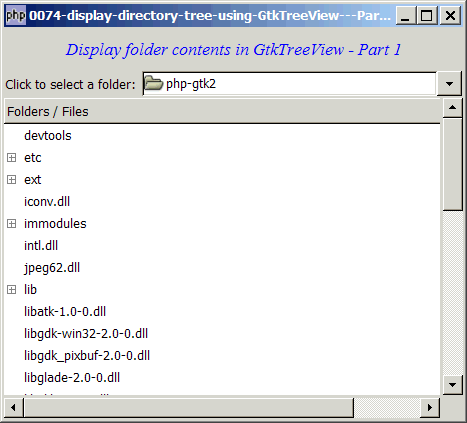
You have displayed a directory tree using a GtkTreeView in Part 1 as shown below:
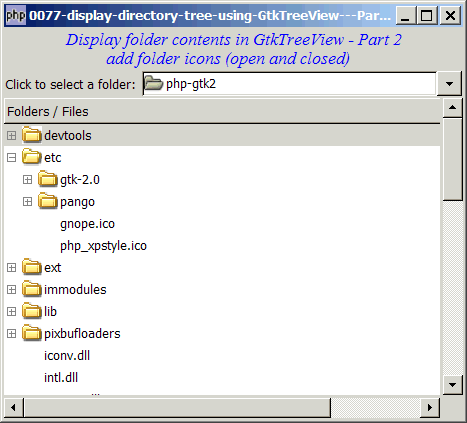
Let's now improve on this with the following:
- Add a folder icon in front each directory
- Show different icons for expanded and closed TreeView item
- Just like a standard windows explorer, we will list the folders first, followed by the files
This is as shown below:
Solution
- We make use of the techniques as described in How to display gif or jpg images in GtkTreeView - Part 2? to combine the gif/jpg/png image and the text in the same treeview column.
- We set the pixbuf for open expander with GtkCellrendererpixbuf::pixbuf-expander-open().
- We set the pixbuf for close expander with GtkCellrendererpixbuf::pixbuf-expander-closed().
Sample Code
Note 1: If you select "C:\", the program will run, but it will take a long time. You will see the processing, though, in the command window.
Note 2: On windows, you may see a warning "Gtk-WARNING: Could not find the icon 'stock_unknown'. The 'hicolor' theme
was not found either, perhaps you need to install it." This is from the GtkFileChooserButton. It's just a warning. You may ignore it, or go ahead and install it.
Note 3: The following image files are required by the sample code below. Please save a copy of the image files and put them in the same directory where you store the sample code.
 | folder_open.gif |
 | folder_closed.gif |
| 1 2 4 5 6 7 8 9 10 11 12 13 14 15 16 17 18 19 20 21 22 23 24 25 26 27 29 30 31 32 33 34 35 36 37 38 39 40 41 42 43 44 49 50 51 52 53 54 55 56 57 59 60 61 62 63 65 66 67 68 69 71 72 73 74 75 76 77 78 79 80 81 82 83 84 85 86 87 88 89 90 91 92 93 94 95 96 97 98 99 100 101 102 103 104 105 106 107 108 109 110 111 112 113 114 115 116 117 118 119 120 121 122 123 124 125 126 127 | <?php $window = new GtkWindow(); $window->connect_simple('destroy', array('Gtk','main_quit')); $window->add($vbox = new GtkVBox()); // display title $title = new GtkLabel("Display folder contents in GtkTreeView - Part 2\n". " add folder icons (open and closed)"); $title->modify_font(new PangoFontDescription("Times New Roman Italic 10")); $title->modify_fg(Gtk::STATE_NORMAL, GdkColor::parse("#0000ff")); $title->set_size_request(-1, 40); $vbox->pack_start($title, 0, 0); $vbox->pack_start($hbox = new GtkHBox()); $hbox->pack_start(new GtkLabel('Click to select a folder: '), 0, 0); // set up model if (defined("GObject::TYPE_STRING")) { $model = new GtkTreeStore(GObject::TYPE_STRING); } else { $model = new GtkTreeStore(Gtk::TYPE_STRING); } // set up file chooser button $file_chooser_button = new GtkFileChooserButton('Select the Folder', Gtk::FILE_CHOOSER_ACTION_SELECT_FOLDER); $file_chooser_button->set_size_request(320, -1); $file_chooser_button->connect('selection-changed', 'on_selection_changed'); on_selection_changed($file_chooser_button); $hbox->pack_start($file_chooser_button, 0, 0); // set up scroll window $scrolled_win = new GtkScrolledWindow(); $scrolled_win->set_policy( Gtk::POLICY_AUTOMATIC, Gtk::POLICY_AUTOMATIC); $vbox->pack_start($scrolled_win); // set up treeview $view = new GtkTreeView($model); $scrolled_win->add($view); $view->set_size_request(400, 320); //set up treeview columns $column = new GtkTreeViewColumn(); // for image $cell_renderer = new GtkCellRendererPixbuf(); // note 1 $column->pack_start($cell_renderer, false); $cell_renderer->set_property('pixbuf-expander-open', GdkPixbuf::new_from_file('folder_open.gif')); // note 2 $cell_renderer->set_property('pixbuf-expander-closed', GdkPixbuf::new_from_file('folder_closed.gif')); // for filename $cell_renderer = new GtkCellRendererText(); // note 3 $column->pack_start($cell_renderer, true); $column->set_attributes($cell_renderer, 'text', 0); $view->append_column($column); $column->set_title('Folders / Files'); //display it $window->show_all(); Gtk::main(); function on_selection_changed($button) { $folder = $button->get_current_folder(); echo "new folder: $folder\n"; populate_tree($folder); } function populate_tree($folder) { global $model; $model->clear(); $root = $folder; $dir_list = array($root); $nodes = array(); $nodes[$root] = null; while(count($dir_list)>0) { $dir = array_shift($dir_list); echo "folder = $dir\n"; // add the directories first note 4 if ($handle = opendir($dir)) { while (false !== ($file = readdir($handle))) { if ($file != "." && $file != "..") { $fullpath = $dir.'/'.$file; if (is_dir($fullpath)) { $nodes[$fullpath] = $model->append($nodes[$dir], array($file)); array_push($dir_list, $fullpath); } } } closedir($handle); } $num_files = 0; // then add the files note 5 if ($handle = opendir($dir)) { while (false !== ($file = readdir($handle))) { if ($file != "." && $file != "..") { $fullpath = $dir.'/'.$file; if (!is_dir($fullpath)) { $nodes[$fullpath] = $model->append($nodes[$dir], array($file)); ++$num_files; } } } closedir($handle); } if ($num_files==0) $nodes[$fullpath] = $model->append($nodes[$dir], array('')); // note 6 } } ?> |
Output
As shown above.Explanation
The above sample code is based on How to display directory tree using GtkTreeView - Part 1?
What's new here:
- Set up the GtkCellRendererPixbuf.
- Set the images for open and closed expander.
- Set up the GtkCellRenderer.
- Add the directories first.
- Then add the files.
- If there are no files in a directory, let's add an empty entry. Otherwise you will find that the folder icon will not be displayed. Try commenting this line out and you will know what I mean.
Related Links
- How to display directory tree using GtkTreeView - Part 1?
- How to display directory tree using GtkTreeView - Part 3 - add selection box?
- How to display directory tree using GtkTreeView - Part 4 - add tooltips?
- How to display directory tree using GtkTreeView - Part 5 - add context sensitive popup menu on right mouse click?
Read more...