Problem
You have displayed a popup menu when user right-click on the tab of GtkNotebook in Part 2.
However, instead of using the "built-in" popup menu of GtkNotebook, let's implement our own popup menu as shown below:
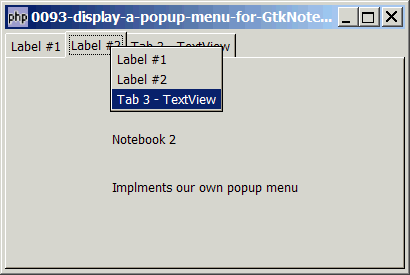
The advantage of writing our own popup menu is that we have absolute control over the popup menu. The "built-in" popup menu only allows users to switch tabs. When we write our own popup menu, we can offer additional menu options such as rename and deletion of tab label, as well as addition of new tabs, etc.
Solution
- Set up the base GtkNotebook as outlined in Part 1
- Set up the popup menu using the technique as described in How to display context sensitive popup menu with right mouse click in GtkTreeView?
Sample Code
| 1 2 3 4 5 6 7 8 10 17 18 19 20 21 22 23 24 25 26 27 29 31 33 34 35 36 37 38 39 40 41 42 43 44 45 47 48 49 52 53 54 55 56 57 58 59 60 61 62 63 64 65 66 67 68 69 70 71 72 73 74 75 76 77 78 79 80 83 84 85 86 87 90 92 93 94 95 96 98 99 100 102 103 104 105 106 107 108 109 110 111 112 113 114 115 116 117 118 119 120 121 122 123 124 126 127 128 129 130 131 132 133 134 135 136 137 138 142 144 145 146 | <?php $window = new GtkWindow(); $window->set_size_request(400, 240); $window->connect_simple('destroy', array('Gtk','main_quit')); $window->add($vbox = new GtkVBox()); // setup notebook $notebook = new GtkNotebook(); $notebook->connect('switch-page', 'on_switch'); $vbox->pack_start($notebook); // add two tabs of GtkLabel add_new_tab($notebook, new GtkLabel('Notebook 1'), 'Label #1'); add_new_tab($notebook, new GtkLabel("Notebook 2\n\n Implments our own popup menu"), 'Label #2'); // add a third tab of GtkTextView $buffer = new GtkTextBuffer(); $view = new GtkTextView(); $view->set_buffer($buffer); $view->set_wrap_mode(Gtk::WRAP_WORD); add_new_tab($notebook, $view, 'Tab 3 - TextView'); $window->show_all(); Gtk::main(); // add new tab function add_new_tab($notebook, $widget, $tab_label) { $eventbox = new GtkEventBox(); $label = new GtkLabel($tab_label); $eventbox->add($label); $label->show(); $eventbox->connect('button-press-event', 'on_tab', $tab_label); // note 1 $notebook->append_page($widget, $eventbox); $menu_label = new GtkLabel($tab_label); $menu_label->set_alignment(0,0); $notebook->set_menu_label($widget, $menu_label); global $tab_widget; static $page=0; $tab_widget[$page] = $widget; // note 2 ++$page; } // function that is called when user click on tab function on_tab($widget, $event, $tab_label) { if ($event->button==1) { echo "tab clicked = $tab_label\n"; return false; } if ($event->button==3) { // it's the right mouse click! popup_menu(); // note 3 return true; } return false; } function on_switch($notebook) { $switched_from = $notebook->get_current_page(); if ($switched_from==-1) return; global $tab_widget; $tab_label = $notebook->get_tab_label($tab_widget[$switched_from]); $tab_label_text = $tab_label->child->get_text(); echo "You have switched from: $tab_label_text (page $switched_from)\n"; } function popup_menu() { global $menu, $notebook; //define the popup menu $num_pages = $notebook->get_n_pages(); $menu_definition = array(); for ($i=0; $i<$num_pages; ++$i) { $widget = $notebook->get_nth_page($i); $tab_label = $notebook->get_tab_label($widget); $tab_label_text = $tab_label->child->get_text(); $menu_definition[] = $tab_label_text; // note 4 } $menu = show_popup_menu($menu_definition); // show the popup menu } // show popup menu function show_popup_menu($menu_definition) { $menu = new GtkMenu(); foreach($menu_definition as $menuitem_definition) { if ($menuitem_definition=='<hr>') { $menu->append(new GtkSeparatorMenuItem()); } else { $menu_item = new GtkMenuItem($menuitem_definition); $menu->append($menu_item); $menu_item->connect('activate', 'on_popup_menu_select'); } } $menu->show_all(); $menu->popup(); } // process popup menu item selection function on_popup_menu_select($menu_item) { global $notebook; $item = $menu_item->child->get_label(); switch($item) { case 'Label #1': $notebook->set_current_page(0); // note 5 echo "New tab selected: Label #1 (page 0)\n"; break; case 'Label #2': $notebook->set_current_page(1); // note 5 echo "New tab selected: Label #2 (page 1)\n"; break; case 'Tab 3 - TextView': $notebook->set_current_page(2); // note 5 echo "New tab selected: Tab 3 - TextView (page 2)\n"; break; } } ?> |
Output
As shown above.Explanation
We make use of the code in Part 1 to setup a tabbed GtkNotebook, and the code in How to display context sensitive popup menu with right mouse click in GtkTreeView? to set up the popup menu.
What's new here:
- Let us know when there is a right-mouse click.
- Save a copy of the tab label widgets.
- Popup the tab menu when there's a right-mouse click.
- Set up the popup menu using the text label of each tab.
- Switch to corresponding page.
Read more...