Problem
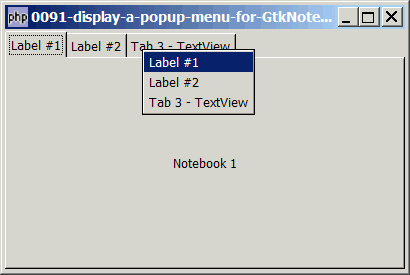
You want to display a popup menu when user right-click on the tab of GtkNotebook as shown below:
Solution
- Set up a tabbed notebook using the technique as explained in How to know which tab of GtkNotebook is being clicked on?
- Setting up a popup menu for GtkNotebook is easy. Just turn it on using GtkNotebook::popup_enable(). php-gtk will setup everything for you!
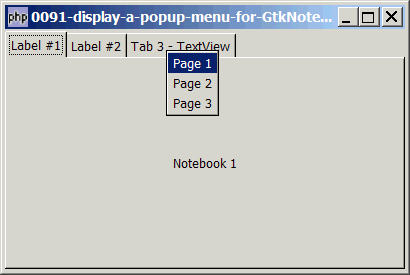
- However, if you simply turn it on, the default menu is "Page 1 / Page 2 / Page 3" as shown below:
- To set the menu label, we use GtkNotebook::set_menu_label().
Sample Code
| 1 2 3 4 5 6 7 8 9 12 13 14 15 16 17 18 19 20 21 23 25 26 27 28 29 30 31 32 33 34 35 36 37 38 40 41 42 43 44 45 46 47 48 49 50 65 | <?php $window = new GtkWindow(); $window->set_size_request(400, 240); $window->connect_simple('destroy', array('Gtk','main_quit')); $window->add($vbox = new GtkVBox()); // setup notebook $notebook = new GtkNotebook(); $notebook->popup_enable(); // note 1 $vbox->pack_start($notebook); // add two tabs of GtkLabel add_new_tab($notebook, new GtkLabel('Notebook 1'), 'Label #1'); add_new_tab($notebook, new GtkLabel('Notebook 2'), 'Label #2'); // add a third tab of GtkTextView $buffer = new GtkTextBuffer(); $view = new GtkTextView(); $view->set_buffer($buffer); $view->set_wrap_mode(Gtk::WRAP_WORD); add_new_tab($notebook, $view, 'Tab 3 - TextView'); $window->show_all(); Gtk::main(); // add new tab function add_new_tab($notebook, $widget, $tab_label) { $eventbox = new GtkEventBox(); $label = new GtkLabel($tab_label); $eventbox->add($label); $label->show(); $eventbox->connect('button-press-event', 'on_tab', $tab_label); $notebook->append_page($widget, $eventbox); $menu_label = new GtkLabel($tab_label); $menu_label->set_alignment(0,0); // note 3 $notebook->set_menu_label($widget, $menu_label); // note 2 } // function that is called when user click on tab function on_tab($widget, $event, $tab_label) { if ($event->button!==1) return; // note 4 echo "tab clicked = $tab_label\n"; } ?> |
Output
As shown above.Explanation
We make use of the code in How to know which tab of GtkNotebook is being clicked on? to setup a tabbed GtkNotebook.
What's new here:
- Enable popup.
- Set the menu label.
- Align the menu label to the left. Try commenting this line, and you will know what I mean.
- Only process left mouse click.
Read more...