Problem
You have displayed a popup menu when user right-click on the tab of GtkNotebook in Part 1.
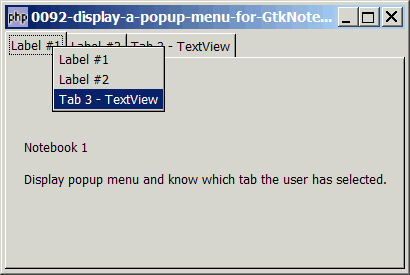
However, you want to know which tab the user has selected from the popup menu as shown below:
Solution
Note: By right, the signal 'select-page' should allow us to know the new tab the uesr has selected. However, I tried it and it didn't work as expected. Guess it's not implemented yet. Anyway, just like many other things in php-gtk2, there are more than one way to achieve the same thing. In this case, we can use the signal 'event' of GtkWidget to know which tab the user has selected.
- Know the tab that was switched from with GtkNotebook::switch-page().
- Know the tab that was switched to (i.e. the new tab) with GtkWidget::event().
- Get the tab label with GtkNotebook::get_tab_label().
Sample Code
| 1 2 3 4 5 6 7 8 9 10 17 18 19 20 21 22 23 24 25 26 27 29 31 32 33 34 35 36 37 38 39 40 41 42 43 44 46 47 48 49 51 52 53 54 55 56 57 58 59 60 61 62 63 64 65 66 67 68 69 70 71 74 75 76 77 80 81 85 86 87 88 | <?php $window = new GtkWindow(); $window->set_size_request(400, 240); $window->connect_simple('destroy', array('Gtk','main_quit')); $window->add($vbox = new GtkVBox()); // setup notebook $notebook = new GtkNotebook(); $notebook->popup_enable(); $notebook->connect('switch-page', 'on_switch'); // note 1 $vbox->pack_start($notebook); // add two tabs of GtkLabel add_new_tab($notebook, new GtkLabel("Notebook 1\n\n Display popup menu and know which tab the user has selected."), 'Label #1'); add_new_tab($notebook, new GtkLabel('Notebook 2'), 'Label #2'); // add a third tab of GtkTextView $buffer = new GtkTextBuffer(); $view = new GtkTextView(); $view->set_buffer($buffer); $view->set_wrap_mode(Gtk::WRAP_WORD); add_new_tab($notebook, $view, 'Tab 3 - TextView'); $window->show_all(); Gtk::main(); // add new tab function add_new_tab($notebook, $widget, $tab_label) { $eventbox = new GtkEventBox(); $label = new GtkLabel($tab_label); $eventbox->add($label); $label->show(); $eventbox->connect('button-press-event', 'on_tab', $tab_label); $notebook->append_page($widget, $eventbox); $menu_label = new GtkLabel($tab_label); $menu_label->set_alignment(0,0); $notebook->set_menu_label($widget, $menu_label); $widget->connect('event', 'on_event', $notebook); // note 2 global $tab_widget; static $page=0; $tab_widget[$page] = $widget; // note 3 ++$page; } // function that is called when user click on tab function on_tab($widget, $event, $tab_label) { if ($event->button!==1) return; echo "tab clicked = $tab_label\n"; } function on_switch($notebook) { $switched_from = $notebook->get_current_page(); // note 4 if ($switched_from==-1) return; global $tab_widget; $tab_label = $notebook->get_tab_label($tab_widget[$switched_from]); // note 5 $tab_label_text = $tab_label->child->get_text(); // note 6 echo "You have switched from: $tab_label_text (page $switched_from)\n"; } function on_event($widget, $event, $notebook) { if ($event->type!=2) return false; $tab_label = $notebook->get_tab_label($widget); // note 5 $tab_label_text = $tab_label->child->get_text(); // note 6 echo "New tab selected: $tab_label_text\n"; } ?> |
Output
As shown above.Explanation
We make use of the code in How to display a popup menu for GtkNotebook tab - Part 1? to setup a tabbed GtkNotebook with popup menu.
What's new here:
- The signal 'switch-page' allow us to know the "old" tab (the page that is being switched from).
- the signal 'event' allow us to know the new tab that the user has selected.
- Save a copy of the tab label widget.
- Get the current page. Note that this is an integer indicating the page number.
- Get the widget of the tab label. Note that this is a GtkEventBox as we have set up earlier.
- From the eventbox, we get the label with
$tab_label->child->get_text().
Read more...