Problem
In How to setup interactive search in GtkTreeView for PHP GTK v2.0 - Part 1 - non OOP version? I showed you how to set up an interactive search on the windows platform using the latest PHP-GTK v2.0 and v2.0.1.
Since we have spent so much time trying to "duplicate" the functionalities of the default interactive search for treeview, we might as well make it better than the default one.
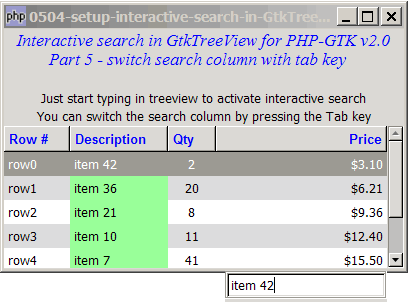
In this Part 5, the user can switch the search column by pressing the tab key in the popup search box. Note that the active search column is highlighted in green as shown below:
Solution
Here are the steps to make this work:
- Register the signal
'key-press-event'on the GtkEntry to know when the the user presses the Tab key. - Use GtkTreeview::set_search_column() to set the new search column.
- Highlight the search column in the custom cell display function (the one used to display the alternate row colors).
Sample Code
Important Note: This only works for PHP-GTK v2.0 (or PHP-GTK2 compliled with gtk+ v2.12 and above. If you are using an older version, for linux, you may follow the step-by-step instructions to recompile php-gtk2 with gtk+ v2.12. For windows, please refer to How to install php gtk2 on windows?
| 1 2 3 4 5 6 7 8 9 10 11 12 13 14 15 16 17 18 19 20 22 23 24 25 26 27 28 29 30 31 32 33 34 39 40 41 42 43 44 45 51 52 53 54 55 56 57 58 59 60 61 62 63 64 65 66 67 68 69 70 71 72 73 74 75 76 77 78 79 80 81 82 83 84 85 86 87 88 89 90 91 92 93 94 95 96 97 98 99 100 101 102 103 104 105 106 107 108 109 110 111 112 113 114 115 116 120 121 122 123 124 125 126 127 128 129 130 131 132 133 134 135 136 137 138 139 140 141 142 143 144 145 147 148 149 150 152 154 155 157 158 159 160 161 162 163 164 165 166 167 168 169 170 171 172 173 176 177 182 184 185 186 187 188 189 190 191 192 194 195 196 197 198 200 201 202 203 204 205 206 207 208 209 210 213 214 215 216 217 218 220 221 222 223 225 226 227 228 229 230 231 233 234 235 236 237 238 239 240 241 242 243 245 246 247 248 249 250 251 252 253 254 255 256 257 258 259 260 261 262 263 264 265 267 268 269 271 272 273 274 275 276 277 278 279 | <?php $window = new GtkWindow(); $window->set_title($argv[0]); $window->set_size_request(400, 240); $window->connect_simple('destroy', array('Gtk','main_quit')); $window->add($vbox = new GtkVBox()); // display title $title = new GtkLabel("Interactive search in GtkTreeView for PHP-GTK v2.0\n". " Part 5 - switch search column with tab key"); $title->modify_font(new PangoFontDescription("Times New Roman Italic 10")); $title->modify_fg(Gtk::STATE_NORMAL, GdkColor::parse("#0000ff")); $title->set_size_request(-1, 40); $vbox->pack_start($title, 0, 0); $vbox->pack_start(new GtkLabel(), 0); $vbox->pack_start(new GtkLabel( 'Just start typing in treeview to activate interactive search'), 0); $vbox->pack_start(new GtkLabel( 'You can switch the search column by pressing the Tab key'), 0); // the 2D table $data = array( array('row0', 'item 42', 2, 3.1), array('row1', 'item 36', 20, 6.21), array('row2', 'item 21', 8, 9.36), array('row3', 'item 10', 11, 12.4), array('row4', 'item 7', 41, 15.5), array('row5', 'item 4', 72, 18.6), array('row6', 'item 3', 93, 21.73)); $view = display_table($vbox, $data); $view->set_enable_search(false); $view->connect('start-interactive-search', 'on_search_start'); $view->connect('button-press-event', 'on_buttonpress'); $view->connect('key-press-event', 'on_keypress'); $searchbox_on = 0; $search_column = 2; // note 1 $window->show_all(); Gtk::main(); function display_table($vbox, $data) { // Set up a scroll window $scrolled_win = new GtkScrolledWindow(); $scrolled_win->set_policy( Gtk::POLICY_AUTOMATIC, Gtk::POLICY_AUTOMATIC); $vbox->pack_start($scrolled_win); // Creates the list store if (defined("GObject::TYPE_STRING")) { $model = new GtkListStore(GObject::TYPE_STRING, GObject::TYPE_STRING, GObject::TYPE_LONG, GObject::TYPE_DOUBLE); } else { $model = new GtkListStore(Gtk::TYPE_STRING, Gtk::TYPE_STRING, Gtk::TYPE_LONG, Gtk::TYPE_DOUBLE); } $field_header = array('Row #', 'Description', 'Qty', 'Price'); $field_justification = array(0.0, 0.0, 0.5, 1.0); // Creates the view to display the list store $view = new GtkTreeView($model); $scrolled_win->add($view); // Creates the columns for ($col=0; $col<count($field_header); ++$col) { $cell_renderer = new GtkCellRendererText(); $cell_renderer->set_property("xalign", $field_justification[$col]); $column = new GtkTreeViewColumn($field_header[$col], $cell_renderer, 'text', $col); $column->set_alignment($field_justification[$col]); $column->set_sort_column_id($col); // set the header font and color $label = new GtkLabel($field_header[$col]); $label->modify_font(new PangoFontDescription("Arial Bold")); $label->modify_fg(Gtk::STATE_NORMAL, GdkColor::parse("#0000FF")); $column->set_widget($label); $label->show(); // setup self-defined function to display alternate row color $column->set_cell_data_func($cell_renderer, "format_col", $col); $view->append_column($column); } // pupulates the data for ($row=0; $row<count($data); ++$row) { $values = array(); for ($col=0; $col<count($data[$row]); ++$col) { $values[] = $data[$row][$col]; } $model->append($values); } $selection = $view->get_selection(); $selection->connect('changed', 'on_selection'); return $view; } // self-defined function to format the price column function format_col($column, $cell, $model, $iter, $col_num) { $path = $model->get_path($iter); // get the current path $row_num = $path[0]; // get the row number if ($col_num==3) { $amt = $model->get_value($iter, 3); $cell->set_property('text', '$'.number_format($amt,2)); } $row_color = ($row_num%2==1) ? '#dddddd' : '#ffffff'; global $searchbox_on, $search_column, $view; if ($searchbox_on && $col_num==$search_column) { $row_color = '#99FF99'; // note 6 $view->queue_draw(); } $cell->set_property('cell-background', $row_color); } // the function that is called when user selects a row function on_selection($selection) { list($model, $iter) = $selection->get_selected(); if ($iter==null) return; $desc = $model->get_value($iter, 1); $qty = $model->get_value($iter, 2); $price = $model->get_value($iter, 3); print "You have selected $desc: $qty ($price)\n"; } function on_search_start($view) { global $searchbox_on; if (!$searchbox_on) interactive_search($view); } function interactive_search($view, $key='') { global $searchbox_on; $searchbox_on = 1; global $search_win; $search_win = new GtkWindow(); $search_win->add($vbox = new GtkVBox()); $search_win->set_modal(0); $search_win->set_decorated(0); global $search_entry; $vbox->pack_start($frame = new GtkFrame(), 0); $frame->add($search_entry = new GtkEntry()); $search_entry->connect('key-press-event', 'on_entry_keypress'); $search_entry->connect('button-press-event', 'on_entry_buttonpress'); global $search_column; $view->set_search_entry($search_entry); $view->set_search_column($search_column); // note 2 $search_entry->set_text($key); $search_win->show_all(); set_searchwin_pos($search_entry); $search_entry->set_position(-1); global $timeout_handle, $start_time; $start_time = microtime(1); $timeout_handle = Gtk::timeout_add(1000, 'check_idle'); $view->queue_draw(); } function on_buttonpress($view, $event) { global $searchbox_on; if ($searchbox_on) destroy_searchwin(); } function destroy_searchwin() { global $search_win, $searchbox_on, $view; $view->set_search_entry(null); $search_win->destroy(); $searchbox_on = 0; $view->queue_draw(); $view->grab_focus(); } function set_searchwin_pos($search_entry) { global $window, $view, $search_win; $win_pos = $window->get_position(); $x_shift = 0; $y_shift = 6; $x = $win_pos[0] + $view->allocation->width - $search_entry->allocation->width + $x_shift; $y = $win_pos[1] + $view->allocation->height + $view->allocation->y + $search_entry->allocation->height + $y_shift ; $search_win->move($x, $y); } function on_keypress($view, $event) { if ($event->keyval>255 || $event->keyval<32) return false; if (preg_match('/f/i', chr($event->keyval)) && ($event->state & Gdk::CONTROL_MASK)) return false; if (preg_match('/[a-zA-Z0-9\s_\!@#\$%\^&\*-+=;\:,\.<>]/', chr($event->keyval))) { Gtk::idle_add('interactive_search', $view, chr($event->keyval)); return true; } return false; } function check_idle() { global $timeout_handle, $start_time; $elapsed_time = microtime(1)-$start_time; if ($elapsed_time>3) { Gtk::timeout_remove($timeout_handle); destroy_searchwin(); return false; } else { return true; } } function on_entry_buttonpress($entry, $event) { global $start_time; $start_time = microtime(1); } function on_entry_keypress($entry, $event) { global $start_time; $start_time = microtime(1); if ($event->keyval==Gdk::KEY_Return || $event->keyval==Gdk::KEY_Escape) { destroy_searchwin(); } elseif ($event->keyval==Gdk::KEY_Tab) { // note 3 global $view, $search_column, $search_entry; ++$search_column; // note 4 if ($search_column>3) $search_column = 0; $view->set_search_column($search_column); // note 5 $search_entry->set_text(''); $view->queue_draw(); return true; } return false; } ?> |
Output
As shown above.Explanation
The code above is extended from that of How to setup interactive search in GtkTreeView for PHP GTK v2.0 - Part 4 - automatically hide after 3 seconds?
What's new here:
- We used a global variable
$search_columnto store the active search column. Here we start with column 2 (i.e. the Qty column) as the initial search column. - Set the initital search column.
- Check if the user has pressed the
<Tab>key. - Go to the next column.
- Set the new search column.
- This is where we highlight the search column in green.
Related Links
- How to setup interactive search in GtkTreeView for PHP GTK v2.0 - Part 1 - non OOP version?
- How to setup interactive search in GtkTreeView for PHP GTK v2.0 - Part 2 - OOP version using classes?
- How to setup interactive search in GtkTreeView for PHP GTK v2.0 - Part 3 - start on any keypress?
- How to setup interactive search in GtkTreeView for PHP GTK v2.0 - Part 4 - automatically hide after 3 seconds?
- How to finetune interactive search in GtkTreeView - Part 1 - turning it on?
- How to finetune interactive search in GtkTreeView - Part 2 - set search column?
- How to finetune interactive search in GtkTreeView - Part 3 - set custom search entry?
- How to finetune interactive search in GtkTreeView - Part 4 - set custom compare function?
Read more...