Problem
This example shows you how to group radio buttons into different groups using GtkRadioButton::set_group().
In this example, we create two radio button groups. The first group is odd numbers from 1 to 9. The second group is even numbers from 2 to 10 as shown below:
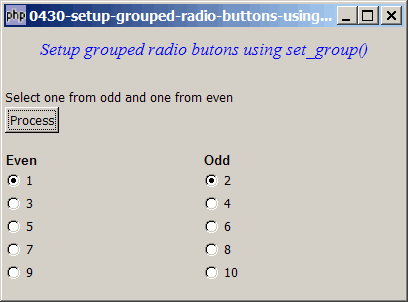
Solution
- To specify the group of a radio button, you can do so in the constructor, as outlined in the article How to display and process grouped radio buttons?
- However, you can also create all radio buttons first without specifying any group (i.e. putting
nullas first parameter in the constructor), and then later specify the group of a rado button usig GtkRadioButton::set_group().
Sample Code
| 1 2 3 4 5 6 7 8 9 10 11 12 13 14 15 16 17 18 19 20 21 22 23 24 25 26 27 28 29 30 31 32 33 34 35 36 37 38 39 40 41 42 43 44 45 46 47 48 49 50 51 52 53 54 55 56 57 58 59 60 61 62 63 65 66 67 68 69 70 71 72 73 74 75 76 77 78 79 80 81 82 83 84 85 86 87 91 92 93 94 95 96 97 98 99 100 101 | <?php $window = new GtkWindow(); $window->set_size_request(400, 270); $window->connect_simple('destroy', array('Gtk','main_quit')); $window->add($vbox = new GtkVBox()); // display title $title = new GtkLabel("Setup grouped radio butons using set_group()"); $title->modify_font(new PangoFontDescription("Times New Roman Italic 10")); $title->modify_fg(Gtk::STATE_NORMAL, GdkColor::parse("#0000ff")); $title->set_size_request(-1, 40); $vbox->pack_start($title, 0, 0); $vbox->pack_start(new GtkLabel(), 0, 0); setup_menu($vbox); setup_numbers($vbox); $window->show_all(); Gtk::main(); function setup_numbers($vbox) { function setup_radio_numbers($radio_button_grp, $button_label) { $radio = new GtkRadioButton($radio_button_grp, $button_label); $radio->connect('toggled', "on_toggle_numbers"); return $radio; } function on_toggle_numbers($radio) { global $status_area; $label = $radio->child->get_label(); $active = $radio->get_active(); if ($active) print "radio button (number) pressed: $label\n"; } $vbox->pack_start($hbox = new GtkHBox()); $hbox->pack_start($vbox2[1] = new GtkVBox()); $hbox->pack_start($vbox2[0] = new GtkVBox()); global $radios; $vbox2[0]->pack_start($hbox1 = new GtkHBox, 0); $hbox1->pack_start($label = new GtkLabel('Odd'), 0); $label->modify_font(new PangoFontDescription("Arial Bold")); $vbox2[1]->pack_start($hbox2 = new GtkHBox, 0); $hbox2->pack_start($label = new GtkLabel('Even'), 0); $label->modify_font(new PangoFontDescription("Arial Bold")); for ($i=1; $i<=10; ++$i) { $radio = setup_radio_numbers(null, $i); // note 1 $vbox2[$i%2]->pack_start($radio, 0); $radios[$i] = $radio; // note 2 } for ($i=3; $i<=10; $i+=2) { $radios[$i]->set_group($radios[1]); // note 3 } for ($i=4; $i<=10; $i+=2) { $radios[$i]->set_group($radios[2]); // note 4 } } function setup_menu($vbox) { function on_button() { global $radios; for ($i=1; $i<=10; $i+=2) { if ($radios[$i]->get_active()) { // note 5 echo "selected odd number = $i\n"; break; } } for ($i=2; $i<=10; $i+=2) { if ($radios[$i]->get_active()) { // note 6 echo "selected even number = $i\n"; break; } } } $vbox->pack_start($hbox = new GtkHBox, 0); $hbox->pack_start(new GtkLabel('Select one from odd and one from even'), 0); $vbox->pack_start($hbox = new GtkHBox(), 0); $hbox->pack_start($button = new GtkButton('Process'), 0); $button->connect('clicked', 'on_button'); $vbox->pack_start(new GtkLabel()); } ?> |
Output
As shown above.Explanation
- Create all the 10 radio buttons first without grouping them.
- Take note of the pointers to these radio buttons.
- Set all odd numbers to the same group.
- Set all even numbers to the same group.
- Find out which odd number is selected.
- Find out which even number is selected.
Note
Please take a look at the article How to display and process grouped radio buttons? to learn more about the radio buttons.
Read more...