Problem
At least for now, there is still no GtkCellRenderer yet to display a native button inside a treeview.
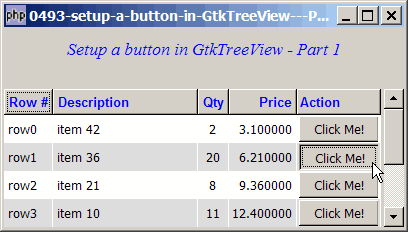
However, since the main functionality of a button is to respond to button clicks, we can simulate a button using gif, png or jpg image files as shown below.
To make the button more realistic, I used two gif images for the button one more button up, and one for button down.
Solution
- We make use of the signal button-press-event on the treeview to detect any "clicks" on the image button.
- We make use of the signal button-release-event on the treeview to detect when the user releases the button.
- We make use of the technique from How to display gif or jpg images in GtkTreeView - Part 1? to display a gif image in treeview.
- Note that I've made extensive use of the notation
$model[$path][$col_num]. This greatly simplifies the codes instead of using$model->get_value($iter, $col_num)and$model->set($iter, $col_num, $value)(in which case you have to always convert the path to the iter first). If you're not familiar with this, I would strongly encourage you to read this article by Andrei Zmievski titled New GtkTreeModel functionality.
Sample Code
The following image files are required by the sample code below. Please save a copy of the image files and put them in the same directory where you store the sample code.
 | button_click.gif |
 | button_click2.gif |
| 1 2 3 4 5 6 7 8 9 10 11 12 13 14 15 16 17 18 19 20 21 22 23 24 25 26 27 28 29 30 31 32 33 34 35 36 37 38 39 40 41 42 43 44 45 46 47 48 49 50 51 52 53 54 55 56 57 58 59 60 61 62 63 64 65 66 67 68 69 70 71 72 73 74 75 76 77 78 79 80 81 82 83 84 85 86 87 88 89 90 91 92 93 94 95 96 97 98 99 100 101 102 103 104 105 106 107 108 109 110 111 114 115 116 117 118 121 122 123 124 125 127 128 129 130 131 133 134 135 136 137 138 139 140 141 142 146 148 149 151 152 153 154 155 156 157 159 160 161 162 163 164 165 166 167 168 169 171 172 173 174 175 176 | <?php $window = new GtkWindow(); $window->set_size_request(400, 200); $window->connect_simple('destroy', array('Gtk','main_quit')); $window->add($vbox = new GtkVBox()); // display title $title = new GtkLabel("Setup a button in GtkTreeView - Part 1"); $title->modify_font(new PangoFontDescription("Times New Roman Italic 10")); $title->modify_fg(Gtk::STATE_NORMAL, GdkColor::parse("#0000ff")); $title->set_size_request(-1, 40); $vbox->pack_start($title, 0, 0); $vbox->pack_start(new GtkLabel(), 0, 0); // the 2D table $data = array( array('row0', 'item 42', 2, 3.1, 0), array('row1', 'item 36', 20, 6.21, 0), array('row2', 'item 21', 8, 9.36, 0), array('row3', 'item 10', 11, 12.4, 0), array('row4', 'item 7', 5, 15.5, 0), array('row5', 'item 4', 17, 18.6, 0), array('row6', 'item 3', 20, 21.73, 0)); display_table($vbox, $data); $window->show_all(); Gtk::main(); function display_table($vbox, $data) { // Set up a scroll window $scrolled_win = new GtkScrolledWindow(); $scrolled_win->set_policy( Gtk::POLICY_AUTOMATIC, Gtk::POLICY_AUTOMATIC); $vbox->pack_start($scrolled_win); // Creates the list store if (defined("GObject::TYPE_STRING")) { $model = new GtkListStore(GObject::TYPE_STRING, GObject::TYPE_STRING, GObject::TYPE_LONG, GObject::TYPE_DOUBLE, GObject::TYPE_LONG); } else { $model = new GtkListStore(Gtk::TYPE_STRING, Gtk::TYPE_STRING, Gtk::TYPE_LONG, Gtk::TYPE_DOUBLE, Gtk::TYPE_LONG); } $field_header = array('Row #', 'Description', 'Qty', 'Price', 'Action'); $field_justification = array(0.0, 0.0, 0.5, 1.0, 0.0); // Creates the view to display the list store $view = new GtkTreeView($model); $scrolled_win->add($view); $view->connect('button-press-event', 'on_buttonpress', $model); // note 1 $view->connect('button-release-event', 'on_buttonrelease', $model); // note 2 // Creates the columns for ($col=0; $col<count($field_header); ++$col) { if ($col==4) { $cell_renderer = new GtkCellRendererPixbuf(); // note 3 $column = new GtkTreeViewColumn(); $column->pack_start($cell_renderer); $column->set_title($field_header[$col]); } else { $cell_renderer = new GtkCellRendererText(); $cell_renderer->set_property("xalign", $field_justification[$col]); $column = new GtkTreeViewColumn($field_header[$col], $cell_renderer, 'text', $col); $column->set_alignment($field_justification[$col]); $column->set_sort_column_id($col); if ($col==1) $column->set_expand(1); } // set the header font and color $label = new GtkLabel($field_header[$col]); $label->modify_font(new PangoFontDescription("Arial Bold")); $label->modify_fg(Gtk::STATE_NORMAL, GdkColor::parse("#0000FF")); $column->set_widget($label); $label->show(); // setup self-defined function to display alternate row color $column->set_cell_data_func($cell_renderer, "format_col", $col); $view->append_column($column); } // pupulates the data for ($row=0; $row<count($data); ++$row) { $values = array(); for ($col=0; $col<count($data[$row]); ++$col) { $values[] = $data[$row][$col]; } $model->append($values); } $selection = $view->get_selection(); $selection->set_mode(Gtk::SELECTION_NONE); } // self-defined function to display alternate row color function format_col($column, $cell, $model, $iter, $col_num) { if ($col_num==4) { if ($model[$iter][4]) { // note 4 $pixbuf = GdkPixbuf::new_from_file("button_click2.gif"); // note 4 } else { $pixbuf = GdkPixbuf::new_from_file("button_click.gif"); // note 4 } $cell->set_property('pixbuf', $pixbuf); } $path = $model->get_path($iter); $row_num = $path[0]; $row_color = ($row_num%2==1) ? '#dddddd' : '#ffffff'; $cell->set_property('cell-background', $row_color); } function on_buttonpress($view, $event, $model) { static $i=0; if ($event->button==1 && $event->type==4) { ++$i; // get the row and column $path_array = $view->get_path_at_pos($event->x, $event->y); $path = $path_array[0][0]; $col = $path_array[1]; $col_title = $col->get_title(); clear_all_buttons($model); if ($col_title!='Action') return true; $model[$path][4] = 1; echo "$i: You have clicked the button for {$model[$path][0]}: {$model[$path][1]}\n"; // note 5 return true; } else { clear_all_buttons($model); return false; } } function on_buttonrelease($view, $event, $model) { if ($event->button==1) { // get the row and column $path_array = $view->get_path_at_pos($event->x, $event->y); $path = $path_array[0][0]; $col = $path_array[1]; $col_title = $col->get_title(); if ($col_title!='Action') { clear_all_buttons($model); return true; } $model[$path][4] = 0; return true; } else { clear_all_buttons($model); return false; } } function clear_all_buttons($model) { // note 6 $n = $model->iter_n_children(null); for ($i=0; $i<$n; ++$i) { $iter = $model->get_iter($i); $model[$iter][4] = 0; } } ?> |
Output
As shown above.Explanation
- Detect button click on the treeview.
- Detect button release on the treeview.
- Set up the column where the button image will appear. Note that there is no image loaded at this point in time. The respective images are loaded in the custom cell display function.
- This is the part that sets the image button depending on the status of the button.
- Try clicking the button in very fast sequence, and take note of the output in the command window. You will see that even though the treeview might not reflect that clicks fast enough, all the button clicks are indeed being captured.
- This function takes care of the case when the user clicks on a button, holds on to the mouse button, and moves away from the button. Since there is no button-release signal, the button will still be in the 'clicked' state. This function serves to release any previous button clicks that have not been released.
Related Links
- How to have a start stop button in GtkTreeView - Part 1 - using liststore?
- How to have a start stop button in GtkTreeView - Part 2 - using treestore?
- How to have a start stop button in GtkTreeView - Part 3 - update parent?
- How to display a 2D array in GtkTreeView - Part 3 - with alternate row colors?
- How to display gif or jpg images in GtkTreeView - Part 1?
- How to display context sensitive popup menu with right mouse click in GtkTreeView?
Read more...