Problem
This is in response to Zach's post titled "GtkEntryCompletion to autofill multiple fields".
He has set up a GtkEntryCompletion similar to the following:

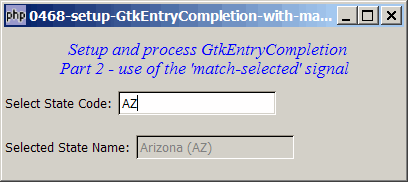
When the user has selected a state code, say "AZ", without pressing any other key or button, he would like some GtkEntry fields to be immediately populated with relevant data. In this example, I populate another GtkEntry field with the corresponding state name "Arizona" as shown below:
Solution
- We make use of the signal match-selected which is emitted when a string is selected from a GtkEntryCompletion.
Sample Code
| 1 2 3 4 5 6 7 8 9 10 11 12 13 14 15 16 17 18 19 20 21 22 23 24 25 26 27 28 29 30 31 32 33 34 35 36 37 38 39 40 41 42 43 44 45 46 47 48 49 50 51 52 53 54 55 56 57 58 59 60 61 62 63 64 65 66 67 68 69 70 71 72 73 74 75 76 77 78 79 80 81 82 83 84 85 89 90 91 92 93 98 99 100 101 102 103 104 105 106 107 108 109 114 115 118 119 120 121 134 135 | <?php $window = new GtkWindow(); $window->connect_simple('destroy', array( 'Gtk', 'main_quit')); $window->set_size_request(400,150); $window->add($vbox = new GtkVBox()); // display title $title = new GtkLabel(" Setup and process GtkEntryCompletion\n". "Part 2 - use of the 'match-selected' signal"); $title->modify_font(new PangoFontDescription("Times New Roman Italic 10")); $title->modify_fg(Gtk::STATE_NORMAL, GdkColor::parse("#0000ff")); $title->set_size_request(-1, 60); $vbox->pack_start($title, 0, 0); // the selection $list = array('AL'=>"Alabama", 'AK'=>"Alaska", 'AZ'=>"Arizona", 'AR'=>"Arkansas", 'CA'=>"California", 'CO'=>"Colorado", 'CT'=>"Connecticut", 'DE'=>"Delaware", 'DC'=>"District Of Columbia", 'FL'=>"Florida", 'GA'=>"Georgia", 'HI'=>"Hawaii", 'ID'=>"Idaho", 'IL'=>"Illinois", 'IN'=>"Indiana", 'IA'=>"Iowa", 'KS'=>"Kansas", 'KY'=>"Kentucky", 'LA'=>"Louisiana", 'ME'=>"Maine", 'MD'=>"Maryland", 'MA'=>"Massachusetts", 'MI'=>"Michigan", 'MN'=>"Minnesota", 'MS'=>"Mississippi", 'MO'=>"Missouri", 'MT'=>"Montana", 'NE'=>"Nebraska", 'NV'=>"Nevada", 'NH'=>"New Hampshire", 'NJ'=>"New Jersey", 'NM'=>"New Mexico", 'NY'=>"New York", 'NC'=>"North Carolina", 'ND'=>"North Dakota", 'OH'=>"Ohio", 'OK'=>"Oklahoma", 'OR'=>"Oregon", 'PA'=>"Pennsylvania", 'RI'=>"Rhode Island", 'SC'=>"South Carolina", 'SD'=>"South Dakota", 'TN'=>"Tennessee", 'TX'=>"Texas", 'UT'=>"Utah", 'VT'=>"Vermont", 'VA'=>"Virginia", 'WA'=>"Washington", 'WV'=>"West Virginia", 'WI'=>"Wisconsin", 'WY'=>"Wyoming"); $vbox->pack_start($hbox=new GtkHBox(), 0); $hbox->pack_start(new GtkLabel('Select State Code: '), 0); // setup GtkEntryCompletion if (defined("GObject::TYPE_STRING")) { $model = new GtkListStore(GObject::TYPE_STRING, GObject::TYPE_STRING); } else { $model = new GtkListStore(Gtk::TYPE_STRING, Gtk::TYPE_STRING); } $completion = new GtkEntryCompletion; $completion->set_model($model); $completion->set_text_column(0); $entry = new GtkEntry(); $entry->set_completion($completion); $hbox->pack_start($entry, 0); $completion->connect('match-selected', 'on_match_selected'); // note 1 // Stuff the choices in the model foreach($list as $state_code => $state_name) { $model->append(array($state_code, $state_name)); } $vbox->pack_start(new GtkLabel(), 0); $vbox->pack_start($hbox2=new GtkHBox(), 0); $hbox2->pack_start(new GtkLabel('Selected State Name: '), 0); $entry2 = new GtkEntry(); $hbox2->pack_start($entry2, 0); $entry2->set_sensitive(false); $window->show_all(); Gtk::main(); function on_match_selected($widget, $model, $iter) { $state_code = $model->get_value($iter, 0); $state_name = $model->get_value($iter, 1); // note 2 global $entry2; $entry2->set_text("$state_name ($state_code)"); // note 3 } ?> |
Output
As shown above.Explanation
We make use of the code from How to setup GtkEntry with auto completion?
What's new:
- Register for the signal
'match-selected'. - Get the state name.
- Populate the state name in
$entry2.
Read more...