Problem
This is in response to Zach's post titled "GtkEntryCompletion to autofill multiple fields".
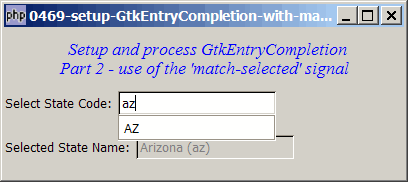
If you have followed the solution in Part 1, there is one case you need to take care of. That is, even though you have set up GtkEntryCompletion, it's possible that the user decides to type the whole state code himself/herself and press Enter (e.g. AZ) without choosing anything from the auto-completion list. In this case we need to use the signal "activate" so that the state name will be populated as shown below:
Solution
- We make use of the signal activate which is emitted when the user types the whole state code (e.g. AZ) and press
<Enter>.
Sample Code
| 1 2 3 4 5 6 7 8 9 10 11 12 13 14 15 16 17 18 19 20 21 22 23 24 25 26 27 28 29 30 31 32 33 34 35 36 37 38 39 40 41 42 43 44 45 46 47 48 49 50 51 52 53 54 55 56 57 58 59 60 61 62 63 64 65 66 67 68 69 70 71 72 73 74 75 76 77 78 79 80 81 82 83 84 85 86 89 90 91 92 93 98 99 100 101 102 103 104 105 106 107 108 109 114 115 118 119 120 121 122 124 125 126 127 128 129 137 138 | <?php $window = new GtkWindow(); $window->connect_simple('destroy', array( 'Gtk', 'main_quit')); $window->set_size_request(400,150); $window->add($vbox = new GtkVBox()); // display title $title = new GtkLabel(" Setup and process GtkEntryCompletion\n". "Part 2 - use of the 'match-selected' signal"); $title->modify_font(new PangoFontDescription("Times New Roman Italic 10")); $title->modify_fg(Gtk::STATE_NORMAL, GdkColor::parse("#0000ff")); $title->set_size_request(-1, 60); $vbox->pack_start($title, 0, 0); // the selection $list = array('AL'=>"Alabama", 'AK'=>"Alaska", 'AZ'=>"Arizona", 'AR'=>"Arkansas", 'CA'=>"California", 'CO'=>"Colorado", 'CT'=>"Connecticut", 'DE'=>"Delaware", 'DC'=>"District Of Columbia", 'FL'=>"Florida", 'GA'=>"Georgia", 'HI'=>"Hawaii", 'ID'=>"Idaho", 'IL'=>"Illinois", 'IN'=>"Indiana", 'IA'=>"Iowa", 'KS'=>"Kansas", 'KY'=>"Kentucky", 'LA'=>"Louisiana", 'ME'=>"Maine", 'MD'=>"Maryland", 'MA'=>"Massachusetts", 'MI'=>"Michigan", 'MN'=>"Minnesota", 'MS'=>"Mississippi", 'MO'=>"Missouri", 'MT'=>"Montana", 'NE'=>"Nebraska", 'NV'=>"Nevada", 'NH'=>"New Hampshire", 'NJ'=>"New Jersey", 'NM'=>"New Mexico", 'NY'=>"New York", 'NC'=>"North Carolina", 'ND'=>"North Dakota", 'OH'=>"Ohio", 'OK'=>"Oklahoma", 'OR'=>"Oregon", 'PA'=>"Pennsylvania", 'RI'=>"Rhode Island", 'SC'=>"South Carolina", 'SD'=>"South Dakota", 'TN'=>"Tennessee", 'TX'=>"Texas", 'UT'=>"Utah", 'VT'=>"Vermont", 'VA'=>"Virginia", 'WA'=>"Washington", 'WV'=>"West Virginia", 'WI'=>"Wisconsin", 'WY'=>"Wyoming"); $vbox->pack_start($hbox=new GtkHBox(), 0); $hbox->pack_start(new GtkLabel('Select State Code: '), 0); // setup GtkEntryCompletion if (defined("GObject::TYPE_STRING")) { $model = new GtkListStore(GObject::TYPE_STRING, GObject::TYPE_STRING); } else { $model = new GtkListStore(Gtk::TYPE_STRING, Gtk::TYPE_STRING); } $completion = new GtkEntryCompletion; $completion->set_model($model); $completion->set_text_column(0); $entry = new GtkEntry(); $entry->set_completion($completion); $hbox->pack_start($entry, 0); $completion->connect('match-selected', 'on_match_selected'); $entry->connect('activate', 'on_activate'); // note 1 // Stuff the choices in the model foreach($list as $state_code => $state_name) { $model->append(array($state_code, $state_name)); } $vbox->pack_start(new GtkLabel(), 0); $vbox->pack_start($hbox2=new GtkHBox(), 0); $hbox2->pack_start(new GtkLabel('Selected State Name: '), 0); $entry2 = new GtkEntry(); $hbox2->pack_start($entry2, 0); $entry2->set_sensitive(false); $window->show_all(); Gtk::main(); function on_match_selected($widget, $model, $iter) { $state_code = $model->get_value($iter, 0); $state_name = $model->get_value($iter, 1); global $entry2; $entry2->set_text("$state_name ($state_code)"); } function on_activate($entry) { global $entry2, $list; $state_code = $entry->get_text(); // note 2 $state_name = $list[strtoupper($state_code)]; // note 3 $entry2->set_text("$state_name ($state_code)"); // note 4 } ?> |
Output
As shown above.Explanation
We make use of the code from How to setup GtkEntryCompletion with match selected signal - Part 1?
What's new:
- Register for the signal
'activate'. - Get the state code typed in by the user.
- Get the corresponding state name.
- Populate the state name in
$entry2.
Read more...