Problem
Just want to show you the kind of fine controls php-gtk2 give us in the exact positioning of widgets.
Take a closer look at the output of Part 1 as shown below. Did you notice that the positioning of the custom labels varies? This is because the size of the custom graphics are not the same,
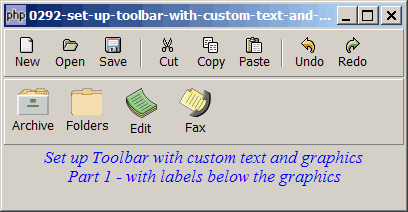
Suppose we want to make sure that all the custom graphics are centered, and the custom labels aligned to the bottom as shown below:
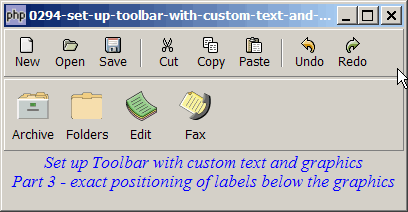
Solution
We make use of GtkAlignment to align the custom graphics and labels.
Sample Code
The following image files are required by the sample code below. Please save a copy of the image files and put them in the same directory where you store the sample code.
 | 0070.1.png |
 | 0070.2.png |
 | 0070.3.png |
 | 0070.4.png |
| 1 2 3 4 5 6 9 10 11 12 13 14 15 16 17 18 19 20 21 22 23 24 25 26 27 28 30 31 32 33 34 35 36 37 39 41 42 43 44 45 46 47 48 50 51 52 53 56 57 58 59 60 62 63 64 65 66 67 68 69 70 71 72 73 74 76 78 79 80 | <?php $window = new GtkWindow(); $window->set_title($argv[0]); $window->set_size_request(400, 180); $window->connect_simple('destroy', array('Gtk','main_quit')); $window->add($vbox = new GtkVBox()); // define menu definition $toolbar_definition1 = array('New', 'Open', 'Save', '<hr>', 'Cut', 'Copy', 'Paste', '<hr>', 'Undo','Redo'); $toolbar_definition2 = array( 'Archive' => '0070.1.png', 'Folders' => '0070.2.png', 'Edit' => '0070.3.png', 'Fax' => '0070.4.png'); setup_toolbar($vbox, $toolbar_definition1); setup_toolbar($vbox, $toolbar_definition2); // display title $title = new GtkLabel(" Set up Toolbar with custom text and graphics\n". "Part 3 - exact positioning of labels below the graphics"); $title->modify_font(new PangoFontDescription("Times New Roman Italic 10")); $title->modify_fg(Gtk::STATE_NORMAL, GdkColor::parse("#0000ff")); $vbox->pack_start($title); $vbox->pack_start(new GtkLabel('')); $window->show_all(); Gtk::main(); // setup toolbar function setup_toolbar($vbox, $toolbar_definition) { $toolbar = new GtkToolBar(); $vbox->pack_start($toolbar, 0, 0); foreach($toolbar_definition as $label=>$item) { if ($item=='<hr>') { $toolbar->insert(new GtkSeparatorToolItem(), -1); } else { $stock_image_name = 'Gtk::STOCK_'.strtoupper($item); if (defined($stock_image_name)) { $toolbar_item = GtkToolButton::new_from_stock( constant($stock_image_name)); $toolbar_item->connect('clicked', 'on_toolbar_button', $item); } else { $toolbutton = new GtkVBox(); $img=GtkImage::new_from_file($item); $img->set_size_request(-1, 36); // note 1 $toolbutton->pack_start($img, 0); $toolbutton->pack_start(new GtkLabel($label), 0); $toolbar_item = new GtkToolButton(); $toolbar_item->set_label_widget($toolbutton); $toolbar_item->connect('clicked', 'on_toolbar_button', $label); } $toolbar->insert($toolbar_item, -1); } } } // process toolbar function on_toolbar_button($button, $item) { echo "toolbar clicked: $item\n"; } ?> |
Output
As shown above.Explanation
We make use of the entire code from How to set up toolbar with custom text and graphics - Part 1 - labels below graphics?
All you need is to add just one line:
- Set the height of the custom graphics.
Note
When I first started on PHP-GTK, I find size and positioning one of the most confusing areas in PHP-GTK. I believe it's the same for many of the people new to PHP-GTK2.
To develop any serious application, the first step is always to layout the widgets. It's something so fundamental, such as making the buttons to be of size 80x32, or making the Help button always stay at the top right-hand corner no matter how the user resize the application. But, unless you have learned it before, you will find it a challenge trying to accomplish these supposedly simple tasks.
That's why I devoted one-third of my ebook PHP-GTK2 Demystified just on size and positioning. I called them the three fundamental building blocks of PHP-GTK2 (the other two being signal handling and object-oriented framework).
Basically, size and positioning is just like playing with Lego building blocks. By combining various hboxes and vboxes, with appropriate use of the expand and fill parameters, you can achieve precise positioning and sizing of all widgets in PHP-GTK2, as the above example illustrates.
Read more...