Problem
You have seen how to set up menus using GtkAction in Part 1.
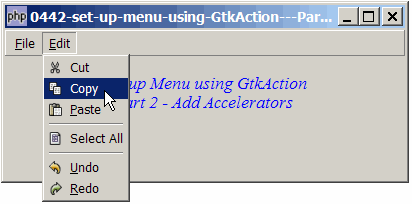
In this part 2, I'll show you how to add accelerators to the menu items so that users can press Ctrl-N for New, Ctrl-O for Open, etc. as shown below:
Solution
- The technique used is exactly the same as that of How to set up toolbar using GtkAction - Part 2 - add accelerators?
- This is one of the "beauties" of using GtkAction. Setting up menus and toolbars is the same using the GtkAction approach.
Sample Code
| 1 2 3 4 5 6 7 8 9 10 11 12 13 14 15 16 17 21 22 23 24 25 26 27 28 30 31 32 33 34 35 36 39 40 43 44 45 46 47 48 49 51 52 53 54 55 56 57 58 59 60 61 62 63 64 65 74 75 76 78 79 84 86 87 88 89 90 92 93 94 95 98 99 100 101 102 103 104 105 107 108 109 110 111 | <?php $window = new GtkWindow(); $window->set_title($argv[0]); $window->set_size_request(400, 150); $window->connect_simple('destroy', array('Gtk','main_quit')); $window->add($vbox = new GtkVBox()); $accel_group = new GtkAccelGroup(); // note 1 $window->add_accel_group($accel_group); // note 1 $actiongrp = new GtkActionGroup('menu'); // note 2 // define menu definition // define menu definition $menu_definition = array( '_File' => array('_New|N', '_Open|O', '_Close', '<hr>', '_Save|S', 'Save _As','<hr>', '_Quit'), '_Edit' => array('Cut|X', 'Copy|C', '_Paste|V', '<hr>', 'Select All|A', '<hr>', '_Undo|Z','_Redo|Y'), ); setup_menu($vbox, $menu_definition); // display title $title = new GtkLabel("Set up Menu using GtkAction\n". " Part 2 - Add Accelerators"); $title->modify_font(new PangoFontDescription("Times New Roman Italic 10")); $title->modify_fg(Gtk::STATE_NORMAL, GdkColor::parse("#0000ff")); $vbox->pack_start($title); $vbox->pack_start(new GtkLabel('')); $window->show_all(); Gtk::main(); function setup_menu($vbox, $menu_definition) { $menubar = new GtkMenuBar(); $vbox->pack_start($menubar, 0, 0); foreach($menu_definition as $toplevel => $sublevels) { $menubar->append($top_menu = new GtkMenuItem($toplevel)); $menu = new GtkMenu(); $top_menu->set_submenu($menu); foreach($sublevels as $item) { if (strpos("$item", '|') === false) { $accel_key = ''; } else { list($item, $accel_key) = explode('|', $item); } if ($item=='<hr>') { $menu->append(new GtkSeparatorMenuItem()); } else { $item2 = str_replace('_', '', $item); $item2 = str_replace(' ', '_', $item2); $stock_image_name = 'Gtk::STOCK_'.strtoupper($item2); $stock_image = ''; if (defined($stock_image_name)) $stock_image = constant($stock_image_name); $action = new GtkAction($item, $item, '', $stock_image); $menu_item = $action->create_menu_item(); $action->connect('activate', 'on_menu_select', $item); $menu->append($menu_item); global $accel_group, $actiongrp; if ($accel_key!='') { $accel = "<control>$accel_key"; // note 3 $actiongrp->add_action_with_accel($action, $accel); // note 4 $action->set_accel_group($accel_group); // note 5 $action->connect_accelerator(); // note 6 } } } } } // process toolbar function on_menu_select($button, $item) { echo "menu item selected: $item\n"; if ($item=='_Quit') Gtk::main_quit(); } ?> |
Output
As shown above.Explanation
- Create a new accelerator and attach it to the window.
- Create an action group.
- Define the accelerator key. Here we use the <control> key. You can change this to use 'Alt', or 'Ctrl-Alt'.
- Add the action to the action group, specifying the accelerator key at the same time.
- Specify the accelerator group.
- Connect the accelerator with the action.
Read more...