Problem
You have seen how to set up menu in the article How to set up menu and radio menu - Part 1?
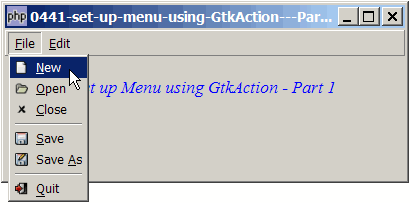
You can also create menus using another way: using the GtkAction. The result is the same – you'll get the same menus as shown below:
Solution
Compare the sample code below with that of How to set up toolbar using GtkAction - Part 1?
You will find that setting up menus and setting up toolbars using GtkAction is almost identical, except for the following:
- For toolbars, we use the method GtkAction::create_tool_item() to automatically create a toolbar item from the action.
- For menu items, we use the method GtkAction::create_menu_item() to automatically create a menu item from the action.
Sample Code
| 1 2 3 4 5 6 10 11 12 13 14 15 16 17 21 22 23 24 25 26 27 29 30 31 32 33 34 35 38 39 42 43 44 45 46 47 48 50 51 52 53 54 55 56 57 58 59 68 69 71 72 77 79 80 81 82 83 84 85 86 88 89 90 91 92 | <?php $window = new GtkWindow(); $window->set_title($argv[0]); $window->set_size_request(400, 150); $window->connect_simple('destroy', array('Gtk','main_quit')); $window->add($vbox = new GtkVBox()); // define menu definition // define menu definition $menu_definition = array( // note 1 '_File' => array('_New', '_Open', '_Close', '<hr>', '_Save', 'Save _As','<hr>', '_Quit'), '_Edit' => array('Cut', 'Copy', '_Paste', '<hr>', 'Select All', '<hr>', '_Undo','_Redo'), ); setup_menu($vbox, $menu_definition); // display title $title = new GtkLabel("Set up Menu using GtkAction - Part 1"); $title->modify_font(new PangoFontDescription("Times New Roman Italic 10")); $title->modify_fg(Gtk::STATE_NORMAL, GdkColor::parse("#0000ff")); $vbox->pack_start($title); $vbox->pack_start(new GtkLabel('')); $window->show_all(); Gtk::main(); function setup_menu($vbox, $menu_definition) { // note 1 $menubar = new GtkMenuBar(); // note 2 $vbox->pack_start($menubar, 0, 0); foreach($menu_definition as $toplevel => $sublevels) { $menubar->append($top_menu = new GtkMenuItem($toplevel)); $menu = new GtkMenu(); $top_menu->set_submenu($menu); foreach($sublevels as $item) { if ($item=='<hr>') { $menu->append(new GtkSeparatorMenuItem()); } else { $item2 = str_replace('_', '', $item); $item2 = str_replace(' ', '_', $item2); $stock_image_name = 'Gtk::STOCK_'.strtoupper($item2); $stock_image = ''; if (defined($stock_image_name)) $stock_image = constant($stock_image_name); // note 3 $action = new GtkAction($item, $item, '', $stock_image); // note 4 $menu_item = $action->create_menu_item(); // note 5 $action->connect('activate', 'on_menu_select', $item); // note 6 $menu->append($menu_item); // note 7 } } } } // process toolbar function on_menu_select($button, $item) { // note 8 echo "menu item selected: $item\n"; if ($item=='_Quit') Gtk::main_quit(); } ?> |
Output
As shown above.Explanation
- This is the menu definition.
- Create a new toolbar.
- Get the stock image name from menu definition.
- Create a new GtkAction.
- Create a new menu item from the action.
- Register for the 'activate' signal on the action.
- Insert the menuitem into the menu.
- Process selection of menuitem.
Read more...