Problem
You want to set align=left and valign=top in a GtkTable as shown below:
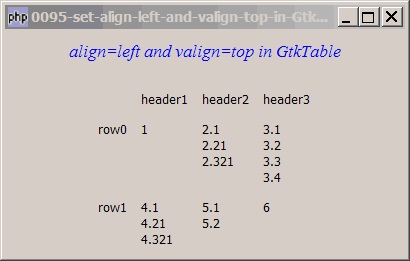
Solution
- First set valign=top in a GtkTable using the technique as described in How to set valign top in GtkTable?
- Use one more GtkBox to align the content to the left.
Sample Code
| 1 2 3 4 5 6 7 8 9 10 11 12 13 14 15 16 17 18 19 20 21 22 23 24 25 26 27 28 29 30 31 33 34 35 36 37 38 39 40 41 45 46 47 48 49 50 51 52 | <?php $window = new GtkWindow(); $window->set_size_request(400, -1); $window->connect_simple('destroy', array('Gtk','main_quit')); $window->add($vbox = new GtkVBox()); // display title $title = new GtkLabel("align=left and valign=top in GtkTable"); $title->modify_font(new PangoFontDescription("Times New Roman Italic 10")); $title->modify_fg(Gtk::STATE_NORMAL, GdkColor::parse("#0000ff")); $title->set_size_request(-1, 40); $vbox->pack_start($title, 0, 0); $gap = new GtkHBox(); $gap->set_size_request(-1, 10); // add a small gap btw title and table $vbox->pack_start($gap, 0, 0); $vbox->pack_start($hbox = new GtkHBox()); $hbox->pack_start(new GtkHBox()); $hbox->pack_start($table = new GtkTable(), 0, 0); $hbox->pack_start(new GtkHBox()); $data = array( array('', 'header1', 'header2', 'header3'), array('row0', 1, "2.1\n2.21\n2.321", "3.1\n3.2\n3.3\n3.4"), array('row1', "4.1\n4.21\n4.321", "5.1\n5.2", 6)); display_table ($table, $data); function display_table($table, $a) { for ($row=0; $row<count($a); ++$row) { for ($col=0; $col<count($a[$row]); ++$col) { $vbox = new GtkVBox(); $vbox->pack_start(new GtkLabel($a[$row][$col]), 0, 0); $vbox->pack_start(new GtkVBox()); $hbox = new GtkHBox(); $hbox->pack_start($vbox, 0, 0); // note 1 $hbox->pack_start(new GtkVBox()); // note 2 $table->attach($hbox, $col, $col+1, $row, $row+1); } } } $window->show_all(); Gtk::main(); ?> |
Output
As shown above.Explanation
We make use of the code in How to set valign top in GtkTable? to display a 2D array.
What's new here:
- Create a GtkHBox and stuff it inside the vbox. Note the use of
0, 0to prevent any expansion or filling. - Create another empty GtkVbox and turn on expansion and filling so that it will "push" the vbox to the left.
Read more...