Problem
In the article How to open an application at last window position - works with multiple monitors? we have seen how to restore an application at last window position.
Assuming your applications allow users to change the application window size.
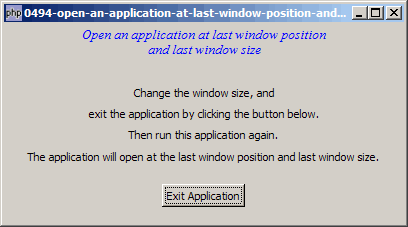
In this article, I'll show you how to restore an application at the last window size as shown below:
Solution
- We can get a copy of the allocated window size from the property
$window->allocation. - Save a copy of the width and height together with the last window position.
- To restore the size of the application, we use GtkWidget::set_size_request().
Sample Code
| 1 2 3 4 5 6 7 8 9 10 11 12 14 15 16 17 18 19 20 21 22 23 24 25 26 27 28 29 30 31 32 33 34 35 36 37 38 39 40 41 42 43 44 45 46 47 48 49 50 51 52 53 54 55 56 57 58 59 60 61 62 63 64 65 | <?php $window = new GtkWindow(); $window->set_title($argv[0]); $window->set_size_request(400, 200); $window->connect('delete-event', 'on_delete_event'); $window->connect_simple('destroy', array('Gtk','main_quit')); $window->add($vbox = new GtkVBox()); $title = new GtkLabel("Open an application at last window position\n". " and last window size"); $title->modify_font(new PangoFontDescription("Times New Roman Italic 10")); $title->modify_fg(Gtk::STATE_NORMAL, GdkColor::parse("#0000ff")); $vbox->pack_start($title); $vbox->pack_start(new GtkLabel('')); $vbox->pack_start(new GtkLabel('Change the window size, and')); $vbox->pack_start(new GtkLabel('exit the application by clicking the button below.')); $vbox->pack_start(new GtkLabel('Then run this application again.')); $vbox->pack_start(new GtkLabel('The application will open at the \n". "last window position and last window size.')); $vbox->pack_start(new GtkLabel(), 0); $vbox->pack_start($hbox = new GtkHBox(), 0); $button = new GtkButton('Exit Application'); $button->connect('clicked', 'on_click'); $hbox->pack_start(new GtkLabel()); $hbox->pack_start($button, 0); $hbox->pack_start(new GtkLabel()); $vbox->pack_start(new GtkLabel(), 0); $window->show_all(); Gtk::idle_add('change_to_last_pos_and_size'); Gtk::main(); function on_click($button) { save_window_position(); Gtk::main_quit(); } function on_delete_event($window) { save_window_position(); } function save_window_position() { global $window; $alloc = $window->allocation; echo "save window position and size!\n"; file_put_contents('last_pos.txt', implode("\t", $window->get_position())."\t". $alloc->width."\t".$alloc->height); // note 1 } function change_to_last_pos_and_size() { if (file_exists('last_pos.txt')) { $pos = file_get_contents('last_pos.txt'); // note 2 list($x, $y, $w, $h) = explode("\t", $pos); global $window; echo "move to: $x ($y)\n"; $window->move($x, $y); // note 3 $window->set_size_request($w, $h); // note 4 } } ?> |
Output
As shown above.Explanation
We make use of the code from How to open an application at last window position - works with multiple monitors?
What's new here:
- Save a copy of the position, width and height of the application window in the file last_pos.txt.
- Retrieve the last saved position.
- Move to the last saved position.
- Reset the window to the last window size.
Read more...